




01. Edit your form online
Type text, add images, blackout confidential details, add comments, highlights and more.

Type text, add images, blackout confidential details, add comments, highlights and more.

Draw your signature, type it, upload its image, or use your mobile device as a signature pad.

Send it via email, link, or fax. You can also download it, export it or print it out.
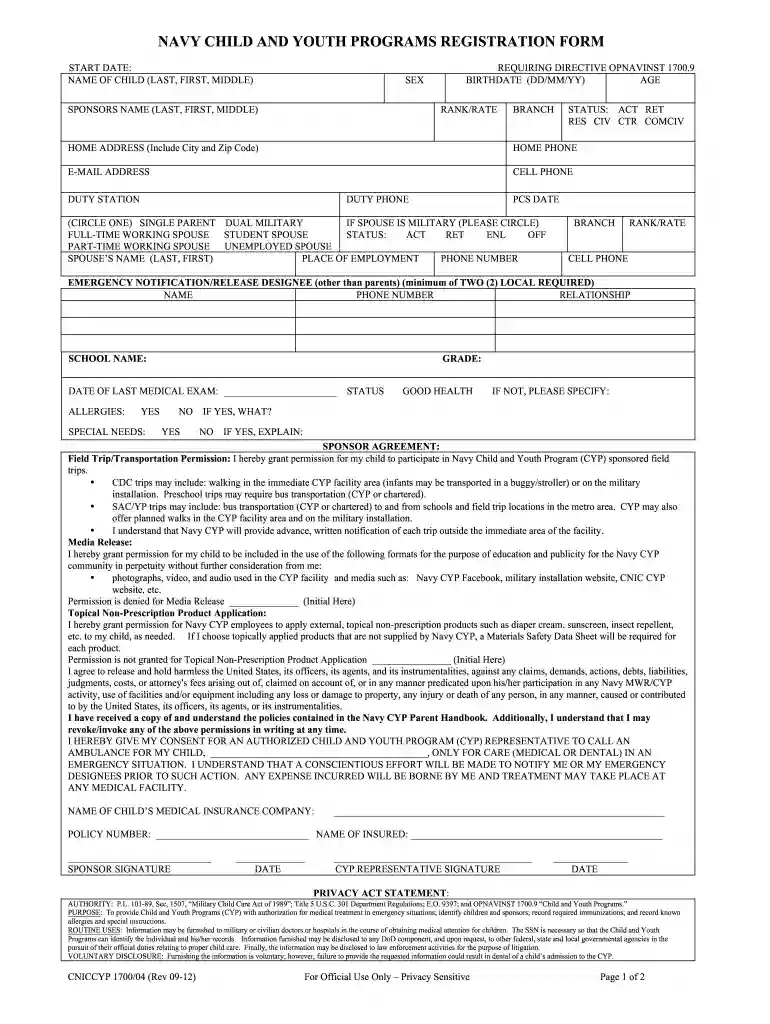
The Navy Child and Youth Programs Registration Form collects essential information about children enrolling in the Navy's Child and Youth Programs. It covers personal details about the child, including the full name in the order of last, first, and middle, and the anticipated start date of their participation. This form serves as the foundational document for enrollment, ensuring that all necessary data is collected to facilitate the child's involvement in various activities and services provided by the program. The form's purpose extends to safety, security, and communication by gathering data crucial to the child's well-being and the program's operations.
To utilize the Navy Child and Youth Programs Registration Form effectively, follow these steps:
Retrieve the Form: Obtain the form from your local Navy Child and Youth Programs office or website. Digital versions may be available for easier access.
Complete Personal Information: Enter the child's full name, date of birth, and the intended start date. Ensure all spelling is accurate to prevent discrepancies.
Provide Medical Details: Include any medical history or conditions that may be relevant to the child's participation. This could involve allergies, dietary restrictions, or any necessary medication.
Emergency Contacts: Specify multiple emergency contacts with up-to-date information to ensure immediate communication if needed.
Review and Submit: Double-check all entries for accuracy. Submit the completed form to the designated office either through an in-person visit or via electronic submission if available.
Completing the form requires careful attention to detail:
Identification Section: Fill in the child's last name first, followed by the first and middle names to align with program records.
Health Information: Detail any ongoing treatments or conditions, alongside contact details for the child’s physician. Provide vaccination records if required.
Emergency Protocols: List authorized personnel to pick up the child and outline communication protocols during emergencies.
Parental Consent: Sign sections that authorize the child’s participation in various program activities and medical treatment when necessary.
Ensure Comprehensiveness: Make sure every section is completed to avoid delays in processing.
Submit and Confirm: Submit the form to the specified office. Confirm its receipt and verification has been completed.
The main components and data fields present in the form include:
The Navy Child and Youth Programs Registration Form fulfills several legal functions. It ensures compliance with child safety regulations, including health and emergency preparedness. By signing the form, parents consent to their child's participation, which includes agreeing to the program's guidelines and procedures. Legally, it serves as a binding agreement between the parents or guardians and the Navy's Child and Youth Programs. The document must be filled out accurately to ensure all legal protections are honored.
While the form is a standardized Navy document, certain state-specific variations may apply, particularly relating to health records and vaccination requirements. Ensure you are aware of any unique state mandates that could affect the submission or completion of this form, particularly if relocating or moving between states. Contact the local Navy Child and Youth Programs office for guidance on compliance with state laws.
The form can typically be submitted through the following channels:
Each submission method has its own verification and processing timeline, so it's important to select the method that best suits your needs and timeline.
This form is pertinent for:
Families involved in Navy relocations or changes in duty stations commonly interact with this form to ensure uninterrupted access to child and youth services.
We've got more versions of the NAVY CHILD AND YOUTH PROGRAMS REGISTRATION FORM START DATE: NAME OF CHILD (LAST, FIRST, MIDDLE) REQU form. Select the right NAVY CHILD AND YOUTH PROGRAMS REGISTRATION FORM START DATE: NAME OF CHILD (LAST, FIRST, MIDDLE) REQU version from the list and start editing it straight away!
At DocHub, your data security is our priority. We follow HIPAA, SOC2, GDPR, and other standards, so you can work on your documents with confidence.
including a prefix, the first, middle, and last name and a suffix, if relevant. It is important to collect as. Page 363. 14-7 complete a name as possible as
Children/Youth must be fully registered before they can use any CYS Services Program. To expedite the registration process, please have the following
Provide the last name, first name and middle initial of the child for whom care is being requested. 3.d. Provide the date of birth of the child for whom care is


