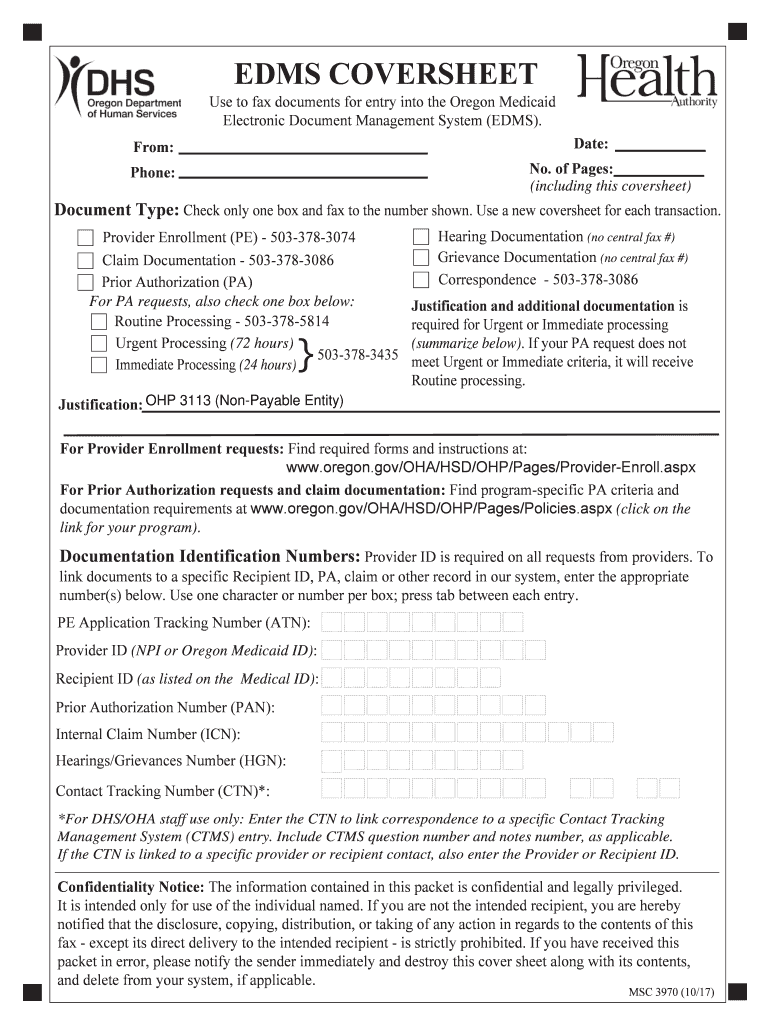
EDMS Cover Sheet Instructions - Ohio Department of Medicaid 2026

Get Form
ohp 3113 form Preview on Page 1

Here's how it works

01. Edit your ohp 3113 form online
Type text, add images, blackout confidential details, add comments, highlights and more.
02. Sign it in a few clicks
Draw your signature, type it, upload its image, or use your mobile device as a signature pad.
03. Share your form with others
Send it via email, link, or fax. You can also download it, export it or print it out.

How to use or fill out EDMS Cover Sheet Instructions - Ohio Department of Medicaid with DocHub

Form edit decoration
9.5
Ease of Setup
DocHub User Ratings on G2
9.0
Ease of Use
DocHub User Ratings on G2
  1. Click ‘Get Form’ to open the EDMS Cover Sheet in our editor.
  2. Begin by entering the 'Date' and 'From' fields at the top of the cover sheet. Ensure that you provide your contact information accurately.
  3. Indicate the 'No. of Pages' including the cover sheet itself, and provide a contact phone number for any follow-up.
  4. Select the appropriate 'Document Type' by checking only one box. This is crucial as it determines where your documents will be faxed.
  5. If submitting a Prior Authorization request, check one of the urgency options: Routine, Urgent, or Immediate Processing, and summarize justification if necessary.
  6. Fill in all required identification numbers such as Provider ID and Recipient ID in their respective fields. Use one character per box and press tab between entries.
  7. Review all entered information for accuracy before finalizing your document. Once complete, save your changes and proceed to fax it using the provided numbers.

Start using our platform today to streamline your document editing and submission process for free!

See more EDMS Cover Sheet Instructions - Ohio Department of Medicaid versions

We've got more versions of the EDMS Cover Sheet Instructions - Ohio Department of Medicaid form. Select the right EDMS Cover Sheet Instructions - Ohio Department of Medicaid version from the list and start editing it straight away!
Versions Form popularity Fillable & printable
2024 4.6 Satisfied (34 Votes)
2019 4.2 Satisfied (52 Votes)
2014 4.9 Satisfied (58 Votes)
be ready to get more

Complete this form in 5 minutes or less

Get form

Got questions?

We have answers to the most popular questions from our customers. If you can't find an answer to your question, please contact us.
Contact us
You have three options to update your information. You can docHub out directly to the Ohio Medicaid Consumer Hotline, contact a case worker through your local department of job and family services, or if you have an Ohio Benefits Self-Service account, you can report a change through the online portal.
Email OMESEDISupport@medicaid.ohio.gov or call the ODM Integrated Helpdesk (IHD) at 800-686-1516, option 4, sub-option 1. Representatives are available 8 a.m.-4:30 p.m. Eastern time Monday - Friday.
Parents of Dependent Children: Income limits for 2025 are reported as a percentage of the federal poverty level (FPL). The 2025 FPL for a family of three is $26,650. Other Adults: Eligibility limits for other adults are presented as a percentage of the 2025 FPL for an individual is $15,650.
Attach copies of your proof of income, resources (such as cash, savings, checking, real property, stocks, bonds, etc.), proof of citizenship or alien status, pregnancy if applicable, and other insurance you may have.
If you have already registered in the MITS portal, you can access the secure portal and proceed to submit your claims. Submitting claims through the MITS portal is free. If you need assistance call the Medicaid Provider Call Center at 1-800-686-1516 We urge you to act now to ensure future payment of your claims.

Security and compliance

At DocHub, your data security is our priority. We follow HIPAA, SOC2, GDPR, and other standards, so you can work on your documents with confidence.

Learn more
ccpa2
pci-dss
gdpr-compliance
hipaa
soc-compliance
be ready to get more

Complete this form in 5 minutes or less

Get form

People also ask

Some states use a computerized system to cross reference a Medicaid applicants reported income. For instance, in California, an electronic database, the Income Eligibility Verification System (IEVS), is used to match the income information provided by the applicant to other databases to verify it is accurate.

Related links