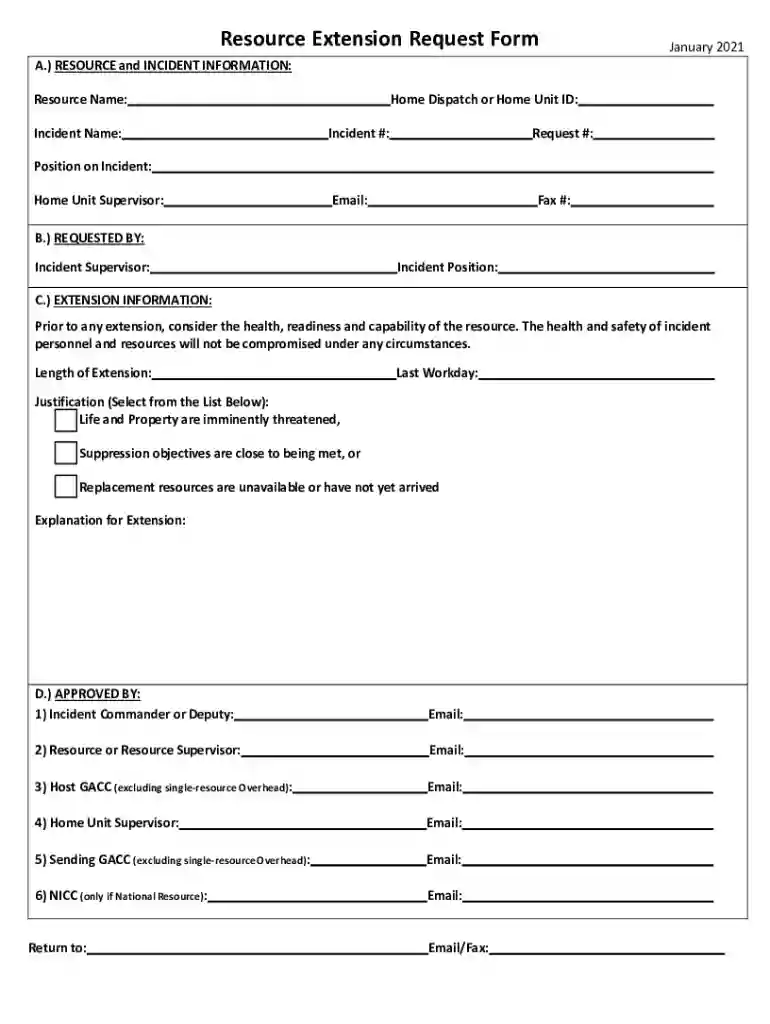
Definition and Purpose of the Resource Extension Request Form
The Resource Extension Request Form is primarily used for requesting additional resources in ongoing incident scenarios. This document plays a critical role in managing and allocating resources efficiently, ensuring that operations are not halted due to inadequate support. Structured to capture essential information, the form includes fields for documenting resource details, incident specifics, and justifications for the extension request. Its design focuses on maintaining operational continuity while prioritizing the safety and health of personnel. Use of this form is particularly relevant during emergency situations, where timely and appropriate resource allocation is vital.
Key Elements and Sections of the Form
To serve its purpose effectively, the Resource Extension Request Form is structured with multiple sections that capture critical information. These include:
- Resource Information: Specifies the type and quantity of resources needed, whether personnel, equipment, or materials.
- Incident Details: Documents the nature of the incident, location, and the current status of operations requiring extension.
- Requester Information: Captures the identity of the individual or department requesting the extension, including contact details.
- Justification: Provides space to articulate the necessity for more resources, ensuring that every request is substantiated.
- Approval Requirements: Lists sections for approval from relevant supervisors and commanders, validating the request through hierarchical endorsement.
How to Use the Resource Extension Request Form
Step-by-Step Completion Guide
- Fill in Resource Information: Begin by detailing the specific resources for which an extension is being requested. This includes a precise enumeration and description.
- Add Incident Details: Clearly describe the incident and its current status. Provide specific data such as incident numbers or codes, if applicable.
- Provide Requester Information: Enter the name, role, and contact details of the person or team making the request.
- State Justification for Extension: Outline the reasons for the extension, focusing on operational needs or unforeseen circumstances.
- Seek Required Approvals: Obtain necessary signatures from supervisors or commanders to validate and authorize the request.
Tips for Accurate Completion
- Double-check all entered information for accuracy to prevent processing delays.
- Ensure that the justification is clear and detailed enough to support the request.
- Follow any specific organizational protocols related to form submission and approval processes.
Important Terms Related to the Resource Extension Request Form
Understanding terminology associated with the Resource Extension Request Form is essential for proper utilization:
- Incident Command System (ICS): A standardized approach to manage incidents, often referenced in such forms.
- Operational Period: The timeframe in which specific resources are expected to be deployed or utilized.
- Resource Typing: Classification of assets based on capability, which aids in precise resource requests.
- Chain of Command: The hierarchy in a response structure, crucial for approval sections in the form.
Legal Use and Compliance of the Resource Extension Request Form
Utilizing the Resource Extension Request Form involves adhering to certain legal parameters. This ensures the request complies with organizational policy and governmental regulations. Understanding legal use involves:
- Ensuring all information is accurate and truthful to avoid legal ramifications.
- Compliance with any sector-specific regulations, particularly in public safety and defense domains.
- Adhering to approval processes that are legally binding, holding supervisors and commanders accountable for authorized use.
Examples and Scenarios of Using the Resource Extension Request Form
Several real-world scenarios demonstrate the form's utility:
- Natural Disasters: Following events such as hurricanes, where additional rescue personnel and equipment might be necessary beyond initial allocations.
- Public Health Emergencies: During pandemics when hospitals require a prolonged increase in supplies and staff.
- Infrastructure Failures: In cases of unexpected breakdowns in utility services necessitating extended repair operations.
- Military Operations: For mission extensions due to evolving operational demands.
How to Obtain the Resource Extension Request Form
Access and Distribution
Organizations typically provide access to the Resource Extension Request Form through internal portals, ensuring that all personnel can initiate requests as needed. Alternatives include:
- Digital Portals: Online platforms where forms can be completed and submitted electronically.
- In-Person Availability: Physical copies available through administrative offices for those without digital access.
- Cloud-Based Solutions: Access through software like DocHub, which supports electronic form completion and management.
Form Submission Methods
- Online Submission: Via organizational intranet or dedicated email, facilitating quick processing.
- Mail Submission: For contexts where digital access is limited or not preferred.
- In-Person Submission: Handing over to an administrative officer or relevant authority for physical processing.
Software Compatibility for the Resource Extension Request Form
When managing forms digitally, compatibility with software solutions is vital for efficient workflow:
- DocHub Integration: Provides comprehensive editing and signing capabilities with secure encryption protocols.
- Cloud Storage Compatibility: Integration with services like Google Drive and Dropbox for streamlined file management.
- Mobile Functionality: Capability to access and edit forms via mobile browsers for field personnel needing real-time form updates.
- Interoperability with Office Suites: Compatibility with DOC and XLS formats enhances flexibility in form management and submission processes.