







Definition and Purpose of the Designer Application FY20 Docx
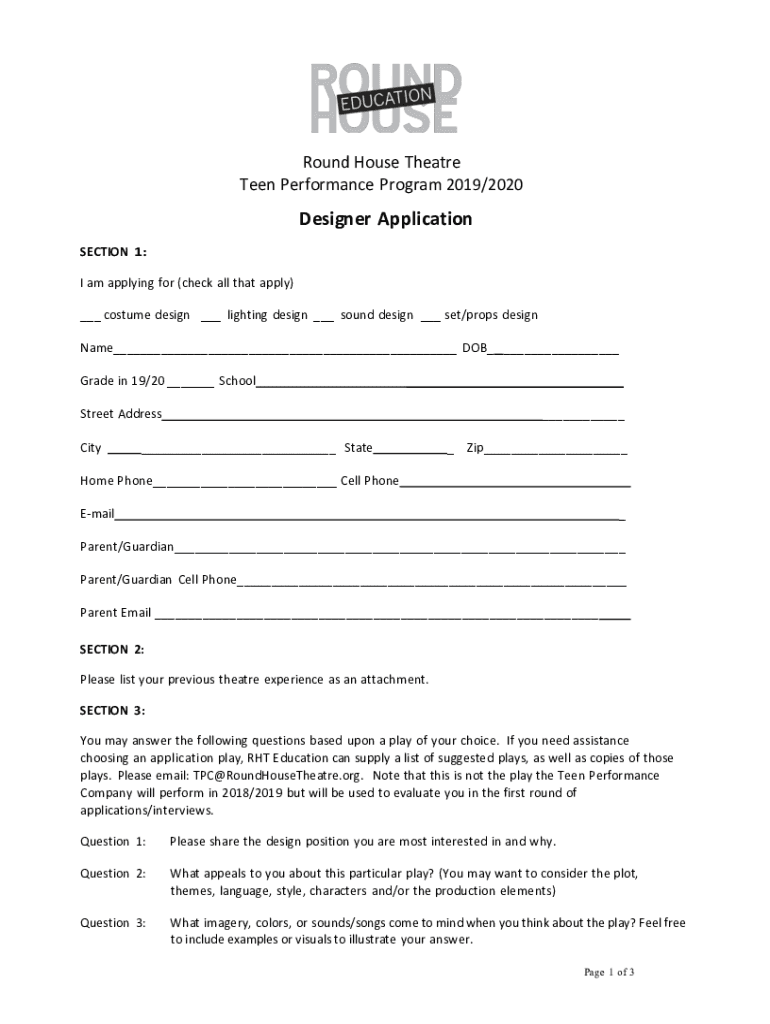
The Designer Application FY20 Docx serves as a formal application form utilized by the Round House Theatre for its Teen Performance Program during the 2019/2020 season. This document is specifically structured to gather detailed personal and professional information from applicants aspiring to participate in the program. It encompasses various sections such as personal details, prior theatre experience, preferences regarding design positions, and responses to questions about a selected play. This application is designed to assess the applicant’s qualifications and ensure that candidates are well-suited for the commitment level required by the program.
Instructions for Acquiring the Designer Application FY20 Docx
To obtain a copy of the Designer Application FY20 Docx, individuals interested in applying to the Round House Theatre's Teen Performance Program can access the form through several methods. Potential applicants may find the document on the official website of the Round House Theatre or receive it through direct communication with the theatre's administrative office. It's advisable to check any announcements or notifications that specify the availability of the form during the designated application period for maximum accessibility.
Completing the Designer Application FY20 Docx: A Step-by-Step Guide
- Personal Information: Begin by accurately filling in your full name, contact details, and any other personal identifiers requested.
- Theatre Experience: Detail your previous involvement in theatre-related activities, including past roles and productions.
- Design Preferences: Clearly indicate your preferred design positions and articulate your reasons for these choices.
- Play Questions: Respond thoughtfully to questions pertaining to a play of your choice, showcasing your analytical and creative skills.
- Commitment Acknowledgment: Acknowledge the program’s schedule and expectations, signed by both you and your parent/guardian.
- Submission and Contact Information: Carefully follow the instructions for submission and provide contact details for follow-up inquiries.
Importance of the Designer Application FY20 Docx
Utilizing the Designer Application FY20 Docx is crucial for structured and efficient information gathering during the selection process for the Round House Theatre’s Teen Performance Program. This application format ensures that all necessary information is systematically presented and evaluates the dedication and potential contribution of each applicant, thereby supporting informed decision-making in the selection of participants.
Typical Users of the Designer Application FY20 Docx
The primary users of the Designer Application FY20 Docx are aspiring teenage designers, aged between 13 and 18, seeking to enhance their practical design skills in a theatrical setting. Additionally, parents or guardians are involved in confirming the commitment required by the program, making them secondary users responsible for endorsing the application's compliance with the program's conditions.
Key Terminologies within the Designer Application FY20 Docx
- Design Positions: Refers to various roles available in theatrical design, such as costume, lighting, or set design.
- Play Analysis: Involves dissecting a chosen play to discuss its themes, characters, and potential design aspects, demonstrating a candidate’s analytical capacity and understanding of theatre production.
- Program Commitment: The obligation to adhere to the schedule and participatory requirements laid out by the Teen Performance Program.
Legal Considerations for the Designer Application FY20 Docx
As a formal application process, the Designer Application FY20 Docx includes legal assurances such as parental consent and commitment to the program's regulations. The submission of this document implies an agreement to comply with the conditions stipulated within it, thus serving as a binding agreement once both the applicant and the parent/guardian sign it.
Essential Components of the Designer Application FY20 Docx
- Personal Information Section: Requests details such as name, age, and contact information.
- Experience and Preferences: Captures prior theatre experience and preferred roles in design.
- Questionnaire about Plays: Assesses the applicant’s analytical and creative skillsets through specific queries.
- Commitment and Consent: Involves signatory sections from both the applicant and their guardian, confirming their understanding and agreement of the program requirements.




