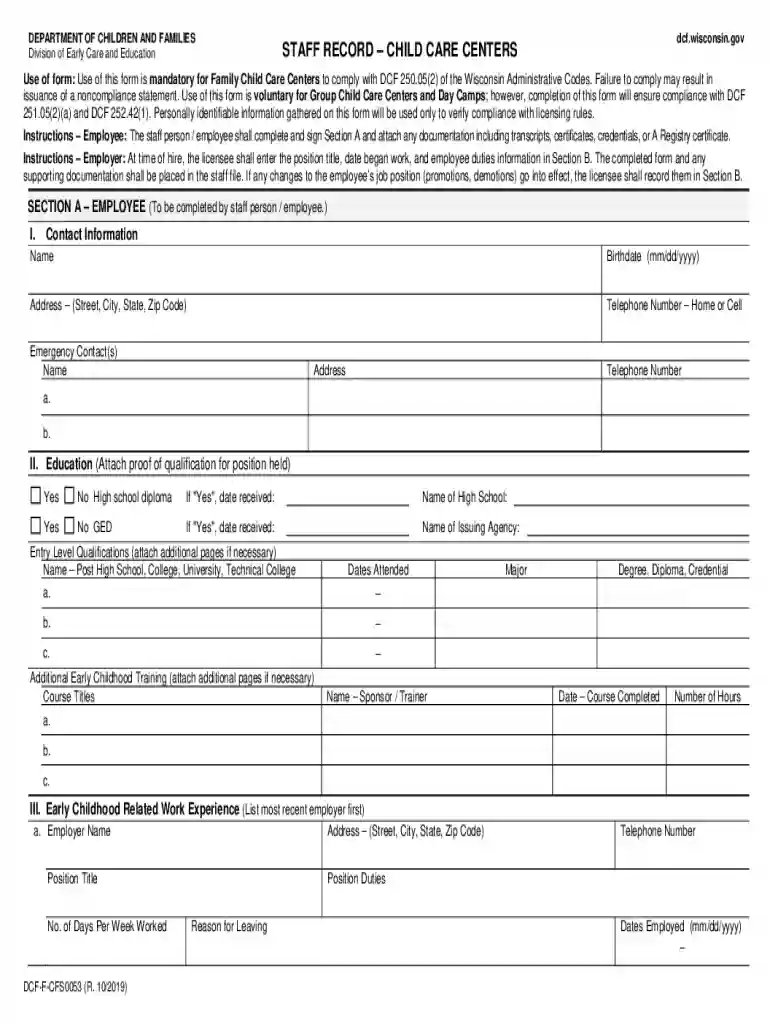
Definition and Purpose of the Staff Record Form
The "Staff Record Form - Fill and Sign Printable Template OnlineUS Legal" is a critical document primarily used by Family Child Care Centers in the United States. This form serves the purpose of collecting comprehensive employee information to ensure compliance with state licensing regulations, particularly in states like Wisconsin. It not only captures personal details but also documents professional credentials, thereby facilitating the maintenance of accurate and legally compliant employee records.
Key Components of the Staff Record Form
- Personal Information: Collects contact details such as name, address, and phone number.
- Professional Background: Includes sections for work experience, educational background, and relevant certifications.
- Regulatory Compliance: Features affirmation statements that ensure the employee acknowledges and complies with state regulations.
- Employer Section: Allows the employer to record the employee's position, status changes, and other relevant employment details.
Completing the Staff Record Form: Step-by-Step Instructions
To properly complete the Staff Record Form, follow these detailed steps ensuring every section is filled accurately to comply with legal requirements.
Step 1: Gathering Necessary Information
- Personal Details: Ensure you have updated personal information, including full name, address, and social security number.
- Professional Credentials: Collect all relevant documents that provide evidence of education, training, and work experience.
Step 2: Filling Out the Form
- Employee Section: Begin by entering your personal and professional details in the respective fields.
- Employer Section: If applicable, hand over the form to your employer to complete sections related to your employment status and position.
Step 3: Review and Sign
- Double-Check Entries: Ensure all information is accurate and complete.
- Signature: Sign the form where required, using either a handwritten signature or a legally recognized electronic one.
Who Uses the Staff Record Form?
The Staff Record Form is typically used by:
- Employers in Child Care Settings: Specifically mandated for use by Family Child Care Centers to ensure compliance with local regulations.
- Employees in Regulated Industries: Anyone employed in a position requiring detailed records for compliance purposes.
Legal Implications and Compliance
Utilizing the Staff Record Form correctly is crucial for maintaining regulatory compliance.
Legal Use
- State Compliance: Adheres to specific state requirements for record-keeping in child care facilities, ensuring businesses meet licensing standards.
- Verification and Audit Trail: Serves as proof of compliance during audits or inspections by regulatory bodies.
Penalties for Non-Compliance
- Fines and Sanctions: Non-compliance can lead to significant fines, legal sanctions, or even the revocation of licenses for operating child care facilities.
State-Specific Regulations and Differences
It's essential to understand how certain elements of the Staff Record Form might differ depending on the state.
Wisconsin Example
- Specific Requirements: Wisconsin mandates the inclusion of affirmation statements and detailed professional background information in the form.
- License-Specific Entries: There may be additional sections or required data fields depending on the state’s licensing requirements.
Digital vs. Paper Version of the Form
In the digital age, understanding the difference between digital and paper versions of the form can enhance efficiency and compliance.
Digital Version
- Accessibility: Can be filled out, signed, and submitted electronically, offering greater convenience and speed.
- Cloud Storage Integration: Easily stored and shared via cloud services like Google Drive, enhancing accessibility and collaboration.
Paper Version
- Traditional Use: Still widely used for official documentation and records in some jurisdictions or for organizations preferring physical documentation.
Creating and Managing Fillable Forms Online
Using a platform like DocHub can simplify creating and managing fillable forms.
Features of DocHub
- Form Builder: Allows users to convert existing documents into interactive templates with text boxes, dropdown menus, and signature fields.
- Sign Requests: Enables you to add recipients, specify signing order, and track status.
Benefits
- Streamlined Process: Ensures data collection is efficient and organized.
- Multi-Party Collaboration: Allows for collaborative input from multiple parties.
Software Compatibility and Integration
When managing forms, synchronization with existing software systems is vital.
DocHub Integration
- Google Workspace: Directly integrates with services like Google Drive and Gmail for seamless document management.
- Other Platforms: Compatible with major document and form-handling software like Microsoft Office applications.
Conclusion: Importance and Utility of the Staff Record Form
By understanding how to effectively use the Staff Record Form and leveraging technology platforms such as DocHub, organizations especially in the child care industry can enhance their data accuracy, ensure regulatory compliance, and optimize document handling processes.