
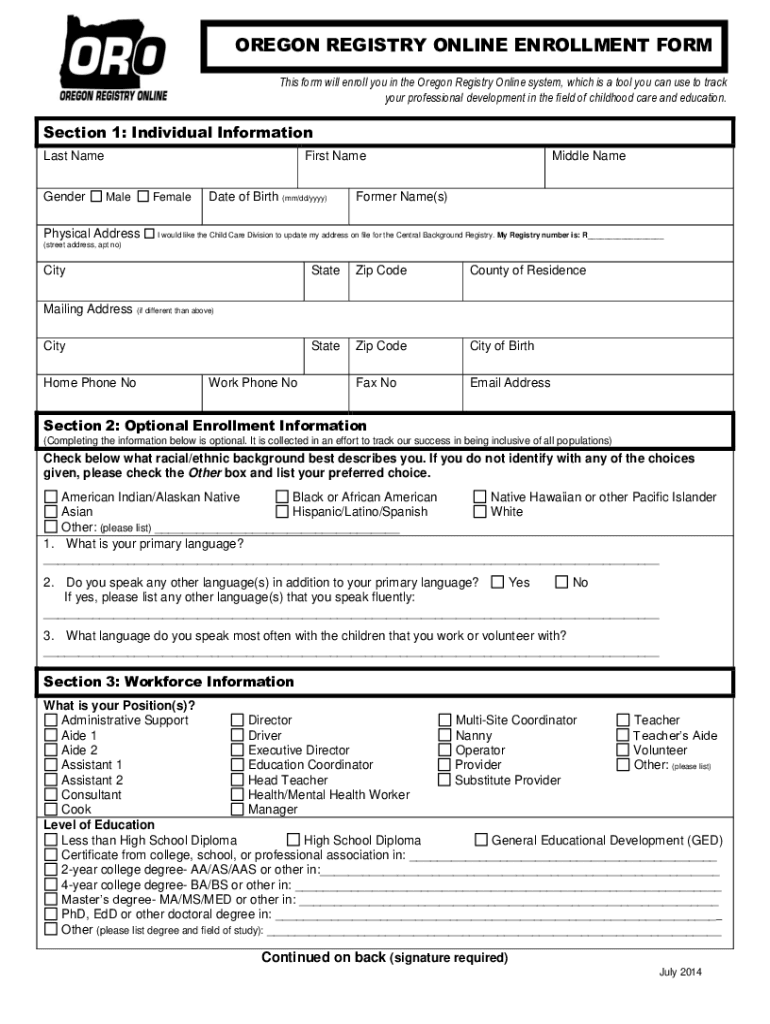







Definition and Purpose of the Oregon Registry Online Enrollment Form
The Oregon Registry Online Enrollment Form plays a crucial role in the professional development ecosystem for those involved in early childhood care and education. This form is designed to help individuals document and track their career progress within the Oregon Registry Online system. It collects essential information such as personal identification details, professional roles, and employment or volunteer experiences related to child care settings. By submitting this form, practitioners ensure their professional growth is well-documented and aligned with state education standards. Understanding its purpose and role is vital for anyone looking to advance in childhood care and education fields within Oregon.
How to Use the Oregon Registry Online Enrollment Form
Utilizing the Oregon Registry Online Enrollment Form efficiently involves understanding the different sections and required information. Begin by gathering all necessary personal and professional details beforehand. Start with filling out your personal identification section, including name and contact information. Move on to providing optional demographic data; although these fields are not compulsory, they can help enhance the diversity metrics of the registry. Next, record your workforce and employment details, ensuring all current positions are accurately detailed. Finally, ensure you complete the enrollment authorization to maintain confidentiality of your provided information. Once filled, review the form thoroughly for accuracy before submission.
How to Obtain the Oregon Registry Online Enrollment Form
Accessing the Oregon Registry Online Enrollment Form is straightforward. You can retrieve this form through the official Oregon Registry Online website, where it is available for download. Depending on your preferences, printed copies might also be available through local educational agencies or child care provider organizations. For digital access, download the form directly and save it to your device for completion. If assistance is needed, you can reach out to Oregon’s early childhood support services for guidance on obtaining and completing this form.
Steps to Complete the Oregon Registry Online Enrollment Form
- Download the Form: Obtain the latest version of the form from the official Oregon Registry Online website.
- Collect Required Information: Prepare all necessary personal, demographic, and employment information.
- Fill Out Personal Identification: Enter your full name, contact information, and any other personal details required.
- Provide Professional Details: Include your current job title, responsibilities, and any relevant volunteer work.
- Complete Employment Sections: Record information about your employment or volunteer locations related to child care.
- Authorization and Submission: Complete the enrollment authorization section to ensure data confidentiality, then submit the form as instructed on the website.
Who Typically Uses the Oregon Registry Online Enrollment Form
The primary users of the Oregon Registry Online Enrollment Form include early childhood educators, child care workers, and any professionals involved in early childhood education within Oregon. This group often comprises individuals seeking to track their professional development, align with state educational standards, or advance within their field. Other potential users are child care facility administrators who need to enroll team members or volunteers. Understanding who uses this form helps contextualize its significance in fostering a skilled and recognized workforce in early childhood care.


Key Elements of the Oregon Registry Online Enrollment Form
The form comprises several key elements crucial to its functions:
- Personal Information Section: Collects basic identification and contact details.
- Demographic Data: Optional fields that enhance registry data diversity analysis.
- Workforce Information: Insight into individual roles, responsibilities, and current employment.
- Employment or Volunteer Details: Records affiliated organizations, job titles, and experience.
- Enrollment Authorization: Ensures the confidentiality and privacy of submitted information. These elements collectively enable the Oregon Registry to create a comprehensive profile of professionals in childhood education.
Legal Use of the Oregon Registry Online Enrollment Form
The Oregon Registry Online Enrollment Form is legally used to maintain records of individual professional development in the field of childhood care and education. The information provided is protected under privacy laws and solely used for professional tracking, educational analysis, and standard compliance. Utilizing this form also allows professionals to comply with state reporting and educational requirements, contributing to a standardized and recognized workforce. The legal framework around this form emphasizes confidentiality and accurate data usage to protect professionals’ privacy and promote safe data handling practices.
Software Compatibility for the Oregon Registry Online Enrollment Form
To maximize efficiency and ease of use, the Oregon Registry Online Enrollment Form is compatible with various software tools and platforms. These include common software such as Microsoft Word and PDF readers with form fill-in capabilities, allowing users to complete the form digitally. For an even more streamlined process, online platforms like DocHub can be used to edit, sign, and manage the form directly from the web browser, eliminating unnecessary downloads and uploads. This compatibility ensures wide accessibility and facilitates a more user-friendly experience for all professionals involved.




