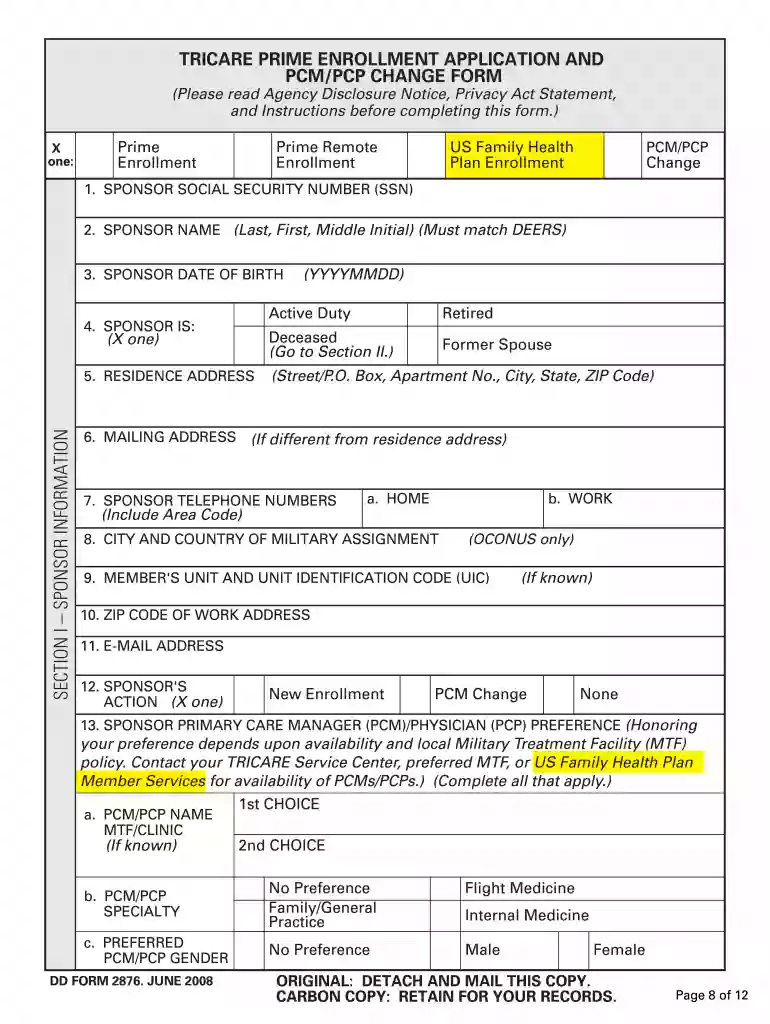
Tricare prime pcp change form 2008-2026

Get Form
tricare prime pcp change form 2008 Preview on Page 1

Here's how it works

01. Edit your form online
Type text, add images, blackout confidential details, add comments, highlights and more.

02. Sign it in a few clicks
Draw your signature, type it, upload its image, or use your mobile device as a signature pad.

03. Share your form with others
Send it via email, link, or fax. You can also download it, export it or print it out.

Definition & Meaning

The TRICARE Prime PCM/PCP Change Form 2008 is a crucial document for members enrolled in the TRICARE Prime program, a health care plan primarily for military members and their families in the United States. This form allows users to update their primary care manager (PCM), which is essential for ensuring access to medical services aligned with their health and location preferences. The form requires detailed personal and sponsor information, ensuring that any changes in care provision are accurately documented.

How to Obtain the TRICARE Prime PCP Change Form 2008

Acquiring the TRICARE Prime PCM/PCP Change Form 2008 involves several straightforward steps. Typically, the form can be accessed through military health services or TRICARE administrative offices. Users can download the form from the official TRICARE website or obtain it in person from military treatment facilities. This accessibility ensures that beneficiaries can make timely changes to their health care arrangements.

Steps to Complete the TRICARE Prime PCP Change Form 2008

  1. Personal Information: Start by filling in your personal information, including name, date of birth, and sponsor's social security number.
  2. Current PCM Information: Indicate your current primary care manager's details such as name and facility location.
  3. New PCM Preferences: Provide information on your preferred new PCM, including any specific clinic or doctor's office.
  4. Reason for Change: Clearly state the reason for the change, such as relocation, dissatisfaction with current care, or changes in medical needs.
  5. Contact Information: Ensure that your contact details, including phone number and email, are current for correspondence regarding the change.
  6. Signature: Sign the form to authorize the change, verifying that all provided information is accurate.

Key Elements of the TRICARE Prime PCP Change Form 2008

  • Sponsor Information: Details about the military sponsor, which are crucial for verifying eligibility and processing the form.
  • Primary Care Manager Details: Information necessary for substituting or modifying the healthcare provider.
  • Justification Section: Space allocated for the user to explain the reasons behind the change request.
  • Signature Block: Mandatory for the authorization and validation of the form's contents.

Legal Use of the TRICARE Prime PCP Change Form 2008

The TRICARE Prime PCM/PCP Change Form 2008 is legally binding once signed. It ensures that all changes in primary care management are recorded and justified within the context of TRICARE regulations. Misuse of the form, such as providing false information, could lead to administrative consequences or loss of TRICARE benefits. The form serves as an official document to safeguard the rights and obligations of beneficiaries within the health care system.

Eligibility Criteria

To use the TRICARE Prime PCM/PCP Change Form 2008, the individual must be a TRICARE Prime beneficiary, which generally includes active duty service members, retirees, and their eligible family members. Eligibility ensures that only those entitled to these health care benefits can request modifications in their care arrangements. Understanding these criteria is essential for avoiding delays or disputes in processing the form.


decoration image ratings of Dochub

Form Submission Methods

The TRICARE Prime PCM/PCP Change Form 2008 can be submitted in multiple ways:

  • Online: Certain TRICARE regions may offer online submission through their websites, allowing for a faster response.
  • Mail: Traditional mailing remains a valid option for individuals who prefer physical documentation or lack internet access.
  • In-Person: Forms can also be hand-delivered to the nearest military treatment facility or TRICARE service center.

Penalties for Non-Compliance

Failure to comply with regulations regarding the TRICARE Prime PCM/PCP Change Form 2008 can result in administrative penalties. These may include delays in processing the form, temporary loss of benefits, or the denial of requested changes. Ensuring accurate and timely submission is crucial to maintaining uninterrupted access to health care services.

State-by-State Differences

While TRICARE operates under federal guidelines, certain regions may have slight variations in processing the PCM/PCP Change Form due to local administrative practices. It is important for users to verify whether there are additional requirements or alternative submission procedures specific to their state or region, ensuring that all documentation is completed correctly and efficiently.

See more tricare prime pcp change form 2008 versions

We've got more versions of the tricare prime pcp change form 2008 form. Select the right tricare prime pcp change form 2008 version from the list and start editing it straight away!
Versions Form popularity Fillable & printable
2016 4.8 Satisfied (286 Votes)
2011 4.4 Satisfied (59 Votes)
2008 4 Satisfied (36 Votes)
be ready to get more

Complete this form in 5 minutes or less

Get form

Got questions?

We have answers to the most popular questions from our customers. If you can't find an answer to your question, please contact us.
Contact us
How can I change my PCM? Go to the milConnect website. Click the blue Sign In button at the top of the page. Go to the Family Members list and choose whose PCM you want to change. On the Medical Enrollments tab, click the Change PCM button. On the Change PCM page, choose the reason you want to change your PCM.
Tricare prime you have a list of s. Tricare Select you can go to the provider of your choice. If traveling, prime may not have a provider in your area. You will then have a higher copay. With select you just go to any provider that accepts tricare.
To change your primary care manager (PCM): Call your regional or overseas contractor; Use the Beneficiary Web Enrollment via milConnect; or. Send a completed TRICARE Prime Enrollment, Disenrollment, and PCM Change Form to your regional contractor with your new PCMs information.
In the Family Members list, select the family member whose PCM you want to change. Some plans do not allow you to change your PCM online. In these cases, the system displays a message telling you what to do next. On the Medical Enrollments tab, click Change PCM.
Use the TRICARE Prime Enrollment, Disenrollment and Primary Care Manager Change Form (DD Form 2876) to enroll in one of the TRICARE Prime options: TRICARE Prime. TRICARE Prime Remote.

Security and compliance

At DocHub, your data security is our priority. We follow HIPAA, SOC2, GDPR, and other standards, so you can work on your documents with confidence.

Learn more
ccpa2
pci-dss
gdpr-compliance
hipaa
soc-compliance

People also ask

Besides TRICARE Open Season, Qualifying Life Events, such as getting married, moving, and retiring from active duty, are the only times you can make enrollment changes for TRICARE Prime and TRICARE Select plans. You can learn more in the TRICARE Qualifying Life Events Fact Sheet.
Providers must verify TRICARE eligibility for beneficiaries at the time of service. Providers should ensure the patient has a valid Common Access Card (CAC), uniformed services ID card or eligibility authorization letter.

Related links