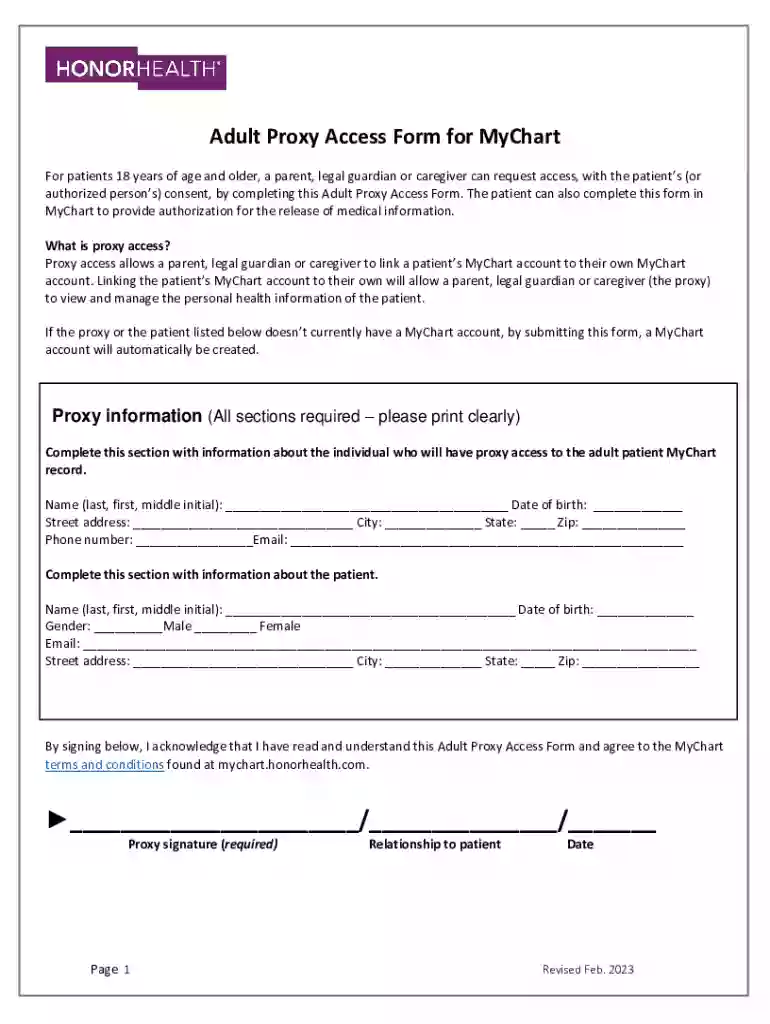
MyChart authorization proxy access form - OhioHealth 2026

Get Form
ohiohealth mychart Preview on Page 1

Here's how it works

01. Edit your ohiohealth mychart online
Type text, add images, blackout confidential details, add comments, highlights and more.

02. Sign it in a few clicks
Draw your signature, type it, upload its image, or use your mobile device as a signature pad.

03. Share your form with others
Send it via email, link, or fax. You can also download it, export it or print it out.

Definition & Meaning

The MyChart Authorization Proxy Access Form from OhioHealth is a legal document enabling individuals to access another person's health information via MyChart, a widely used healthcare management platform. Primarily, the form facilitates caregivers, parents, and legal guardians in overseeing a patient's medical records through a proxy account. To activate this, the proxy must obtain consent from the patient and complete certain formalities stipulated within the form. This kind of authorization aids in seamless collaboration between patients and their supporters in managing healthcare tasks, like scheduling appointments and monitoring treatment plans.

How to Use the MyChart Authorization Proxy Access Form - OhioHealth

To utilize the MyChart Authorization Proxy Access Form effectively, follow these structured steps:

  1. Obtain the form - Access it through OhioHealth's website or request it from the medical facility directly.
  2. Fill out personal information - Provide accurate personal details for both proxy and patient, including full names, contact information, and any relevant identification numbers.
  3. Authorization process - Secure the required signatures from both the patient and the proxy, signifying consent and verification of information.
  4. Form submission - Submit the completed form to the specified department within OhioHealth, either electronically or via mail, depending on guidelines.

Completing these steps ensures that the proxy can access and manage the patient's healthcare needs through MyChart efficiently.

Key Elements of the MyChart Authorization Proxy Access Form - OhioHealth

The form encompasses several critical elements needed for successful completion and authorization:

  • Patient information: Full name, date of birth, and medical record number (if applicable).
  • Proxy details: Proxy's name, address, and relationship to the patient.
  • Authorization specification: Details on the scope of access granted, outlining what medical information the proxy can view or manage.
  • Consent and signature: Signatures from both the patient and proxy, confirming consent for access.
  • Instructions for submission: Directions on where and how to submit the form, including any deadlines or preferred methods of delivery.

Ensuring these elements are accurately represented and thoroughly completed is essential for the form's acceptance and processing.

Legal Use of the MyChart Authorization Proxy Access Form - OhioHealth

Legally, the MyChart Authorization Proxy Access Form complies with health privacy regulations such as the Health Insurance Portability and Accountability Act (HIPAA). The form ensures:

  • Confidentiality: Only individuals named within the form are granted access, protecting the patient's sensitive information.
  • Consent verification: Authority is granted based on the patient's expressed consent, documented through their signature.
  • Limited access scope: The authorization is particular to the specified details on the form, ensuring no unintended information disclosure occurs.

Adhering to these legalities ensures both compliance with state laws and protection of sensitive medical information.

Steps to Complete the MyChart Authorization Proxy Access Form - OhioHealth

Follow this structured approach to complete the form:

  1. Download or request the form - Ensure you have the latest version available.
  2. Gather required information - Collect necessary details from both the proxy and the patient before you start.
  3. Complete personal data - Fill in all fields related to identification, ensuring accuracy.
  4. Detail authorization scope - Clearly outline the access rights the proxy should have.
  5. Obtain signatures - Both parties must sign the document to authorize access.
  6. Review for completeness - Double-check all inputs for accuracy and completeness.
  7. Submit as instructed - Per instructions, submit the form via mail or upload it online through the authorized portal.

Precision and completeness in following these steps guarantee the form is processed without delay.

Required Documents

When preparing to complete the MyChart Authorization Proxy Access Form, you will need:

  • Identification documents: Copies of ID for both patient and proxy may be required to verify identities.
  • Previous medical record references: If applicable, relevant medical records can aid in ensuring the form's data is consistent.
  • Authorization form: The specific proxy access form issued by OhioHealth.

Gathering these documents beforehand aids in a streamlined and precise form submission process.

Examples of Using the MyChart Authorization Proxy Access Form - OhioHealth

Here are several scenarios where the form is frequently utilized:

  • Parental access: Parents seeking access to a minor child's medical records to manage appointments and monitor health care.
  • Caregiver management: Professional caregivers needing access to manage an elderly patient's health needs, including prescription updates and scheduling treatments.
  • Guardianship authority: Legal guardians managing healthcare responsibilities of those under their care, ensuring all health-related tasks are monitored.

In each case, having completed the form allows the proxy to manage healthcare activities more effectively on the patient's behalf.

State-Specific Rules for the MyChart Authorization Proxy Access Form - OhioHealth

OhioHealth's MyChart Authorization Proxy Access Form must align with state-specific regulations related to healthcare data confidentiality and access permissions:

  • Age of consent: Different age requirements might apply for a patient to consent to proxy access without parental approval.
  • Documentation requirements: Additional documents may be unique to Ohio state laws, ensuring compliance with local health privacy acts.
  • Submission instructions: Methods and deadlines can vary, making it crucial to adhere to state-specific protocols for submitting the form.

Being aware of these nuances ensures legal compliance and appropriate access rights are established in accordance with state laws.

See more MyChart authorization proxy access form - OhioHealth versions

We've got more versions of the MyChart authorization proxy access form - OhioHealth form. Select the right MyChart authorization proxy access form - OhioHealth version from the list and start editing it straight away!
Versions Form popularity Fillable & printable
2023 4.4 Satisfied (54 Votes)
2018 4.7 Satisfied (41 Votes)
be ready to get more

Complete this form in 5 minutes or less

Get form

Got questions?

We have answers to the most popular questions from our customers. If you can't find an answer to your question, please contact us.
Contact us
With a few taps in the OhioHealth mobile app, you can find OhioHealth doctors, get directions to nearby urgent and emergency care locations, and access your MyChart health record anytime, anyplace!
CareConnect, powered by Epicthe nations leading electronic medical record platformalso connects patients and providers across OhioHealths entire system, as well as to other hospitals across the country that use Epic. More than 325 million patients nationwide have an Epic record.
If you do not remember any of this information, or you do not have a valid e-mail address on file, you will have to contact your MyChart help desk at (614)533-MyChart (6924) or (844)OHMyChart(646-9242) to help you regain access to your MyChart account.
Follow these steps to sign up for a MyChart account. Enter your personal information. Verify your contact information. Choose a username and password.
A proxy is someone who can have access to another patients health information. If you are a parent or a care partner of a Health Services patient and they would like to grant you access to their medical information via LA Health Portal, please call or visit a Health Services clinic or hospital.

Security and compliance

At DocHub, your data security is our priority. We follow HIPAA, SOC2, GDPR, and other standards, so you can work on your documents with confidence.

Learn more
ccpa2
pci-dss
gdpr-compliance
hipaa
soc-compliance
be ready to get more

Complete this form in 5 minutes or less

Get form

People also ask

Take Charge of Your Health With MyChart The MyChart features of the OhioHealth app require a MyChart account. New users can request an activation code within the app by clicking Create an Account, or online at MyChart.OhioHealth.com.
0:18 1:14 Type My Chart into the search box and press search find the My Chart icon and click on get on yourMoreType My Chart into the search box and press search find the My Chart icon and click on get on your Apple. Device or on an Android device to download the app to your. Device.

Related links