




Here's how it works



How to use or fill out special occasion license with our platform

- Click ‘Get Form’ to open the special occasion license in the editor.
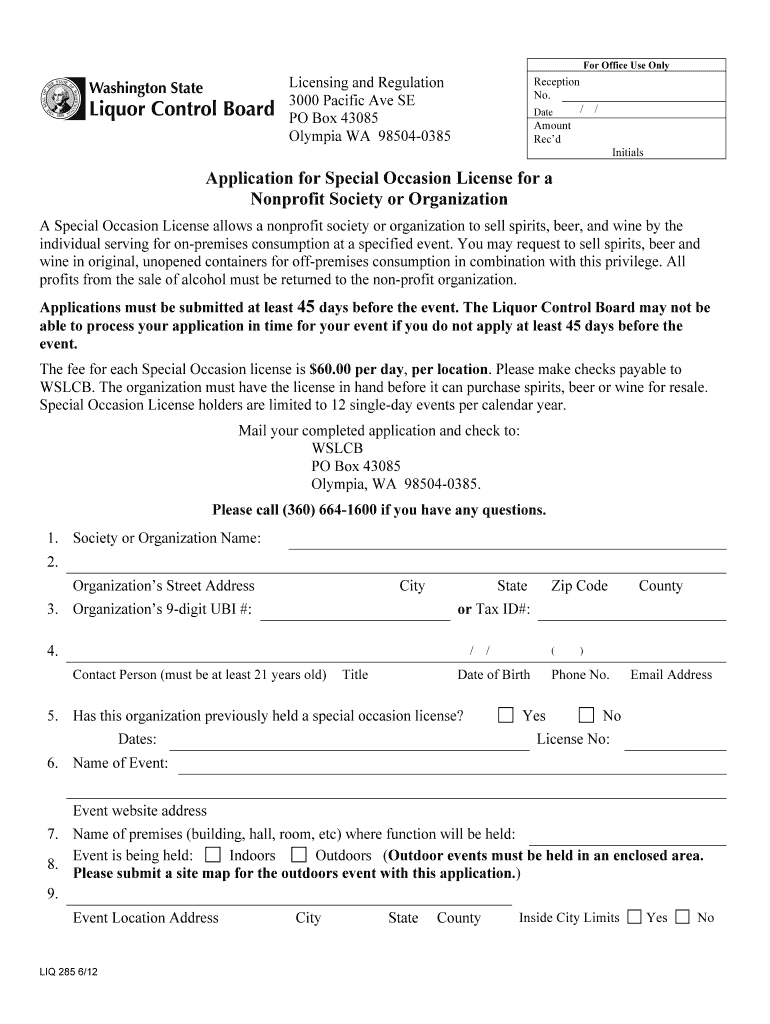
- Begin by entering your organization’s name in the designated field, followed by the street address and 9-digit UBI number.
- Provide contact details for a responsible person, including their title, date of birth, phone number, and email address.
- Indicate whether your organization has previously held a special occasion license and provide relevant dates if applicable.
- Fill in the event name and website address, along with the premises where the event will be held. Specify if it is indoors or outdoors.
- Complete the event location address and confirm if it is within city limits. If applicable, authorize liquor sales with signatures from appropriate officials.
- Detail the expected attendance numbers and specify event dates and times.
- Indicate if any wineries or breweries are participating and describe any goods received from them.
- Finally, certify that all information is accurate by signing on behalf of your organization before submitting your application.
Start filling out your special occasion license today for free using our platform!
It's free
See more special occasion license versions
| Versions | Form popularity | Fillable & printable |
|---|---|---|
| 2012 | 4.9 Satisfied (57 Votes) |
Got questions?
Can I use DocHub to generate legal eSignatures on my special occasion license?
Yes, you can use DocHub for signing any business and private documentation, including your special occasion license. All eSignatures you generate with our tool are legally binding and court-admissible, as DocHub complies with standards required by ESIGN and UETA. Save your accomplished document with a detailed Audit Trail if needed.
How do you get special occasion license for my state?
If you are searching for a state-specific special occasion license sample, you will find it in our DocHub Forms & Templates catalog. Use the search field, key in your form’s name, and search through the results for your state. You can also filter out irrelevant results while searching our catalog by categories.
Security and compliance
At DocHub, your data security is our priority. We follow HIPAA, SOC2, GDPR, and other standards, so you can work on your documents with confidence.
Learn more




