Type text, add images, blackout confidential details, add comments, highlights and more.
02. Sign it in a few clicks
Draw your signature, type it, upload its image, or use your mobile device as a signature pad.
03. Share your form with others
Send incident report regulated via email, link, or fax. You can also download it, export it or print it out.
How to use or fill out incident report child with our platform
Ease of Setup
DocHub User Ratings on G2
Ease of Use
DocHub User Ratings on G2
Click ‘Get Form’ to open the incident report in the editor.
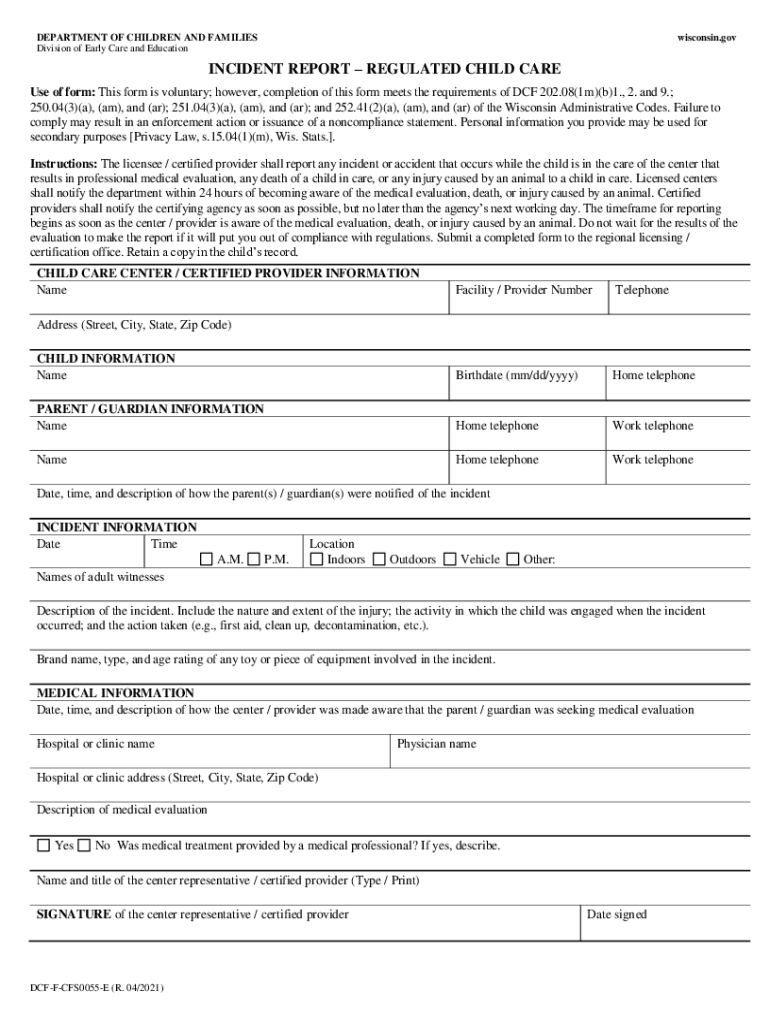
Begin by filling out the 'Child Care Center / Certified Provider Information' section. Enter the name, facility/provider number, and telephone number of your center.
Next, move to the 'Child Information' section. Input the child's name, birthdate, and home telephone number.
In the 'Parent / Guardian Information' section, provide details for each parent or guardian including names, home and work telephone numbers, and their address.
Fill out the 'Incident Information' section by specifying the date, time (A.M. or P.M.), location of the incident, names of adult witnesses, and a detailed description of what occurred.
Complete the 'Medical Information' section if applicable. Include details about how you were informed of any medical evaluation sought by parents/guardians and provide hospital or clinic information.
Finally, ensure that a center representative signs and dates the form before submission.
Start using our platform today to easily complete your incident report for free!
We've got more versions of the incident report child form. Select the right incident report child version from the list and start editing it straight away!
EVENT REPORTED TO THE DEPARTMENT (CHECK ALL THAT APPLY) a. □ Death of any child from any cause. b. □ Any injury to a child that requires treatment by aRead more
THIS FORM CAN BE USED TO MEET THE REPORTING REQUIREMENTS FOR ACCIDENT, INJURY, ILLNESS, HOSPITALIZATION, EMERGENCY ROOM TREATMENT, DEATH. THE DEATH OF A CHILD
The Regional CVPA plays a vital role in AYSOs promise to provide a safe, fair, fun, positive family environment for youth soccer. In return, AYSO wants toRead more
Cookie consent notice
This site uses cookies to enhance site navigation and personalize your experience.
By using this site you agree to our use of cookies as described in our Privacy Notice.
You can modify your selections by visiting our Cookie and Advertising Notice.