







Definition & Meaning
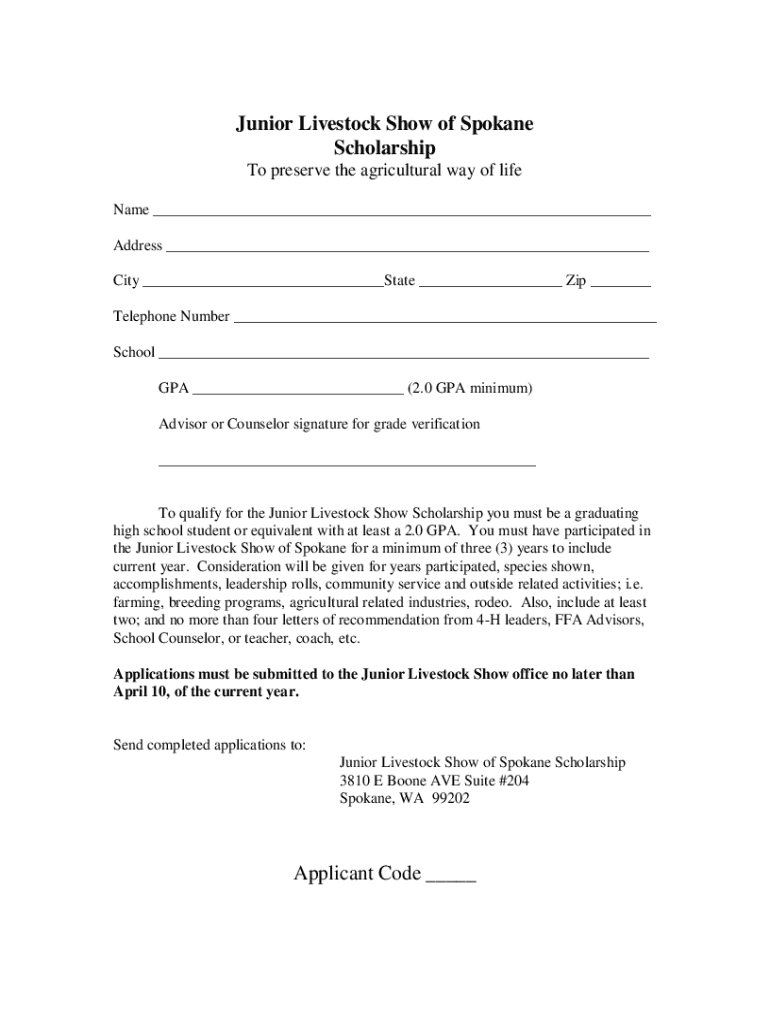
The "DocHub fill-and-sign-pdf-form35019Scholarship Application Junior Livestock Show of Spokane" refers to a digital form designed for students applying for a scholarship at the Junior Livestock Show in Spokane. This document is part of DocHub's suite of tools that aim to streamline the process of editing, filling, and signing PDF forms online. The form is specifically tailored to capture all necessary applicant details, including educational information, past participation in livestock shows, and future plans, thereby simplifying the scholarship application process for both the applicant and the reviewer.
Eligibility Criteria
To be eligible for the Junior Livestock Show of Spokane Scholarship, applicants must meet several requirements:
- Age and Educational Status: Applicants need to be graduating high school students with a minimum GPA of 2.0.
- Participation in Junior Livestock Show: Candidates must have participated in the Junior Livestock Show for at least three years.
- Additional Requirements: Submission of personal information, leadership roles, community service experience, future ambitions, and letters of recommendation are mandated.
These criteria ensure that the scholarship is awarded to individuals who are committed to agriculture and actively engaged in community and leadership activities.


How to Obtain the Form
Obtaining the "DocHub fill-and-sign-pdf-form35019Scholarship Application Junior Livestock Show of Spokane" is facilitated through the DocHub platform:
- Access the DocHub Website: Go to dochub.com, ensuring accessibility from both desktop and mobile browsers.
- Search for the Specific Form: Use the search bar to locate the scholarship application form.
- Download or Directly Edit: You can download the form for offline use or edit it directly on the platform, leveraging DocHub's comprehensive suite of document management tools.
This flexibility allows applicants to manage their document workflow effectively, regardless of their technological setup.
Steps to Complete the Application Form
Completing the "DocHub fill-and-sign-pdf-form35019Scholarship Application Junior Livestock Show of Spokane" involves several detailed steps:
- Fill Personal Information: Enter accurate personal data, including name, address, and contact details.
- Educational Background: Provide your current educational status, including GPA and school details.
- Livestock Show Participation: Detail your past involvement in the Junior Livestock Show.
- Leadership and Community Service: Highlight any roles and responsibilities undertaken in leadership and community services.
- Future Plans: Describe your career aspirations and how the scholarship will aid in achieving those goals.
- Recommendation Letters: Attach required letters of recommendation.
These steps ensure that every aspect of the applicant’s qualifications is thoroughly documented, enhancing the chances for a successful application.
Legal Use of the Form
The form is legally binding and adheres to U.S. regulations concerning online documentation and scholarship applications. It accommodates features like:
- Secure Electronic Signatures: Signatures are compliant with the ESIGN Act, ensuring they are legally recognized.
- Data Protection: With 256-bit SSL encryption and OAuth 2.0 protocols, all personal data and document interactions are secured.
These measures protect both the applicant's information and the integrity of the scholarship awarding process.
Required Documents
To submit a complete application, certain supporting documents must accompany the filled form:
- Proof of Participation: Documentation verifying participation in the Junior Livestock Show for three or more years.
- Letters of Recommendation: Usually two or more letters from educators or mentors.
- Transcripts: An official transcript reflecting the applicant's GPA and academic performance.
Ensuring all required documents are included is crucial for the application to be considered valid and complete.
Form Submission Methods
The form offers multiple submission methods, enhancing accessibility and convenience:
- Online Submission: Upload the completed form and documents directly through the DocHub platform.
- Email Potential: If applicable, email the completed PDF to the designated scholarship committee address.
- Physical Submission: Printing and mailing the form may be an option for those preferring traditional submission methods.
Offering diverse submission pathways caters to various applicant preferences and technological capabilities.
Application Process & Approval Time
Understanding the timeline and process for application approval helps applicants plan accordingly:
- Application Deadline: Generally, all applications must be submitted by April 10.
- Review Period: The review period can vary but typically takes several weeks post-deadline.
- Approval Notification: Successful applicants are notified via the contact information provided in their form.
Staying aware of these timelines ensures applicants meet all deadlines and understand when to expect responses.




