Fillable Online ACTIVITY REGISTRATION CLUB USE ONLY BOYS 2026

Get Form
Fillable Online ACTIVITY REGISTRATION CLUB USE ONLY BOYS Preview on Page 1

Here's how it works

01. Edit your form online
Type text, add images, blackout confidential details, add comments, highlights and more.

02. Sign it in a few clicks
Draw your signature, type it, upload its image, or use your mobile device as a signature pad.

03. Share your form with others
Send it via email, link, or fax. You can also download it, export it or print it out.

Definition and Purpose of the Activity Registration Form

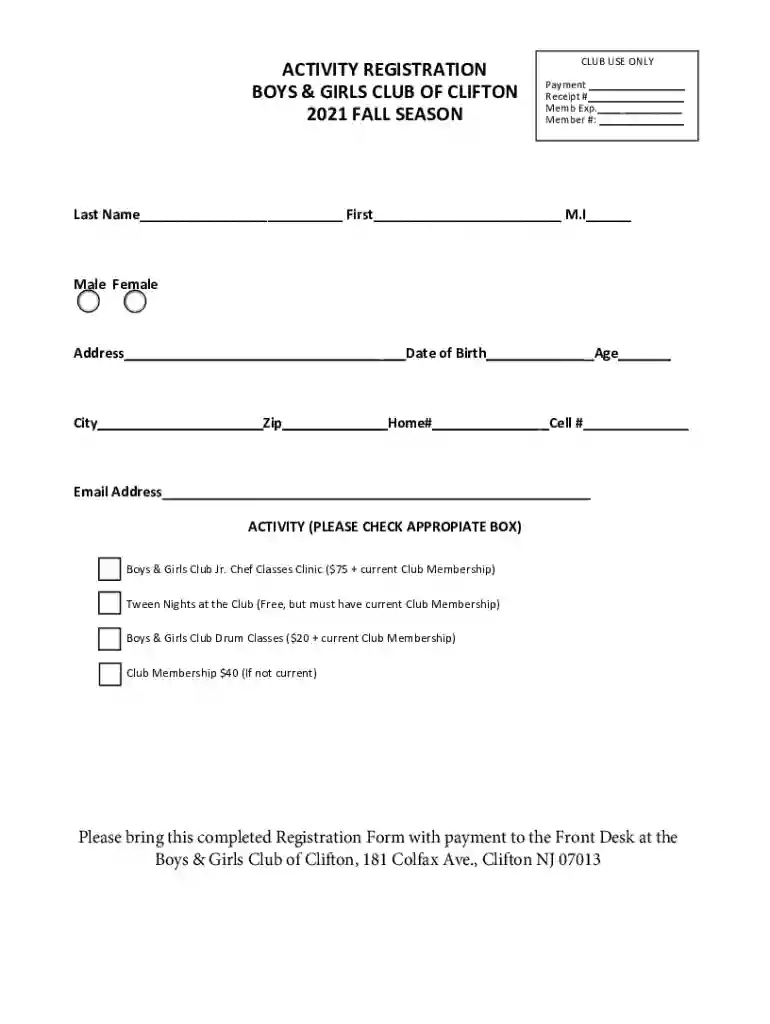
The Fillable Online Activity Registration Form, titled "Club Use Only Boys," serves as a standardized document utilized by organizations such as the Boys & Girls Club of Clifton for registering participants in various club activities. Primarily, this form is used to facilitate the collection of essential personal and membership information for boys interested in joining club activities. It is designed to streamline the registration process by providing an all-in-one tool for both club administrators and registrants.

The form includes several sections to capture a wide range of details, from personal data to specific activity selections and associated fees. This ensures accurate record-keeping and helps manage logistical aspects like scheduling and resource allocation efficiently. Additionally, being a fillable form, it supports digital completion, enhancing ease of use and accessibility.

Components of the Activity Registration Form

Personal Information Section

One of the core elements of the Activity Registration Form is the personal information section. This part of the form collects critical data necessary for identifying and contacting the participant. Information typically required includes:

  • Full name of the participant
  • Date of birth
  • Parent or guardian contact information
  • Home address
  • Emergency contact details

This section is fundamental for ensuring that all participants are adequately identified and can be reached quickly in case of any issues or emergencies.

Club Membership Details

Another key section of the form is dedicated to club membership information. This area asks for:

  • Current membership status
  • Membership ID
  • Expiration date of membership, if applicable

These details help confirm whether the participant is already a club member and eligible for specific activities, potentially influencing fee structures or access to certain programs.

Registration of Activities

Available Activities

The form provides a list of available activities for registration. Participants can choose from various options that may include cooking classes, tween nights, drum sessions, and more. The section typically includes:

  • Names and brief descriptions of activities
  • Age categories
  • Time slots and schedules

Providing comprehensive details about each activity helps participants make informed decisions based on their interests and availability.

Associated Fees

Following the activity selection, participants are required to review and acknowledge any associated fees. This section outlines:

  • Registration fees per activity
  • Payment methods accepted
  • Refund policies, if available

Having a clear breakdown of costs ensures transparency and helps parents or guardians plan accordingly.

Steps to Complete the Form

Step-by-Step Instructions

To successfully fill out the Activity Registration Form, follow these detailed steps:

  1. Download or Access the Form: Obtain the form from the relevant club’s website or request it directly from the club office.
  2. Complete the Personal Information: Fill out all necessary personal data accurately in the designated fields.
  3. Select Activities: Review the list of available activities and mark your choices. Ensure you meet any specified prerequisites for selected activities.
  4. Review Membership Details: Confirm your current membership status and update any outdated information.
  5. Acknowledge Fees: Carefully review the fee section, ensuring you understand all costs involved and agree with the outlined payment methods.
  6. Submit the Form: Depending on the club’s procedure, submit the form either online, via email, or in person at the club’s administrative office.

Following these steps helps avoid common mistakes and ensures that the application is processed smoothly and efficiently.


Who Typically Uses the Activity Registration Form

decoration image ratings of Dochub

Target Audience

The primary users of this form are the parents or guardians of boys who wish to participate in club activities. Typically, these forms target:

  • Parents registering children for after-school programs
  • Club members updating their activity involvement
  • Teenagers independently registering for activities within the allowable age range

Understanding the intended users helps ensure that the form is designed to meet their specific needs and addresses any common questions or concerns.

Legal Considerations

Privacy and Data Protection

The form must comply with legal requirements, including privacy and data protection laws. Key considerations involve:

  • Ensuring that personal data is securely stored and managed
  • Providing opt-in consent for data sharing with third parties
  • Offering transparency in data usage and protection practices

By addressing these legal aspects, clubs can enhance trust and maintain compliance with applicable regulations.

Key Elements for Efficient Form Design

User-Friendly Design

For maximum effectiveness, the form should incorporate user-friendly design principles such as:

  • Clear organization and logical flow of sections
  • Intuitive navigation for digital fillable forms
  • Simple language and instructions

A well-designed form reduces errors and ensures a positive experience for users.

Digital and Paper Versions

While many users may prefer the convenience of a digital form, offering a paper version ensures accessibility for those without internet access. Both formats should maintain consistent content and provide the same level of functionality and clarity.

In summary, this Activity Registration Form is a vital tool for efficiently managing club activities and ensuring a smooth and straightforward registration process for participants and administrators alike.

See more Fillable Online ACTIVITY REGISTRATION CLUB USE ONLY BOYS versions

We've got more versions of the Fillable Online ACTIVITY REGISTRATION CLUB USE ONLY BOYS form. Select the right Fillable Online ACTIVITY REGISTRATION CLUB USE ONLY BOYS version from the list and start editing it straight away!
Versions Form popularity Fillable & printable
2021 4.8 Satisfied (52 Votes)
be ready to get more

Complete this form in 5 minutes or less

Get form

Got questions?

We have answers to the most popular questions from our customers. If you can't find an answer to your question, please contact us.
Contact us
The key goal of your membership application form is to capture transactional information. This includes your members contact information, as well as fee payment. But membership forms are also an opportunity to know your new prospective member and motivate their participation in your organization. A+ Membership Application Forms (with Template Examples!) Wild Apricot blog membership-appli Wild Apricot blog membership-appli
Write the reason why you want to apply for the membership. You can also see more on Membership Cards. You may enumerate points and other items where you think will help you get the membership that you want. You can list the things that you know about the products and the services of the membership that you want to Membership Application Letters - 8+ Word, PDF Documents Download Template.net business membership-applic Template.net business membership-applic
Gather personal information like date of birth, phone number and mailing address. Describe the application process and any membership requirements. Provide information about membership levels. Tell them all about membership benefits.
How to create a registration form on Google Forms Log in to Google. Select a template. Customize form details and add questions. Set up response validation. Customize the forms theme. Preview and share your form. Log in or create an account on forms.app. Generate with AI, choose a template, or start from scratch.
To make a form, you should do the following: Gather personal information like date of birth, phone number and mailing address. Describe the application process and any membership requirements. Provide information about membership levels. Create Free Membership Application Forms - Typeform Typeform Application forms Typeform Application forms

Security and compliance

At DocHub, your data security is our priority. We follow HIPAA, SOC2, GDPR, and other standards, so you can work on your documents with confidence.

Learn more
ccpa2
pci-dss
gdpr-compliance
hipaa
soc-compliance

People also ask

Step-by-Step Guide on How to Create a Registration Link for An Event Choose your Event Registration Platform. Create an Event Page and Registration Form. Customize your Event Registration. Share the Event registration Link or Page. Manage Event Registrations. Track Registrations and Analytics. Conduct Post-event Activities.
If youre using a template, you can skip to Update questions. Open a form in Google Forms. Click Add . To the right of the question title, choose the type of question you want. Type the possible responses to your question. To prevent people from not answering, turn on Required. Create your first form in Google Forms - Google Workspace Learning Center Google Help users answer Google Help users answer

Related links