Type text, add images, blackout confidential details, add comments, highlights and more.
02. Sign it in a few clicks
Draw your signature, type it, upload its image, or use your mobile device as a signature pad.
03. Share your form with others
Send kansas webiz via email, link, or fax. You can also download it, export it or print it out.
How to use or fill out kansas form vaccine with our platform
Ease of Setup
DocHub User Ratings on G2
Ease of Use
DocHub User Ratings on G2
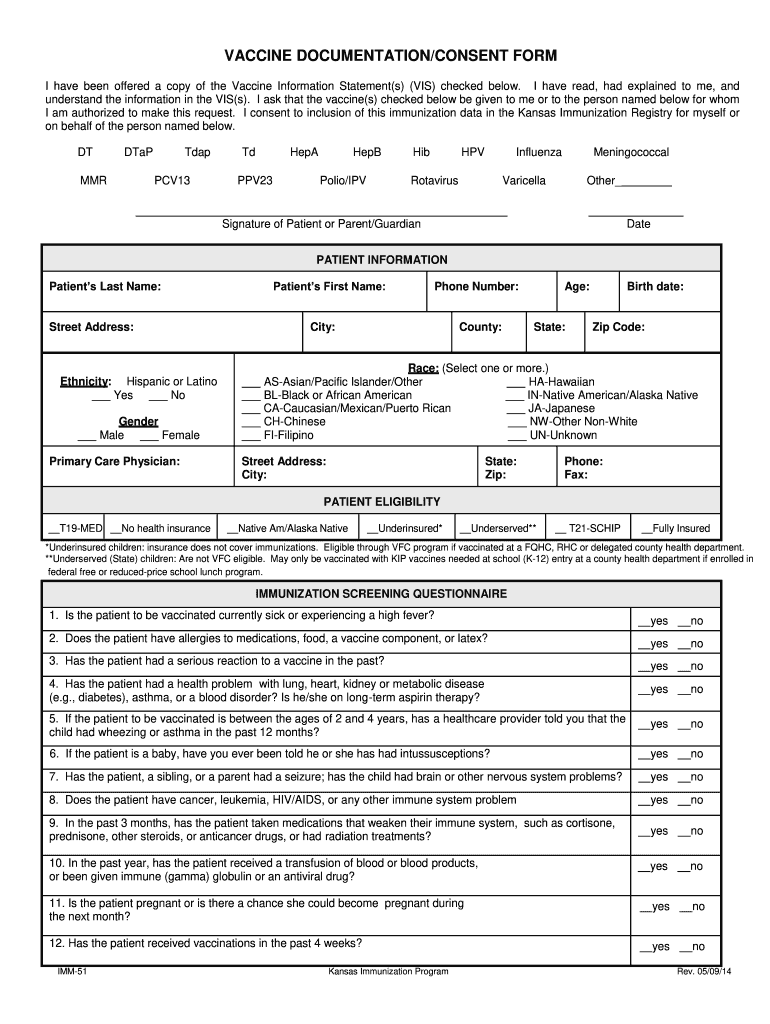
Click ‘Get Form’ to open the Kansas Vaccine Documentation/Consent Form in the editor.
Begin by filling out the Patient Information section. Enter the patient's last name, first name, and date of birth. Ensure you provide accurate contact details including phone number and address.
In the Patient Eligibility section, select the appropriate options regarding health insurance status. This helps determine eligibility for vaccination programs.
Proceed to the Immunization Screening Questionnaire. Answer each question truthfully by selecting 'yes' or 'no' as applicable to ensure safety during vaccination.
Next, indicate which vaccines are requested by checking the relevant boxes in the Vaccine section. Be sure to include any additional vaccines if necessary.
Finally, sign and date the form at the bottom as either the patient or guardian, confirming consent for vaccination and data inclusion in the Kansas Immunization Registry.
Start using our platform today for free to streamline your vaccine documentation process!
We've got more versions of the kansas form vaccine form. Select the right kansas form vaccine version from the list and start editing it straight away!
Kansas immunization records onlineKansas vaccine ScheduleKdhe vaccine consent form spanishKansas Immunization ProgramVaccine Consent form for AdultsPrintable vaccine Consent FormVaccination consent form PDFVaccination consent form for parents
Security and compliance
At DocHub, your data security is our priority. We follow HIPAA, SOC2, GDPR, and other standards, so you can work on your documents with confidence.
Feb 28, 2026 Indicate by check mark if the registrant is a well-known seasoned issuer, as defined in Rule 405 of the Securities Act. ☒ Yes ☐ No.Read more
Adults are eligible for certain immunizations through the VFA program. Underinsured children are eligible for all ACIP recommended immunizations through the VFCRead more
Cookie consent notice
This site uses cookies to enhance site navigation and personalize your experience.
By using this site you agree to our use of cookies as described in our Privacy Notice.
You can modify your selections by visiting our Cookie and Advertising Notice.