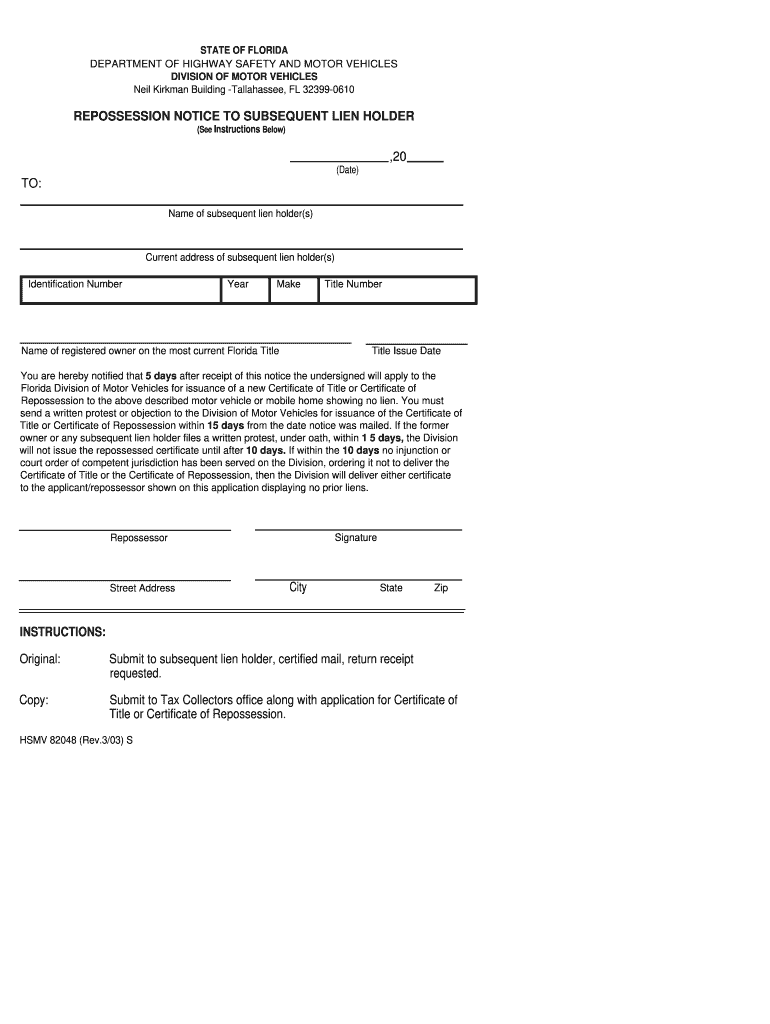
5 day notice repossession florida department of motor vehicles form 2003-2026

Get Form
florida repo affidavit Preview on Page 1

Here's how it works

01. Edit your florida repo affidavit online
Type text, add images, blackout confidential details, add comments, highlights and more.
02. Sign it in a few clicks
Draw your signature, type it, upload its image, or use your mobile device as a signature pad.
03. Share your form with others
Send repossession form dmv via email, link, or fax. You can also download it, export it or print it out.

How to use or fill out 5 day notice repossession florida department of motor vehicles form 2003 with our platform

Form edit decoration
9.5
Ease of Setup
DocHub User Ratings on G2
9.0
Ease of Use
DocHub User Ratings on G2
  1. Click ‘Get Form’ to open the 5 day notice repossession form in the editor.
  2. Begin by entering the date in the designated field at the top of the form. This is crucial as it marks the start of the notification period.
  3. Fill in the name and current address of the subsequent lien holder(s) accurately. Ensure that all details are correct to avoid any delays.
  4. Provide the identification number, year, make, and title number of the vehicle or mobile home. This information is essential for identifying the specific asset involved.
  5. Complete the section for the name of the registered owner as per the most current Florida Title. This ensures that all parties are correctly identified.
  6. Sign and date where indicated as 'Repossessor'. Include your street address, city, state, and zip code to finalize your notice.

Start using our platform today to fill out your forms online for free!

See more 5 day notice repossession florida department of motor vehicles form 2003 versions

We've got more versions of the 5 day notice repossession florida department of motor vehicles form 2003 form. Select the right 5 day notice repossession florida department of motor vehicles form 2003 version from the list and start editing it straight away!
Versions Form popularity Fillable & printable
2011 4.8 Satisfied (291 Votes)
2003 4.4 Satisfied (311 Votes)
2001 3.9 Satisfied (25 Votes)
be ready to get more

Complete this form in 5 minutes or less

Get form

Got questions?

We have answers to the most popular questions from our customers. If you can't find an answer to your question, please contact us.
Contact us

If you frequently deal with documents kept in your Google Drive, DocHub is a superb option for you to easily and quickly complete, adjust, and approve them. This editor integrates properly with Google services, so you can export your florida repossession affidavit from your Google Drive to the editor without downloading and re-uploading it. Right-click on your document, select Open With → DocHub PDF Sign and Edit. In our editor, add and assign Signature Fields for all parties involved, then click on the Menu option above → Send → choose how you want to share your paperwork.

You can find and modify your florida dmv repossession form online by using DocHub. Its simple yet feature-rich design enables you to start productive work right after you sign up your account. Create your account and add your file, then our user interface will guide you via our stress-free form completion experience.

Security and compliance

At DocHub, your data security is our priority. We follow HIPAA, SOC2, GDPR, and other standards, so you can work on your documents with confidence.

Learn more
ccpa2
pci-dss
gdpr-compliance
hipaa
soc-compliance
be ready to get more

Complete this form in 5 minutes or less

Get form