



Fr19 2004 form-2026

Get Form
fr19 Preview on Page 1

Here's how it works

01. Edit your fr19 online
Type text, add images, blackout confidential details, add comments, highlights and more.

02. Sign it in a few clicks
Draw your signature, type it, upload its image, or use your mobile device as a signature pad.

03. Share your form with others
Send fr19 login via email, link, or fax. You can also download it, export it or print it out.

How to use or fill out fr19 2004 form with DocHub

Form edit decoration
9.5
Ease of Setup
DocHub User Ratings on G2
9.0
Ease of Use
DocHub User Ratings on G2
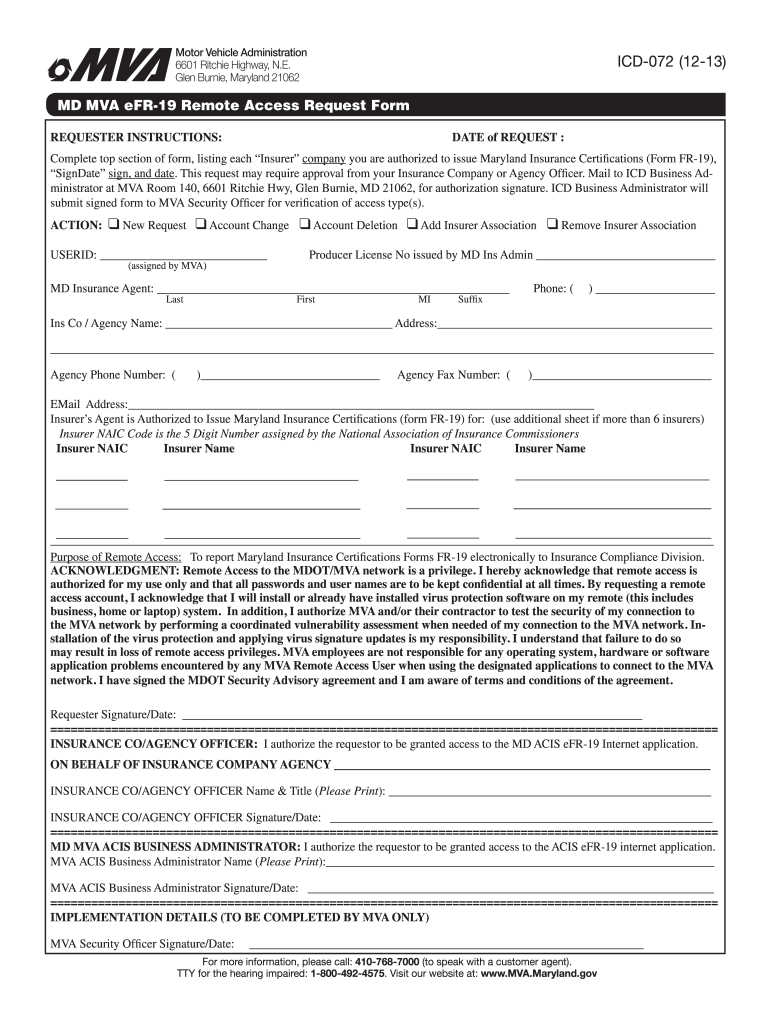
  1. Click ‘Get Form’ to open the fr19 2004 form in our platform's editor.
  2. Begin by filling out the top section, listing each 'Insurer' company you are authorized to issue Maryland Insurance Certifications for. Ensure you include the date of request.
  3. Select the appropriate action from the options provided: New Request, Account Change, Account Deletion, Add Insurer Association, or Remove Insurer Association.
  4. Enter your User ID and Producer License Number issued by MD Ins Admin. Fill in your contact details including phone number and email address.
  5. List the insurers you are authorized to issue certifications for, including their NAIC codes. Use additional sheets if necessary.
  6. Complete the acknowledgment section regarding remote access responsibilities and sign with the date.
  7. Ensure that an Insurance Company or Agency Officer authorizes your request by signing in the designated area before submission.

Start using our platform today to fill out your fr19 2004 form online for free!

See more fr19 2004 form versions

We've got more versions of the fr19 2004 form form. Select the right fr19 2004 form version from the list and start editing it straight away!
Versions Form popularity Fillable & printable
2014 4.8 Satisfied (160 Votes)
2013 4.3 Satisfied (245 Votes)
2004 4.3 Satisfied (78 Votes)
be ready to get more

Complete this form in 5 minutes or less

Get form

Got questions?

We have answers to the most popular questions from our customers. If you can't find an answer to your question, please contact us.
Contact us
About FR-19 Filing Maryland Separate from an SR-22, this form simply states that at a given point in time, you have the required auto insurance in Maryland for your vehicle. If you received one in the mail, contact us for assistance. For more information about auto insurance in Maryland, see About Car Insurance.
The FR-19 is a certification that the vehicle has been continuously insured since the verification date and that coverage is presently in force. The Uninsured Motorist email address is deum@delaware.gov and fax number is 302-739-4750.
The FR-13 reports New Business, Reinstatements or Cancellations and is submitted electronically to the MVA through the MDOT SFTP server. The eFR-19 is submitted to show proof of insurance for a customer via the eFR-19 Website and is generally requested after an insurance compliance case has been created.
To provide verification of vehicle insurance you must obtain the Maryland Vehicle Insurance Certification (form #FR-19) The form can only be issued by a vehicle insurance company licensed to do business in Maryland or an authorized agent of such a company. Its only valid for 30 days.
SR-22 insurance, also known as a Certificate of Financial Responsibility, is a form of auto insurance that carries higher liability coverage requirements and is often mandated by the state for individuals who have committed certain driving offenses, such as DUIs.

Security and compliance

At DocHub, your data security is our priority. We follow HIPAA, SOC2, GDPR, and other standards, so you can work on your documents with confidence.

Learn more
ccpa2
pci-dss
gdpr-compliance
hipaa
soc-compliance

