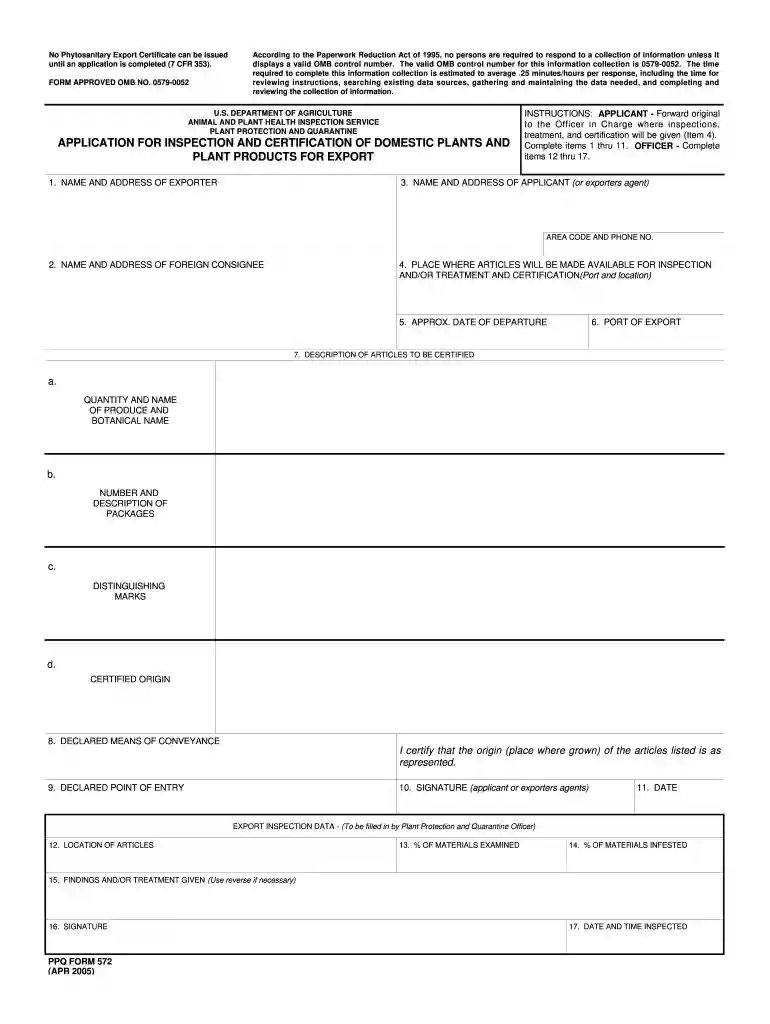
Usda form 572 2026

Get Form
form 572 pdf Preview on Page 1

Here's how it works

01. Edit your form 572 pdf online
Type text, add images, blackout confidential details, add comments, highlights and more.

02. Sign it in a few clicks
Draw your signature, type it, upload its image, or use your mobile device as a signature pad.

03. Share your form with others
Send ppq 572 via email, link, or fax. You can also download it, export it or print it out.

How to use or fill out USDA Form 572 with DocHub

Form edit decoration
9.5
Ease of Setup
DocHub User Ratings on G2
9.0
Ease of Use
DocHub User Ratings on G2
  1. Click ‘Get Form’ to open it in the editor.
  2. Begin by filling out the 'Name and Address of Exporter' section. Ensure that all details are accurate to avoid delays.
  3. Next, complete the 'Name and Address of Applicant' field, including area code and phone number for easy contact.
  4. Fill in the 'Name and Address of Foreign Consignee' to specify where the products will be sent.
  5. Indicate the 'Place Where Articles Will Be Made Available for Inspection' along with the port and location.
  6. Provide the 'Approx. Date of Departure' to inform about shipping timelines.
  7. In the 'Description of Articles to be Certified', detail each item, including quantity, name, botanical name, package description, distinguishing marks, and certified origin.
  8. Declare the means of conveyance and point of entry for your shipment.
  9. Finally, sign and date the form as either the applicant or exporter's agent before submission.

Start using our platform today to fill out USDA Form 572 quickly and efficiently!

See more usda form 572 versions

We've got more versions of the usda form 572 form. Select the right usda form 572 version from the list and start editing it straight away!
Versions Form popularity Fillable & printable
2005 4.8 Satisfied (146 Votes)
1999 4.2 Satisfied (74 Votes)
be ready to get more

Complete this form in 5 minutes or less

Get form

Got questions?

We have answers to the most popular questions from our customers. If you can't find an answer to your question, please contact us.
Contact us

Sure, and it’s really straightforward! DocHub is a web-based PDF editor with advanced document management functions that allow you promptly modify your documents, complete empty fields and drop new ones for other people to fill out, and create eSignatures in several ways. Upload your ppq form 572, give information as requested, and decide how you want to eSign your document - by typing your name, drawing your signature, uploading its picture, or utilizing a QR code.

As a comprehensive document editing platform, DocHub is available on mobile devices. Open DocHub in your choice of mobile browser and employ our intelligent mobile-friendly toolset to fill out your form 572.

In order to obtain a phytosanitary certificate, you will need to set up an account on the US Department of Agricultures PCIT website. You can find instructions on how to set up the account through PCIT.
To get a phytosanitary certificate takes a few days to several weeks. However, the time it takes varies depending on the exporting countrys procedures, the complexity of the inspection, and the importing countrys requirements.
Import-export licenses in the US are generally free of cost. However, some agencies may require a nominal fee to issue or renew the permit. What types of goods require an import license? Certain agricultural products, arms and ammunition, radioactive material, and commercial equipment require an import license.

Security and compliance

At DocHub, your data security is our priority. We follow HIPAA, SOC2, GDPR, and other standards, so you can work on your documents with confidence.

Learn more
ccpa2
pci-dss
gdpr-compliance
hipaa
soc-compliance

People also ask

These include the fees for simple import compliance assistance (from $111 to $249 per shipment), processing initial import permits (from $150 to $303 per application), inspection of live horses at U.S.-Mexico border ports of entry (from $70 to $288 per head), inspections of approved establishments, warehouses, and
Use APHIS eFile to apply for a CIP (this method is faster but requires eAuthentication). If youre unable to apply online, you may download PPQ Form 588 (162.01 KB) and fax a paper copy of the application to 301-734-5786.
Submission of the $120.00 application fee is required prior to processing your application. Animal Care accepts credit cards, checks, and money orders as payment.
There are no standard fees or costs related to import licenses as most agencies have different requirements. However, other agencies may have different requirements or fees, so its always best to check with them individually before starting the import process.

Related links