Preferred vendor agreement template 2026

Get Form
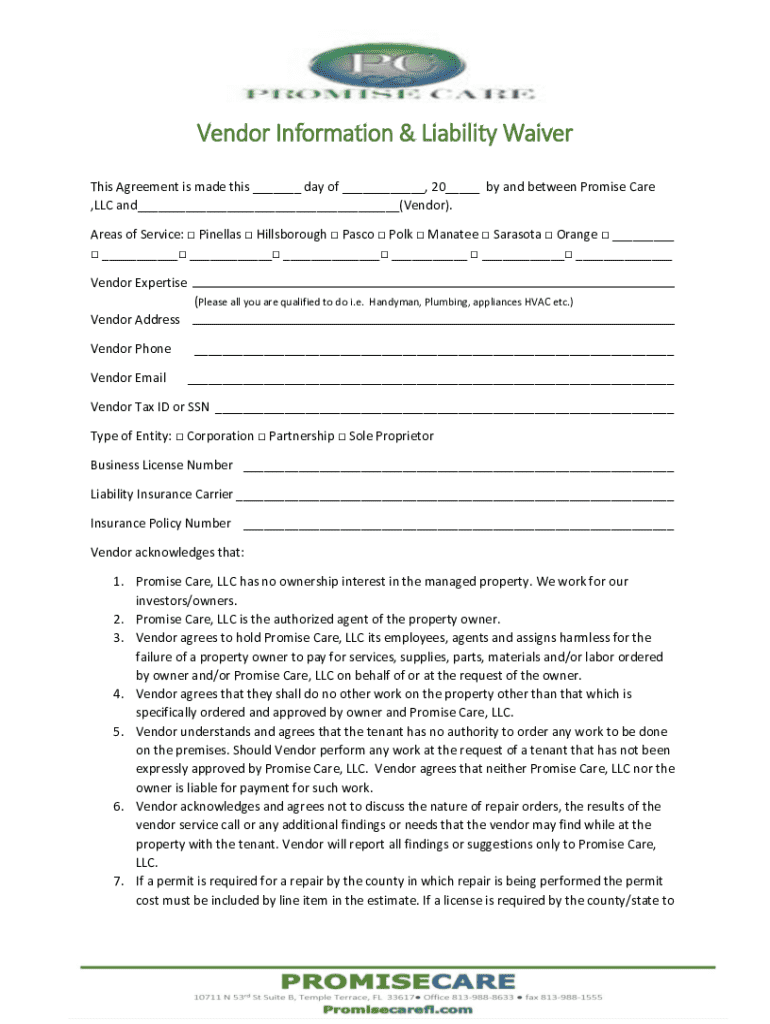
fl vendor agreement information Preview on Page 1

Here's how it works

01. Edit your fl vendor agreement information online
Type text, add images, blackout confidential details, add comments, highlights and more.
02. Sign it in a few clicks
Draw your signature, type it, upload its image, or use your mobile device as a signature pad.
03. Share your form with others
Send it via email, link, or fax. You can also download it, export it or print it out.

How to use or fill out preferred vendor agreement template with our platform

Form edit decoration
9.5
Ease of Setup
DocHub User Ratings on G2
9.0
Ease of Use
DocHub User Ratings on G2
  1. Click ‘Get Form’ to open the preferred vendor agreement template in the editor.
  2. Begin by filling in the date and your name as the vendor at the top of the form. Ensure accuracy for proper identification.
  3. Select your areas of service by checking the appropriate boxes. This helps Promise Care understand where you can provide services.
  4. In the 'Vendor Expertise' section, list all relevant skills and services you offer, such as plumbing or HVAC.
  5. Complete your contact information, including address, phone number, and email. This is crucial for communication.
  6. Fill in your Tax ID or SSN and select your type of entity (Corporation, Partnership, Sole Proprietor).
  7. Provide details about your business license and liability insurance carrier along with policy numbers to ensure compliance.
  8. Review all sections carefully to confirm that you agree with the terms outlined in the agreement before signing.
  9. Once completed, save your document and email it to Promisecarellc@outlook.com or fax it to 813-988-1555 as instructed.

Start using our platform today to streamline your document completion process for free!

See more preferred vendor agreement template versions

We've got more versions of the preferred vendor agreement template form. Select the right preferred vendor agreement template version from the list and start editing it straight away!
Versions Form popularity Fillable & printable
2017 4.8 Satisfied (56 Votes)
be ready to get more

Complete this form in 5 minutes or less

Get form

Got questions?

We have answers to the most popular questions from our customers. If you can't find an answer to your question, please contact us.
Contact us
A vendor contract should include the following: Contact information for both parties. Detailed description of the goods or services. Length of the contract and/or expected product delivery time. Price and payment method. Terms for ending the contract. Consequences of contract bdocHub.
A preferred vendor is specially chosen based on quality, cost, and customer support. This vendor typically offers more favorable terms, prompting the company to prioritize them during contract negotiations. An approved vendor, on the other hand, meets the companys criteria and is deemed apt for business.
Here are a few steps you can take to build your approved vendor list. Determine your needs. Identify the items you purchase on a regular basis. From the list of items you purchase, list associated suppliers that provide these items. Evaluate your suppliers. Select those with the best performances per criteria.
How do I create an Independent Contractor Agreement? Step 1: State the location of the contract. Step 2: Note client and contractor details. Step 3: Describe the services provided. Step 4: Include billing and payment information. Step 5: Add any clauses and conditions for the contract. Step 6: Add signing details.
Vendor contracts (or vendor agreements) outline the key terms covering the exchange of goods or services in return for compensation. These agreements detail the services vendors will supply to their customers and the ways theyll be paid for what they provide.

Security and compliance

At DocHub, your data security is our priority. We follow HIPAA, SOC2, GDPR, and other standards, so you can work on your documents with confidence.

Learn more
ccpa2
pci-dss
gdpr-compliance
hipaa
soc-compliance

People also ask

How to draft a contract in 13 simple steps Start with a contract template. Understand the purpose and requirements. Identify all parties involved. Outline key terms and conditions. Define deliverables and milestones. Establish payment terms. Add termination conditions. Incorporate dispute resolution.
A Preferred Vendor Agreement (PVA) is a formal document that outlines the terms of a business relationship between a purchaser and a supplier. The agreement defines the roles and responsibilities of each party, as well as the expectations for quality, delivery, and price.

Related links