Fillable Online authorization to retrieve tsi placement test 2026

Get Form
Fillable Online authorization to retrieve tsi placement test Preview on Page 1

Here's how it works

01. Edit your form online
Type text, add images, blackout confidential details, add comments, highlights and more.

02. Sign it in a few clicks
Draw your signature, type it, upload its image, or use your mobile device as a signature pad.

03. Share your form with others
Send it via email, link, or fax. You can also download it, export it or print it out.

Definition & Meaning

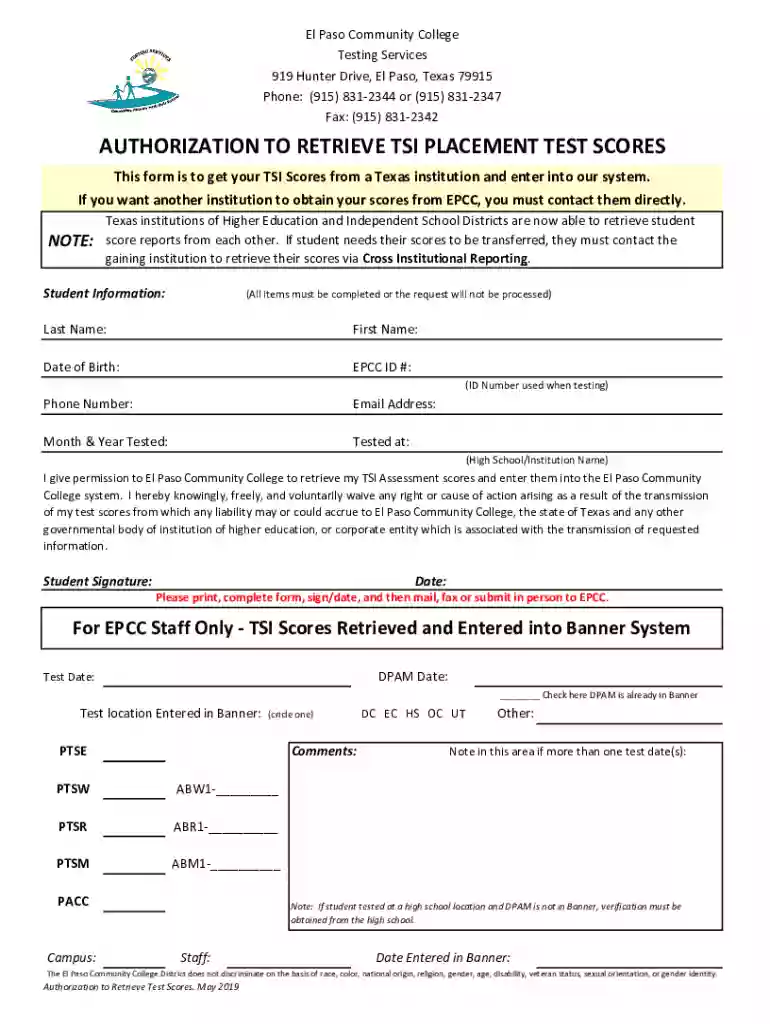
The "Fillable Online authorization to retrieve TSI placement test" form serves as a formal document that allows students to authorize the retrieval of their Texas Success Initiative (TSI) placement test scores from Texas educational institutions. This form is essential for ensuring the secure and authorized transfer of test scores, particularly when students are enrolling in a new institution and need their scores to be evaluated for course placement and enrollment decisions. By using this form, students provide their consent for the score retrieval process, thereby affirming their understanding of the conditions under which their information is being shared.

Key Elements of the Form

The form contains several critical elements necessary for the processing of score retrieval requests. These include:

  • Student's Personal Information: Full name, date of birth, student identification number, and contact details.
  • Consent Statement: A declaration by the student authorizing the release and retrieval of TSI scores.
  • Recipient Information: Details of the institution or organization where the scores are to be sent, including contact person and address.
  • Signature Section: Area for the student's signature, which legally validates the consent for score retrieval.
  • Submission Instructions: Guidelines on how and where to submit the completed form.

These elements ensure that the requested score documents are securely and accurately transferred to the designated educational institutions.

Steps to Complete the Form

Completing the fillable online authorization form involves several straightforward steps:

  1. Access the Form: Visit DocHub or the respective institution’s website to find the fillable form.
  2. Enter Personal Details: Fill in your personal information accurately, including your full name, date of birth, and student ID.
  3. Provide Consent: Read and understand the consent statement carefully before agreeing to authorize the release of your scores.
  4. Specify the Recipient: Clearly input the details of the institution where your scores should be sent.
  5. Sign The Form: Apply your electronic signature to validate the form. This signature can be created using various methods, such as drawing or typing.
  6. Review and Submit: Double-check all entries for accuracy and completeness, then submit the form according to the provided instructions.

Why Students Use This Form

Students primarily use this form to facilitate the seamless transfer of their TSI placement test scores between institutions. This is especially common for those transitioning from one educational setting to another, such as moving from a community college to a university, or when enrolling in programs that require specific placement data. The authorization ensures that the student controls who receives their scores, providing a secure way to manage their educational records for application and enrollment purposes.

Who Typically Uses the Form

The "Fillable Online authorization to retrieve TSI placement test" form is primarily utilized by:

  • Students: Particularly those attending institutions in Texas who need to authorize score transfers.
  • Admissions Offices: University or college admissions personnel who process incoming student test scores.
  • University Registrars: Staff responsible for maintaining academic records and ensuring proper placement based on TSI scores.
  • Academic Advisors: Individuals assisting students in selecting appropriate courses based on their TSI placement results.

Utilization of this form is integral to the smooth functioning of academic processes, especially regarding course placements and institutional applications.


decoration image ratings of Dochub

Legal Use and Compliance

The form complies with privacy laws and educational regulations to protect student information. By requiring a signature, it ensures the student’s consent is recorded, safeguarding against unauthorized access to personal data. It is crucial for students to realize the legal implications of signing the form, as it serves as a formal agreement to transfer sensitive educational information between institutions. Compliance with federal laws such as the Family Educational Rights and Privacy Act (FERPA) is an integral aspect of using the form appropriately.

Form Submission Methods (Online / Mail / In-Person)

Multiple submission methods are available for the "Fillable Online authorization to retrieve TSI placement test":

  • Online Submission: The most efficient and commonly used method, allowing students to submit the form via platforms like DocHub or directly through the institution’s website.
  • Mail: For those who prefer traditional methods, the form can be printed, completed manually, and sent via postal services to the designated address provided in the instructions.
  • In-Person: In certain cases, students may hand-deliver the completed form to the admissions or registrar's office at their institution.

Each method has its steps and processing times, and it's advised to confirm the preferred method with the receiving institution to ensure timely processing.

Examples of Using the Form

Consider the following real-world scenarios where the form might be used:

  • Transferring to a University: A student at El Paso Community College decides to transfer to a university in Texas and needs their TSI scores sent to the university’s admissions office to complete their application.
  • Course Enrollment Verification: A new student enrolling at a Texas institution needs their TSI scores reviewed to determine if additional placement tests are necessary before finalizing course enrollment.

These examples highlight the form's role in facilitating academic transitions and ensuring proper placement based on TSI scores.

See more Fillable Online authorization to retrieve tsi placement test versions

We've got more versions of the Fillable Online authorization to retrieve tsi placement test form. Select the right Fillable Online authorization to retrieve tsi placement test version from the list and start editing it straight away!
Versions Form popularity Fillable & printable
2019 4.7 Satisfied (46 Votes)
2019 4.9 Satisfied (39 Votes)
be ready to get more

Complete this form in 5 minutes or less

Get form

Got questions?

We have answers to the most popular questions from our customers. If you can't find an answer to your question, please contact us.
Contact us
Page 1 How to Share and View your Individual TSI Score Report. Go to .accuplacer.org. Select Your ACCUPLACER Score Report. Complete the Your ACCUPLACER Score Report form to find your Test Results. If your score report is found and there is an email on file, a search result will be provided.
For students aged 13 or older, you can use your College Board student account and go to studentscores.collegeboard.org to access your scores online as well as your PDF score report. Once youre signed in, your most recent score should be shown at the top of the page.
Can I transfer my scores to another Texas college/university? Yes. If you have taken a TSI assessment at Dallas College, other Texas public schools can access these scores if you provide the college name, your student ID and your date of birth.

Security and compliance

At DocHub, your data security is our priority. We follow HIPAA, SOC2, GDPR, and other standards, so you can work on your documents with confidence.

Learn more
ccpa2
pci-dss
gdpr-compliance
hipaa
soc-compliance