Understanding the Fillable Online Immunization Record Form for North Central
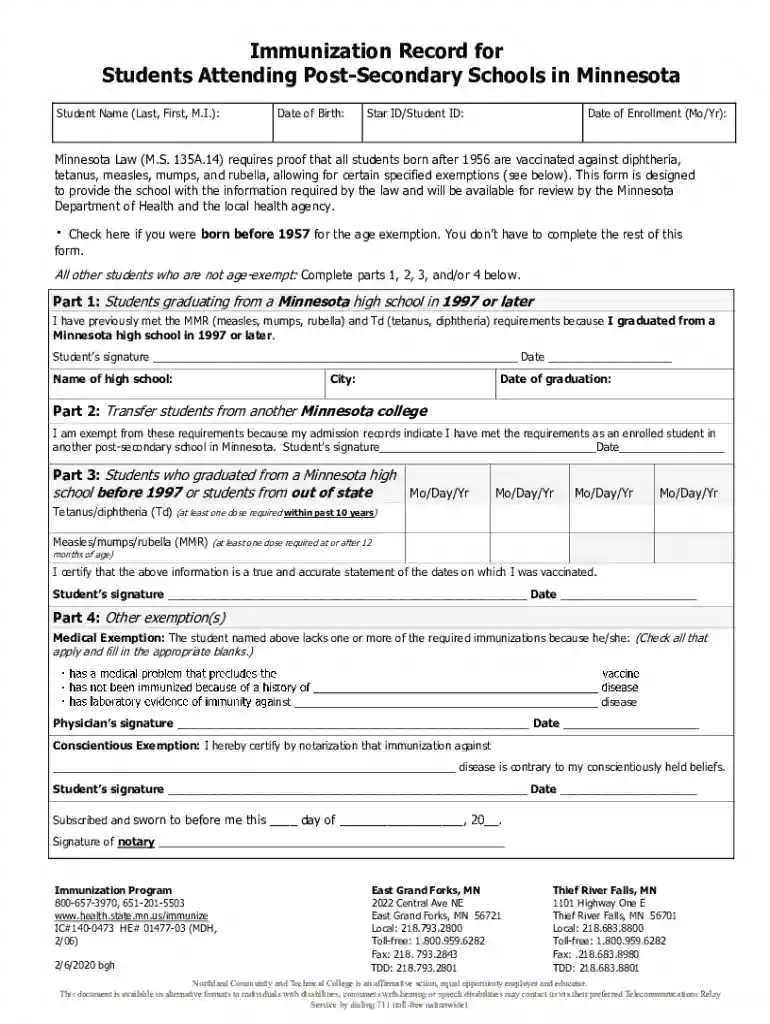
The "Fillable Online immunization record form north central" is a crucial document used primarily for verifying a student's immunization status. This form is essential for adhering to public health requirements and ensuring that students attending educational institutions comply with vaccination mandates.
How to Use the Form
Effectively using the immunization record form involves a step-by-step procedure:
- Access the Form: Obtain the form online through applicable portals or services like DocHub.
- Information Entry: Enter the student's personal details, including name, date of birth, and contact information.
- Certification of Immunization: Provide documentation of vaccines received, verifying immunizations against diseases such as measles, mumps, and rubella.
- Claiming Exemptions: Utilize designated sections to declare any exemptions on medical or personal grounds, providing necessary documentation.
- Review and Submit: Check all entries for accuracy and completeness before submitting the form online or printing for physical submission.
Steps to Complete the Form
Completing the form correctly ensures compliance with regional health regulations:
- Gather Required Documentation: Collect all vaccination records and any supporting documents for exemptions.
- Fill All Relevant Sections: Input details accurately, ensuring no sections are left blank unless claiming an exemption.
- Legal Declarations: Acknowledge understanding of legal responsibilities and certify the accuracy of all provided information.
- Signature and Date: Electronically sign or provide a handwritten signature and date as required by the form’s instructions.
- Submission: Choose your preferred method of submission—online, by mail, or in-person—based on the form's guidelines.
Key Elements of the Form
The form includes several vital components:
- Personal Information: Details about the individual the immunization records pertain to.
- Vaccination Records: Sections for listing all previous immunization series completed.
- Exemption Declarations: Areas to declare any exemptions from vaccination requirements.
Who Uses the Form
This form is typically used by:
- Students and Parents: Especially those enrolling in schools or higher education institutions.
- Healthcare Professionals: For documenting and verifying immunization records.
- School Administrators: To maintain compliance with public health policies.
Legal Uses and Compliance
Conformance with local state laws regarding immunization is critical:
- Documentation: Verify that the form adheres to local health department regulations.
- Exemptions: Ensure proper documentation is in place for any claimed exemptions to maintain legal compliance.
State-Specific Rules
Immunization requirements may vary by state:
- State Legislation: Each state has specific laws regarding required vaccinations for students.
- Additional Documentation: Some states require additional forms or approvals for exemptions.
Required Documents
Accurate completion of the form requires:
- Photocopies of Immunization Records: Certified copies from healthcare providers.
- Exemption Documentation: Official forms for any medical, philosophical, or religious exemptions.
- Proof of Identity: Identification documents for the student or guardian completing the form.
Examples of Form Usage
Consider these practical scenarios:
- Enrollment in College: Students may use the form to show compliance with immunization policies before entering a university in Minnesota.
- Immunization Clinics: Clinics can help parents complete forms during vaccination events.
Penalties for Non-Compliance
Failure to submit a correctly completed form can result in:
- Denial of School Entry: Students may be prohibited from attending classes.
- Fines: Some jurisdictions impose fines for non-compliance.
Filing Deadlines
Timely submission is crucial:
- Cohort Start Dates: Forms must be submitted before classes begin.
- Scheduled Immunization Reviews: Align your submission with specific administrative deadlines.
Digital vs. Paper Version
Choose the submission method that best fits your needs:
- Digital Submission: Conveniently submit online for faster processing.
- Paper Submission: May be required in some districts or for specific exemptions.