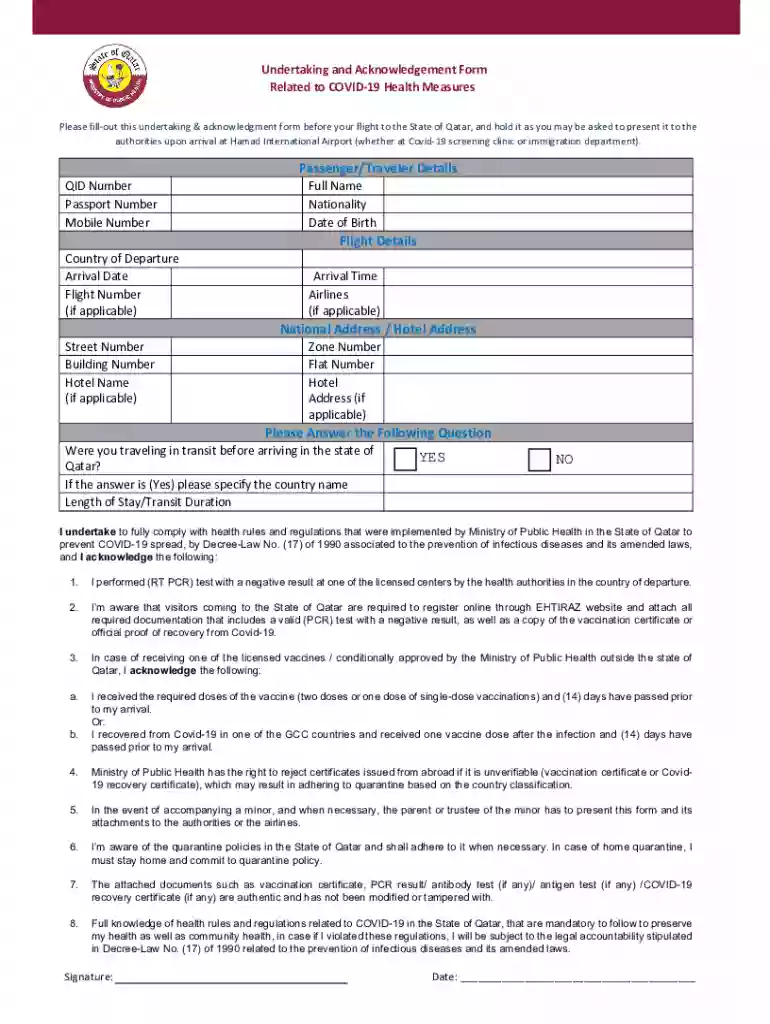
undertaking and acknowledgement form Preview on Page 1

Qatar customer acknowledgement form 2026

Here's how it works

  • 01. Edit your undertaking and acknowledgement form online

    Type text, add images, blackout confidential details, add comments, highlights and more.

  • 02. Sign it in a few clicks

    Draw your signature, type it, upload its image, or use your mobile device as a signature pad.

  • 03. Share your form with others

    Send acknowledgement form qatar via email, link, or fax. You can also download it, export it or print it out.

How to use or fill out qatar customer acknowledgement form with DocHub

Form edit decoration
9.5
Ease of Setup
DocHub User Ratings on G2
9.0
Ease of Use
DocHub User Ratings on G2
  1. Click ‘Get Form’ to open the Qatar Customer Acknowledgement Form in our platform.
  2. Begin by entering your Passenger/Traveler Details. Fill in your QID Number, Passport Number, Mobile Number, Full Name, Nationality, and Date of Birth.
  3. Next, provide your Flight Details. Include the Country of Departure, Arrival Date, Flight Number (if applicable), Arrival Time, and Airlines (if applicable).
  4. Fill in your National Address or Hotel Address. Specify the Street Number, Building Number, Hotel Name (if applicable), Zone Number, and Flat Number.
  5. Answer the question regarding transit travel before arriving in Qatar. If yes, specify the country name and indicate your Length of Stay/Transit Duration.
  6. Review the acknowledgment section carefully. Ensure you understand and agree to comply with health rules and regulations as outlined.
  7. Finally, sign and date the form at the bottom to confirm your acknowledgment.

Start filling out your Qatar Customer Acknowledgement Form online for free today!

See more undertaking and acknowledgement form versions

We've got more versions of the undertaking and acknowledgement form form. Select the right undertaking and acknowledgement form version from the list and start editing it straight away!

VersionsForm popularityFillable & printable
20214.9 Satisfied (51 Votes)

be ready to get more

Complete this form in 5 minutes or less

Got questions?

We have answers to the most popular questions from our customers. If you can't find an answer to your question, please contact us.

Acknowledgement letters are valuable tools for businesses and individuals to maintain professional relationships and communicate effectively with clients and customers. Sending these letters demonstrates your responsiveness and professionalism.
To fill out the form, an employee needs to provide their name, employee ID, date, and signature to indicate they acknowledge the receipt of the employee handbook.
Notary essentials: How to complete an acknowledgment Require personal appearance. Review the document. Screen the signer and verify the facts. Record the notarization. Complete the notarization.
I gratefully acknowledge the assistance/help/effort of Id like to recognize the assistance/help/effort that I received from ..
How to create an acknowledgment receipt Create a template. Add company and recipient details. Include a clear title and date. Specify whats being acknowledged. Write a brief acknowledgment statement. Add a confirmation section. Include next steps and contact info. Send a note to the recipient.

Security and compliance

At DocHub, your data security is our priority. We follow HIPAA, SOC2, GDPR, and other standards, so you can work on your documents with confidence.

People also ask

How to create an acknowledgment receipt Create a template. Add company and recipient details. Include a clear title and date. Specify whats being acknowledged. Write a brief acknowledgment statement. Add a confirmation section. Include next steps and contact info. Send the acknowledgment receipt.

customer acknowledgement form qatar

Student Visa Process (Intl Students Only) - MyNUQ

Complete the State of Qatar Immigration Medical Clearance Acknowledgement. This form can be accessed through the Student Experience portal.

Learn more
Owner Acknowledgement Form

This form must be completed and signed by the owner(s). Tenants cannot sign in for service until this form is received by the District.Read more

Learn more
If you believe that this page should be taken down, please follow our DMCA take down process here