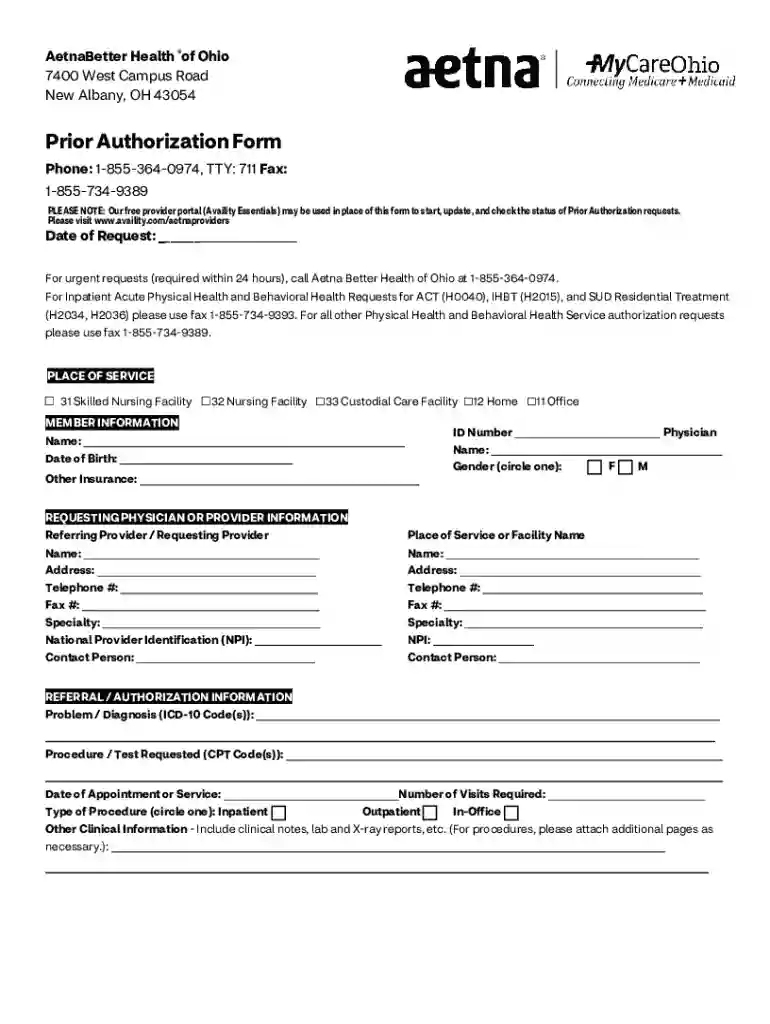
OH-PARequestForm-Availity Accessible PDF 2026

Get Form
ohio health prior authorization Preview on Page 1

Here's how it works

01. Edit your ohio health prior authorization online
Type text, add images, blackout confidential details, add comments, highlights and more.

02. Sign it in a few clicks
Draw your signature, type it, upload its image, or use your mobile device as a signature pad.

03. Share your form with others
Send it via email, link, or fax. You can also download it, export it or print it out.

How to use or fill out OH-PARequestForm-Availity Accessible PDF with DocHub

Form edit decoration
9.5
Ease of Setup
DocHub User Ratings on G2
9.0
Ease of Use
DocHub User Ratings on G2
  1. Click ‘Get Form’ to open the OH-PARequestForm-Availity Accessible PDF in our editor.
  2. Begin by entering the 'Date of Request' at the top of the form. This is essential for tracking your request.
  3. Fill in the 'Member Information' section, including the member's name, date of birth, and ID number. Ensure accuracy for proper identification.
  4. In the 'Requesting Physician or Provider Information' section, provide details about the referring provider, including their name, address, and contact information.
  5. Complete the 'Referral / Authorization Information' by detailing the problem/diagnosis using ICD-10 codes and specifying any requested procedures/tests with CPT codes.
  6. Lastly, include any additional clinical information that may support your request. Attach extra pages if necessary.

Start filling out your OH-PARequestForm today for free using our platform!

See more OH-PARequestForm-Availity Accessible PDF versions

We've got more versions of the OH-PARequestForm-Availity Accessible PDF form. Select the right OH-PARequestForm-Availity Accessible PDF version from the list and start editing it straight away!
Versions Form popularity Fillable & printable
2022 4.5 Satisfied (39 Votes)
2017 4.6 Satisfied (24 Votes)
be ready to get more

Complete this form in 5 minutes or less

Get form

Got questions?

We have answers to the most popular questions from our customers. If you can't find an answer to your question, please contact us.
Contact us
Providers can submit to payers on Essentials for free. An Essentials Plus monthly subscription allows providers to check eligibility and submit claims for many non-sponsoring payers.
The Availity Portal offers healthcare professionals free access to real-time information and instant responses in a consistent format regardless of the payer. Use the secure Availity Portal during patient check-in, checkout or billing, or whenever you might benefit from easy access to health plan information.
Health Plan or Managed Care Organization On the Availity Essentials Homepage, under My Account Dashboard, click My Administrators. Complete the Contact Us form. Complete the Provider Registration.
How to access and use Availity Authorizations: Log in to Availity. Select Patient Registration menu option, choose Authorizations Referrals, then Authorizations* Select Payer BCBSOK, then choose your organization. Select a Request Type and start request. Review and submit your request.
Did you know Availity simplifies provider transactions, such as HIPAA, administrative and clinical data exchange, and payer tools? Availitys secure multi-health plan portal gives you easy access to health plan information.

Security and compliance

At DocHub, your data security is our priority. We follow HIPAA, SOC2, GDPR, and other standards, so you can work on your documents with confidence.

Learn more
ccpa2
pci-dss
gdpr-compliance
hipaa
soc-compliance
be ready to get more

Complete this form in 5 minutes or less

Get form

People also ask

Participating health plans fund the cost of Availitys standard transactions that health care providers process through our network. This allows health care providers like you to use core Availity services for free.
From the Availity home page, select Patient Registration from the top navigation. Select Auth/Referral Inquiry or Authorizations.
From the Availity homepage, select Patient Registration from the top navigation. Select Eligibility and Benefits Inquiry.

Related links