DocHub 549828362--TEXAS-DEPARTMENT-OFFillable Online tdcj state tx TEXAS DEPARTMENT OF CRIMINAL 2026

Get Form
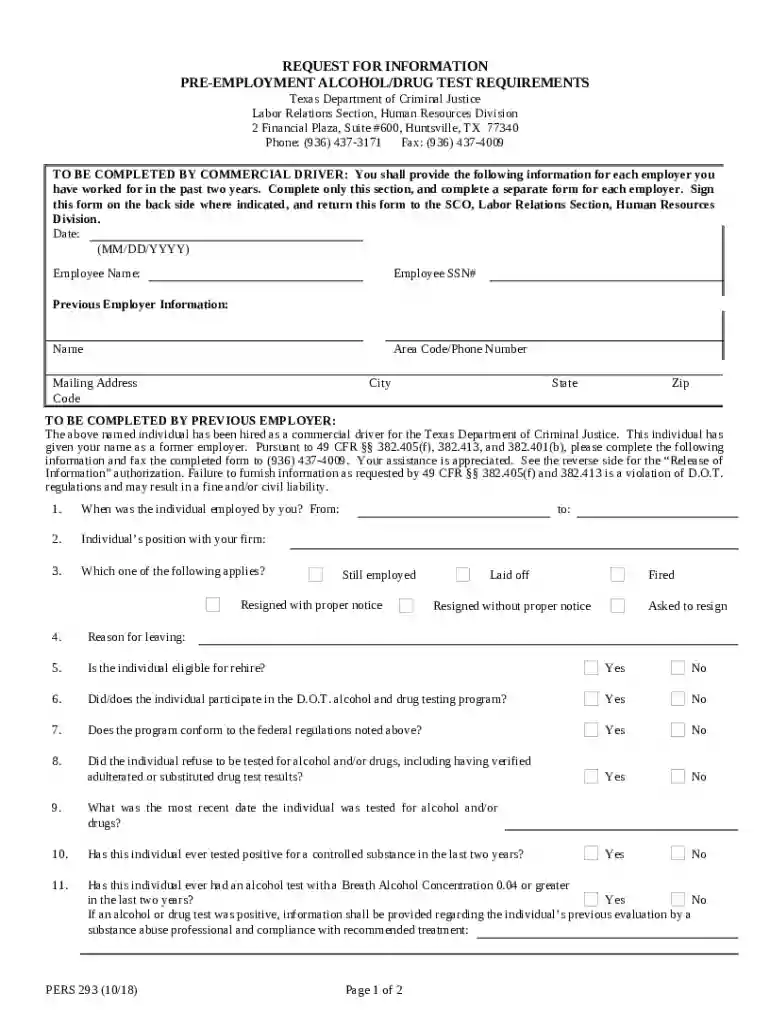
DocHub 549828362--TEXAS-DEPARTMENT-OFFillable Online tdcj state tx TEXAS DEPARTMENT OF CRIMINAL Preview on Page 1

Here's how it works

01. Edit your form online
Type text, add images, blackout confidential details, add comments, highlights and more.

02. Sign it in a few clicks
Draw your signature, type it, upload its image, or use your mobile device as a signature pad.

03. Share your form with others
Send it via email, link, or fax. You can also download it, export it or print it out.

How to use or fill out DocHub 549828362--TEXAS-DEPARTMENT-OFFillable Online tdcj state tx TEXAS DEPARTMENT OF CRIMINAL

Form edit decoration
9.5
Ease of Setup
DocHub User Ratings on G2
9.0
Ease of Use
DocHub User Ratings on G2
  1. Click ‘Get Form’ to open it in the editor.
  2. Begin by entering the date in the specified format (MM/DD/YYYY) at the top of the form.
  3. Fill in your name and Social Security Number (SSN) in the designated fields.
  4. Provide information about your previous employer, including their name, phone number, mailing address, city, state, and zip code.
  5. Complete the section for previous employers by answering questions regarding your employment history and drug testing participation.
  6. Sign the form on the back side where indicated and ensure all required fields are filled out accurately before submission.

Start using our platform today to complete your form quickly and efficiently!

See more DocHub 549828362--TEXAS-DEPARTMENT-OFFillable Online tdcj state tx TEXAS DEPARTMENT OF CRIMINAL versions

We've got more versions of the DocHub 549828362--TEXAS-DEPARTMENT-OFFillable Online tdcj state tx TEXAS DEPARTMENT OF CRIMINAL form. Select the right DocHub 549828362--TEXAS-DEPARTMENT-OFFillable Online tdcj state tx TEXAS DEPARTMENT OF CRIMINAL version from the list and start editing it straight away!
Versions Form popularity Fillable & printable
2018 4.2 Satisfied (34 Votes)
2010 4.1 Satisfied (54 Votes)
be ready to get more

Complete this form in 5 minutes or less

Get form

Got questions?

We have answers to the most popular questions from our customers. If you can't find an answer to your question, please contact us.
Contact us
E-messaging allows friends and families to send electronic messages to inmates. To learn more about the service and to set up an account, click the following link: E-Messaging.
TDCJ Inmate Search Email You can send an email to classify@tdcj.texas.gov with the inmates full name and 7-digit TDCJ number. If you do not know the TDCJ number, provide the exact date of birth to get the location of the TDCJ Inmate. Put the inmates name in the subject line.
All inmate mail must contain the senders full name and complete return address, the inmates full name (the name he/she is booked into jail under), the inmates SPN, the inmates housing facility and cell block location. If incoming mail does not have the above information on it, it will be returned to the sender.
All mail entering and leaving a jail facility is opened, inspected and searched for contraband. The writing is also scanned for safety and security reasons.
The scope of responsibility of the Texas Department of Criminal Justice includes the oversight of probation departments, the incarceration of offenders, and the supervision of persons released from incarceration prior to the end of their sentence.

Security and compliance

At DocHub, your data security is our priority. We follow HIPAA, SOC2, GDPR, and other standards, so you can work on your documents with confidence.

Learn more
ccpa2
pci-dss
gdpr-compliance
hipaa
soc-compliance