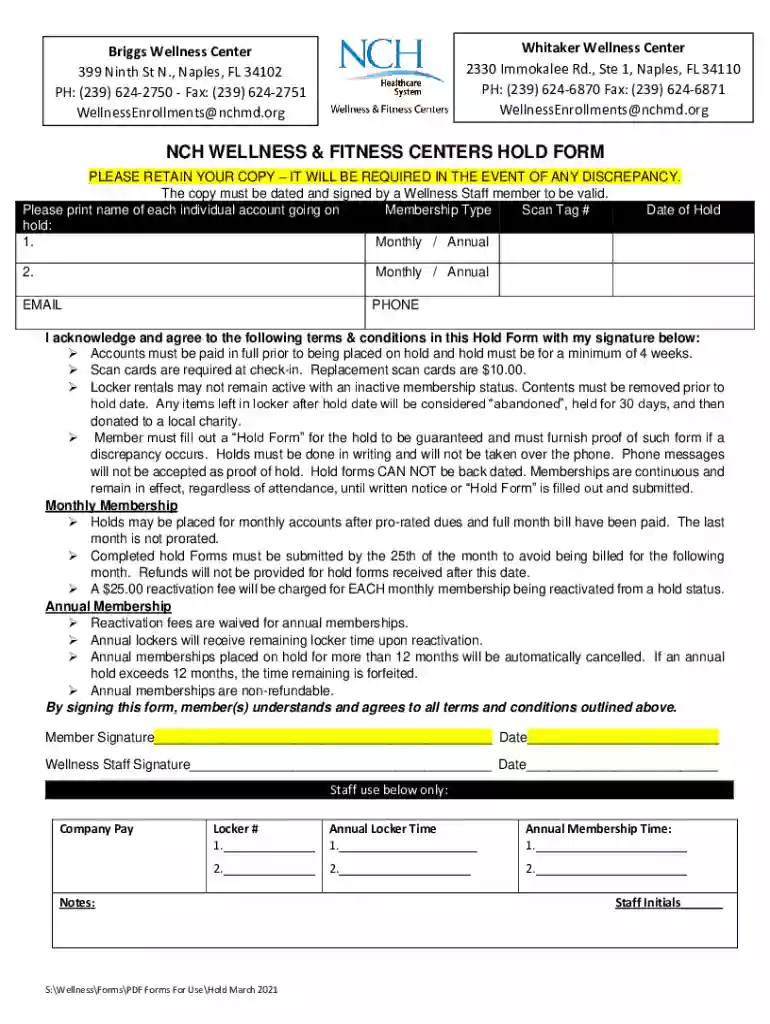
NCH WELLNESS and FITNESS CENTERS HOLD FORM Preview on Page 1

NCH WELLNESS and FITNESS CENTERS HOLD FORM 2026

Here's how it works

  • 01. Edit your form online

    Type text, add images, blackout confidential details, add comments, highlights and more.

  • 02. Sign it in a few clicks

    Draw your signature, type it, upload its image, or use your mobile device as a signature pad.

  • 03. Share your form with others

    Send it via email, link, or fax. You can also download it, export it or print it out.

How to use or fill out NCH WELLNESS and FITNESS CENTERS HOLD FORM with our platform

Form edit decoration
9.5
Ease of Setup
DocHub User Ratings on G2
9.0
Ease of Use
DocHub User Ratings on G2
  1. Click ‘Get Form’ to open it in the editor.
  2. Begin by entering the names of each individual account holder in the designated fields. Ensure accuracy for proper processing.
  3. Select the Membership Type for each account, choosing between Monthly or Annual options as applicable.
  4. Input the Scan Tag Number associated with each membership, which is essential for identification at check-in.
  5. Fill in the Date of Hold, ensuring it reflects when you wish your membership to be placed on hold.
  6. Provide your email and phone number for any necessary communication regarding your hold request.
  7. Review the terms and conditions carefully. By signing below, you acknowledge your understanding and agreement to these terms.
  8. Finally, ensure that a Wellness Staff member signs and dates the form to validate it before submission.

Start using our platform today to easily fill out your NCH WELLNESS and FITNESS CENTERS HOLD FORM for free!

See more NCH WELLNESS and FITNESS CENTERS HOLD FORM versions

We've got more versions of the NCH WELLNESS and FITNESS CENTERS HOLD FORM form. Select the right NCH WELLNESS and FITNESS CENTERS HOLD FORM version from the list and start editing it straight away!

VersionsForm popularityFillable & printable
20214.7 Satisfied (46 Votes)
20204.8 Satisfied (36 Votes)
20184.4 Satisfied (25 Votes)

be ready to get more

Complete this form in 5 minutes or less

Security and compliance

At DocHub, your data security is our priority. We follow HIPAA, SOC2, GDPR, and other standards, so you can work on your documents with confidence.

Related links

Campus Recreation FAQ - Palatine

Frequently Asked Questions regarding The Foglia Foundation Health and Recreation Center, Campus Recreation and Student Involvement on Harpers campus.

Learn more
National Center on Health, Physical Activity and Disability

NCHPAD has grown from a public health resource center into a national hub for implementation science and practice, promoting health and well-being for all.Read more

Learn more
Tag Cloud explore 1,000+ RTI topics by hashtag | RTI Wiki

Explore RTI Wiki by hashtag. 1000+ tags ranked by article count. Click any tag for a curated card list of articles, with AI Drafter and First Appeal tools

Learn more
If you believe that this page should be taken down, please follow our DMCA take down process here