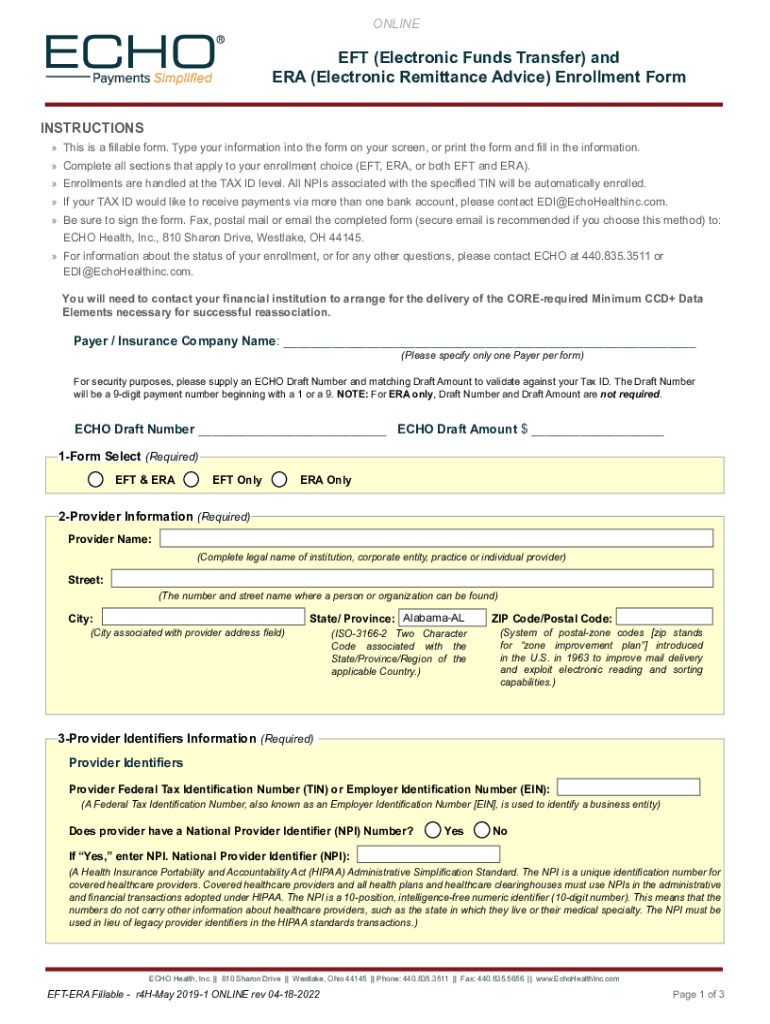
EFT ERA Authorization Agreement Instructions - Optima Health 2026

Get Form
echo health eft enrollment Preview on Page 1

Here's how it works

01. Edit your echo health eft enrollment online
Type text, add images, blackout confidential details, add comments, highlights and more.
02. Sign it in a few clicks
Draw your signature, type it, upload its image, or use your mobile device as a signature pad.
03. Share your form with others
Send it via email, link, or fax. You can also download it, export it or print it out.

How to use or fill out EFT ERA Authorization Agreement Instructions - Optima Health with our platform

Form edit decoration
9.5
Ease of Setup
DocHub User Ratings on G2
9.0
Ease of Use
DocHub User Ratings on G2
  1. Click ‘Get Form’ to open the EFT ERA Authorization Agreement in the editor.
  2. Begin by filling out the 'Payer / Insurance Company Name' section. Specify only one payer per form.
  3. Provide your ECHO Draft Number and Draft Amount if applicable, especially for EFT enrollments.
  4. Complete the 'Provider Information' section with your legal name, address, and contact details.
  5. In the 'Provider Identifiers Information' section, enter your TIN or EIN and indicate if you have an NPI number.
  6. Fill out the 'Financial Institution Information' with your bank's name, routing number, and account details for EFT payments.
  7. For Electronic Remittance Advice (ERA) preferences, specify how you wish to receive remittance data and provide any necessary clearinghouse information.
  8. Finally, complete the submission information including reason for submission and authorized signature before sending it to ECHO Health.

Start using our platform today to streamline your document editing and submission process for free!

See more EFT ERA Authorization Agreement Instructions - Optima Health versions

We've got more versions of the EFT ERA Authorization Agreement Instructions - Optima Health form. Select the right EFT ERA Authorization Agreement Instructions - Optima Health version from the list and start editing it straight away!
Versions Form popularity Fillable & printable
2022 4.1 Satisfied (23 Votes)
2019 4.8 Satisfied (57 Votes)
be ready to get more

Complete this form in 5 minutes or less

Get form

Got questions?

We have answers to the most popular questions from our customers. If you can't find an answer to your question, please contact us.
Contact us
As a kind of EFT, any ACH payment comes with all the same benefits of EFTs generallytheyre faster, cheaper, and safer than using paper checks. More specifically, because ACH payments have to be cleared through an automated clearing house, they include an added level of security validation for those payments.
Because EFT is an umbrella term, it covers a broad range of payments, including telephone-based transfers, computer-based transfers (i.e., online), ATM transfers, Direct Debit, bank transfers, point-of-sale transfers, e-checks, and so on.
You may enroll in the Sentara Health Plans ePayment center for basic electronic funds transfer (EFT) and electronic remittance advice (ERA) services at no cost. To enroll in the Sentara Health Plans ePayment center, please call 1-855-774-4392 or send an email to help@epayment.center.
Our timely filing deadline on all claims is 365 days from the date of service. This includes any corrections or reconsiderations.
Updates. IMPORTANT UPDATE: Optima Health is now Sentara Health Plans! 🌟 For all the latest updates and to get in touch, please follow our new LinkedIn page. Were excited to continue serving you with enhanced resources, services and support as Sentara Health Plans.

Security and compliance

At DocHub, your data security is our priority. We follow HIPAA, SOC2, GDPR, and other standards, so you can work on your documents with confidence.

Learn more
ccpa2
pci-dss
gdpr-compliance
hipaa
soc-compliance