




01. Edit your form online
Type text, add images, blackout confidential details, add comments, highlights and more.

Type text, add images, blackout confidential details, add comments, highlights and more.

Draw your signature, type it, upload its image, or use your mobile device as a signature pad.

Send it via email, link, or fax. You can also download it, export it or print it out.
In the context of document management, "form online" refers to the capability of creating, editing, and managing fillable forms on an online platform like DocHub. These forms serve various purposes, including data collection, agreements, or applications. By allowing users to fill them out directly within a web interface, online forms streamline the process of gathering information and reduce the need for physical paperwork. They can be utilized across different sectors, including education, business, and government, making them versatile tools for both personal and professional use.
Using a form online through DocHub involves several straightforward steps that make the process intuitive and efficient. Begin by selecting or uploading a document you wish to transform into a fillable form. The platform's user-friendly interface allows you to drag and drop fields, such as text boxes, checkboxes, and signatures, to the required positions on your document. You can assign specific fields to different recipients, ensuring form completion is organized and orderly. Users can also set conditions that highlight fields based on the inputs in others, creating a responsive form experience.
To access forms online via DocHub, users can import files from various sources, such as their computer or cloud storage services like Google Drive, Dropbox, or OneDrive. Alternatively, users can create a form from scratch using a blank document template provided by the platform. This feature enhances accessibility and ensures that users can seamlessly transition into editing and customizing their documents without any delays. Using DocHub's integration with Google's ecosystem further simplifies the retrieval process, enabling direct access to files from Gmail or Google Drive without leaving the DocHub environment.
Completing an online form involves several key steps to ensure accuracy and completeness. First, review the form fields to familiarize yourself with the required information. Proceed to fill in data, ensuring all mandatory fields are populated as needed. DocHub provides an intuitive experience, allowing users to click directly on fields to input data. For forms requiring signatures, users can opt to draw, type, or upload their signature, ensuring it meets legal standards. Before submitting the form, double-check all fields for accuracy and completeness. Once validated, the form can be submitted, shared, or exported in the desired format.
Digital document management, especially in the form online, offers a myriad of benefits that enhance productivity and efficiency. Utilizing online forms reduces the need for physical paperwork, thereby lowering the risk of loss, damage, or desk clutter. Online forms facilitate easier distribution and reduce the environmental impact associated with paper use. Furthermore, they improve the speed of data processing and collection, enabling real-time updates and collaboration among stakeholders. This efficiency is crucial in environments requiring quick decision-making, such as in business transactions and legal agreements.
A comprehensive online form comprises several critical components that ensure its effectiveness and usability. Essential fields include text boxes for inputting data, checkboxes for selecting multiple options, and dropdown menus for preset choices. Signature fields are vital for formal agreements, ensuring legal compliance. By incorporating validation rules, forms can prevent incorrect data entry, maintaining data integrity. DocHub's enhanced functions allow users to customize these elements to suit specific requirements, ensuring versatility and adaptability across different contexts and purposes.
When using online forms, especially those intended for official or legal purposes, users may need to provide accompanying documentation to authenticate or support the information provided. These documents can include identification papers, financial statements, or proof of residence. Having these documents ready before filling out the form ensures a smooth process and prevents delays. DocHub's secure infrastructure allows users to attach and manage these documents within the form, maintaining an organized and accessible record. Ensuring all documents are uploaded and verified helps streamline subsequent processes and approvals.
Form submission through DocHub offers multiple avenues to fit various needs and circumstances. The primary method is digital submission, where the form is filled and submitted online directly through the platform. Users can also opt to download a completed form to send via traditional mail if required by specific institutions or scenarios. Additionally, for situations requiring face-to-face verifications, users may choose to print the completed form for in-person submission. This flexibility ensures that the platform caters to diverse user requirements, whether they prefer modern digital solutions or conventional approaches.
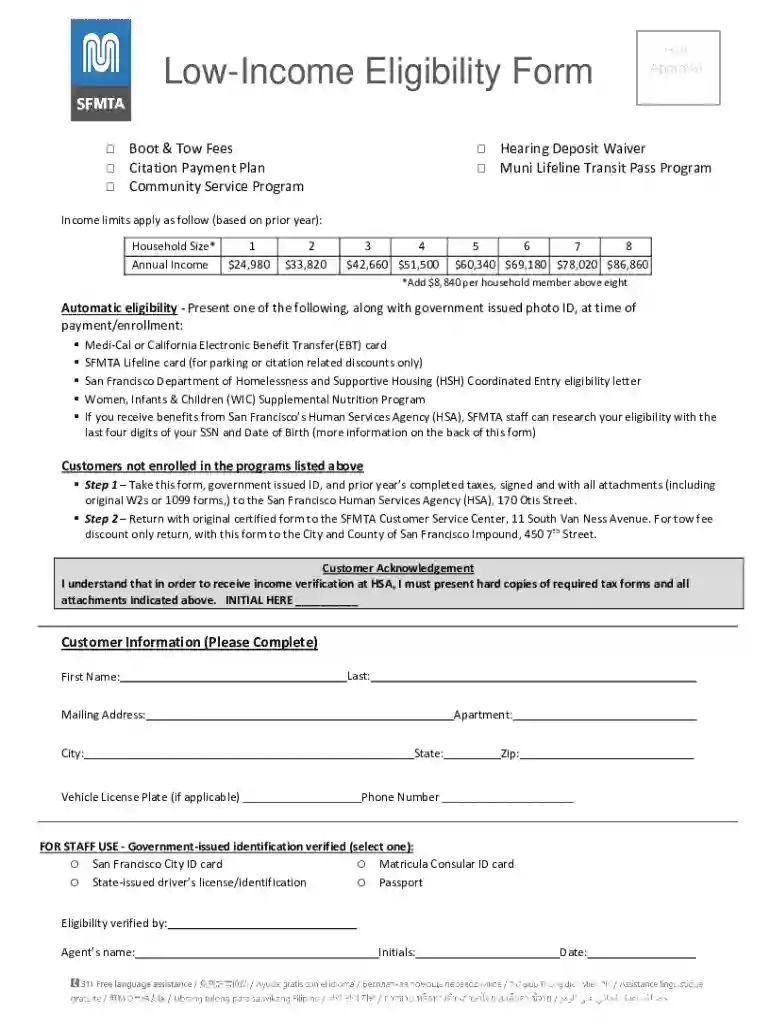
We've got more versions of the Low-Income Eligibility Form form. Select the right Low-Income Eligibility Form version from the list and start editing it straight away!
At DocHub, your data security is our priority. We follow HIPAA, SOC2, GDPR, and other standards, so you can work on your documents with confidence.
The Federal TRIO Programs Current-Year Low-Income Levels information is used by the TRIO grantees (3000 +) to establish eligibility for project services
Complete this form to verify income eligibility. Customer signature is required at the end of this form. The information provided below will be used solely forRead more


