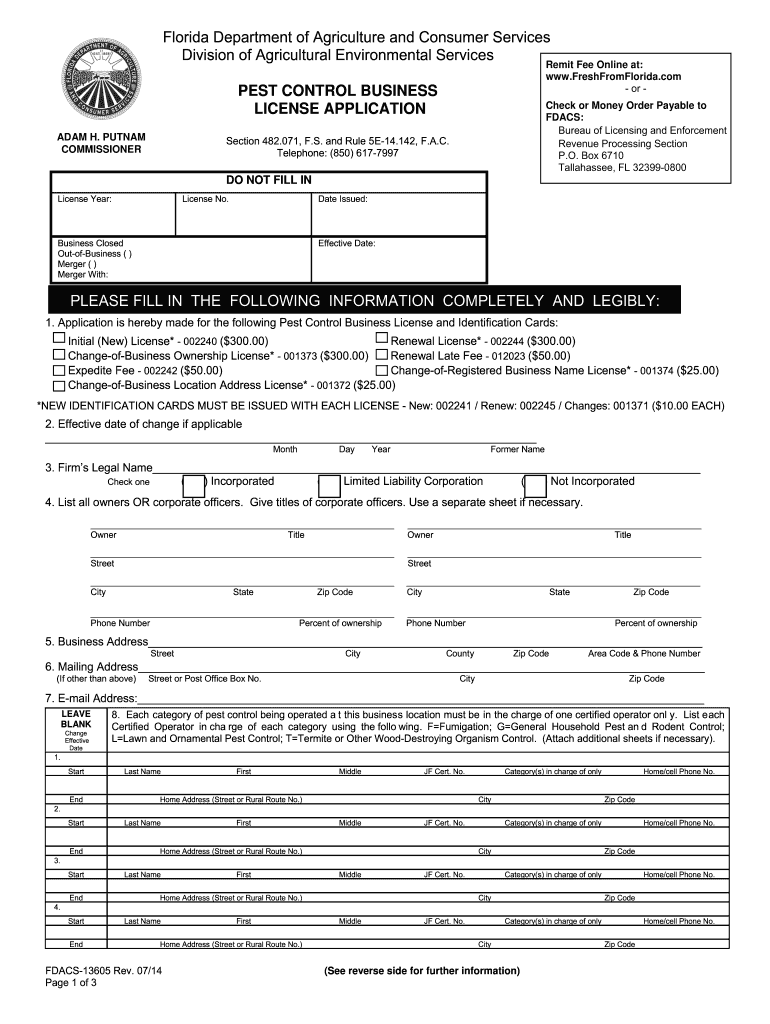
Dacs 13605 2014-2019 form-2026

Get Form
dacs 13605 2014-2019 form Preview on Page 1

Here's how it works

01. Edit your form online
Type text, add images, blackout confidential details, add comments, highlights and more.
02. Sign it in a few clicks
Draw your signature, type it, upload its image, or use your mobile device as a signature pad.
03. Share your form with others
Send it via email, link, or fax. You can also download it, export it or print it out.

How to use or fill out dacs 13605 2014-2019 form with our platform

Form edit decoration
9.5
Ease of Setup
DocHub User Ratings on G2
9.0
Ease of Use
DocHub User Ratings on G2
  1. Click ‘Get Form’ to open the dacs 13605 2014-2019 form in the editor.
  2. Begin by selecting the type of Pest Control Business License you are applying for. Options include Renewal, Initial, Change-of-Business Ownership, and others. Ensure you check the appropriate box.
  3. Fill in the effective date of change if applicable, along with your firm’s legal name. Indicate whether your business is incorporated or a limited liability corporation.
  4. List all owners or corporate officers along with their titles. Use separate sheets if necessary to provide complete information.
  5. Complete the business address and mailing address sections accurately, ensuring all fields are filled legibly.
  6. For each certified operator in charge of pest control categories, provide their full names and certification numbers. Attach additional sheets if needed.
  7. Finally, review all entries for accuracy before signing and dating the application at the bottom of the form.

Start filling out your dacs 13605 form online for free today!

See more dacs 13605 2014-2019 form versions

We've got more versions of the dacs 13605 2014-2019 form form. Select the right dacs 13605 2014-2019 form version from the list and start editing it straight away!
Versions Form popularity Fillable & printable
2015 4.8 Satisfied (241 Votes)
2014 4.4 Satisfied (46 Votes)
2012 3.9 Satisfied (38 Votes)
2008 3.6 Satisfied (35 Votes)
be ready to get more

Complete this form in 5 minutes or less

Get form

Got questions?

We have answers to the most popular questions from our customers. If you can't find an answer to your question, please contact us.
Contact us

Sure, electronically drawing your signature is acceptable, but only if you utilize a tool that complies with industry regulations and policies. Consider DocHub, which ensures eSignature validity under ESIGN and UETA requirements. All you need to eSign your dacs 13605 2014-2019 form is an account with DocHub and an internet connection. After you open your file in our editor, click Sign and choose the Draw option.

You can easily edit and complete your dacs 13605 2014-2019 form on any iOS gadget. Open an internet browser of your liking, go to the DocHub website, authorize or create a new account, upload your file for editing, and make your required adjustments. Our service is mobile-friendly, so using its features on your smartphone will be a no-brainer, even on the first try.

The DS-2019 is needed when applying for US visa. The DS-2019 can be obtained online at . The DS-2019 form contains information on the visitor, purpose, and duration of the visit, financial support details, and the program which invited you.
Log into the Consular Electronic Application Center (CEAC) system and select Retrieve an Application using your application number. If you cant remember your application number, you can retrieve it by answering security questions at this link.
If you lost or misplaced your I-20 or DS-2019, do not panic. Ask the inspector to issue you a Form I-515. The I-515 will allow you to legally enter the US as an F-1 or J-1, but only for one month. Come to the OIS to check in as soon as possible after you arrive, and we will take care of the Form I-515.

Security and compliance

At DocHub, your data security is our priority. We follow HIPAA, SOC2, GDPR, and other standards, so you can work on your documents with confidence.

Learn more
ccpa2
pci-dss
gdpr-compliance
hipaa
soc-compliance
be ready to get more

Complete this form in 5 minutes or less

Get form

People also ask

Copies of Previous DS-2019 forms or Other Documents Log into iHawk and select ISS Services for All Students -- Copies of Previous Documents. You must pay the $20 fee at the ISS online store before the request can be processed. Processing times vary depending on the size of the request.
If you (or your dependents) have lost your current DS-2019(s) or it is damaged, you can request a duplicate DS-2019 for a $20 fee per document. Log into iHawk and select J-1 Student Services -- DS-2019 Requests. Click on Start a New Request, then select Current DS-2019 Duplicate/Replacement.

Related links