Type text, add images, blackout confidential details, add comments, highlights and more.
02. Sign it in a few clicks
Draw your signature, type it, upload its image, or use your mobile device as a signature pad.
03. Share your form with others
Send it via email, link, or fax. You can also download it, export it or print it out.
How to use or fill out 53970 Campaign Disclosure Statement County, City, or School Board Candidates with our platform
Ease of Setup
DocHub User Ratings on G2
Ease of Use
DocHub User Ratings on G2
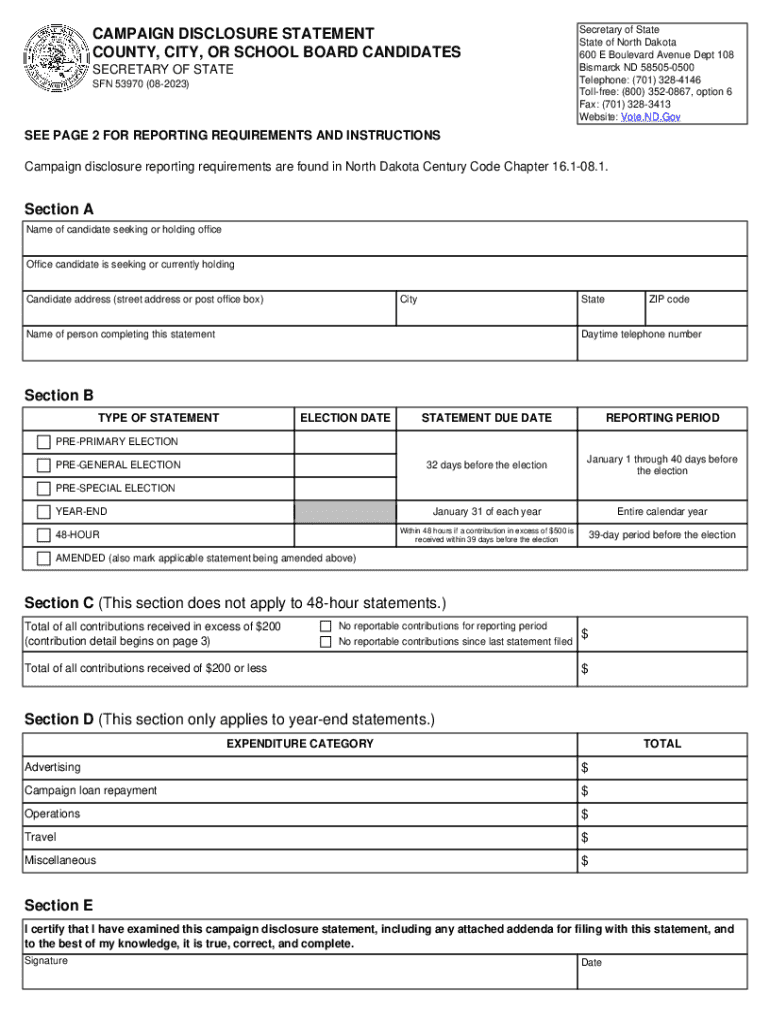
Click ‘Get Form’ to open the 53970 Campaign Disclosure Statement in the editor.
In Section A, enter the full name of the candidate, the office they are seeking or currently holding, and their address. Also include the name and daytime telephone number of the person completing this statement.
Move to Section B and select the type of statement you are filing by checking the appropriate box. If applicable, provide the election date.
For Section C, report total contributions received in excess of $200. If there were no reportable contributions during this period, check the corresponding box.
If you are completing a year-end statement, proceed to Section D and list all expenditures made during the calendar year under specified categories.
Finally, in Section E, certify that all information is accurate by signing and dating the form before submission.
Start filling out your Campaign Disclosure Statement for free today using our platform!
Fill out 53970 Campaign Disclosure Statement County, City, or School Board Candidates online It's free
See more 53970 Campaign Disclosure Statement County, City, or School Board Candidates versions
We've got more versions of the 53970 Campaign Disclosure Statement County, City, or School Board Candidates form. Select the right 53970 Campaign Disclosure Statement County, City, or School Board Candidates version from the list and start editing it straight away!
Nd sos Campaign FinanceStatement of InterestsHow to run for county commissionerNd sos Election ResultsSecretary of State candidate ListCampaign finance sosN.D. primary Election
Security and compliance
At DocHub, your data security is our priority. We follow HIPAA, SOC2, GDPR, and other standards, so you can work on your documents with confidence.
53970 Campaign Disclosure Statement County, City, or
Mar 15, 2017 A year-end statement must be filed each year even if the candidate received no contributions during the year or any reportable contributions in.Read more
UCSF has developed charging practice guidelines for sponsored projects in accordance with the Uniform Guidance and associated Cost Accounting Standards (CAS).Read more
Cookie consent notice
This site uses cookies to enhance site navigation and personalize your experience.
By using this site you agree to our use of cookies as described in our Privacy Notice.
You can modify your selections by visiting our Cookie and Advertising Notice.