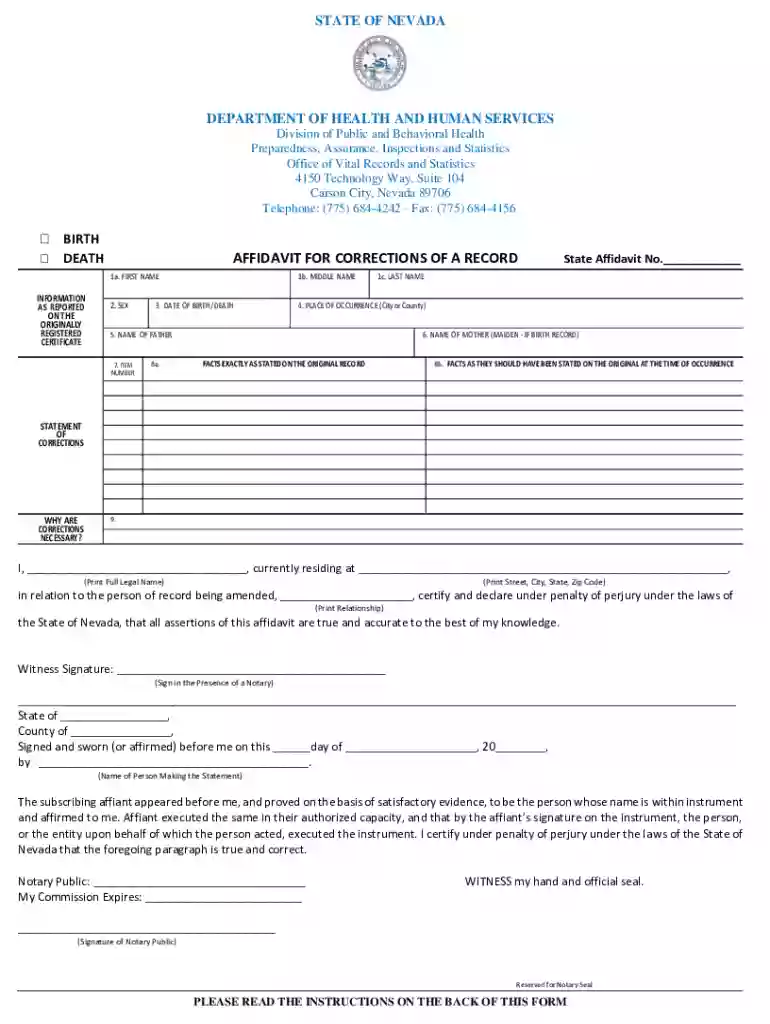
affidavit corrections record birth Preview on Page 1

Division of Public and Behavioral Health Office of Vital 2026

Here's how it works

  • 01. Edit your affidavit corrections record birth online

    Type text, add images, blackout confidential details, add comments, highlights and more.

  • 02. Sign it in a few clicks

    Draw your signature, type it, upload its image, or use your mobile device as a signature pad.

  • 03. Share your form with others

    Send it via email, link, or fax. You can also download it, export it or print it out.

How to use or fill out Division of Public and Behavioral Health Office of Vital with our platform

Form edit decoration
9.5
Ease of Setup
DocHub User Ratings on G2
9.0
Ease of Use
DocHub User Ratings on G2
  1. Click ‘Get Form’ to open the Affidavit for Correction of a Record in the editor.
  2. Begin by filling in your personal information in Section 1a, 1b, and 1c for First Name, Middle Name, and Last Name respectively.
  3. Indicate the sex in Section 2 and provide the Date of Birth/Death in Section 3.
  4. In Section 4, specify the Place of Occurrence (City or County) where the event took place.
  5. Complete Sections 5 and 6 with the names of the father and mother (maiden name if applicable).
  6. Clearly state corrections needed in Section 8a and 8b. Ensure accuracy as this is crucial for processing.
  7. In Section 9, print your full legal name and address. Confirm your relationship to the person of record.
  8. Ensure that your signature is notarized as required before submitting the form.

Start using our platform today to easily complete your Affidavit for Correction of a Record online for free!

See more affidavit corrections record birth versions

We've got more versions of the affidavit corrections record birth form. Select the right affidavit corrections record birth version from the list and start editing it straight away!

VersionsForm popularityFillable & printable
20194.7 Satisfied (27 Votes)
20174.4 Satisfied (25 Votes)
20104.9 Satisfied (59 Votes)

be ready to get more

Complete this form in 5 minutes or less

Got questions?

We have answers to the most popular questions from our customers. If you can't find an answer to your question, please contact us.

If you do not have acceptable ID, an immediate family member with sufficient ID may also obtain the birth certificate. Visit the Persons Qualified to Request or Change Records webpage for full details, including who is considered an immediate family member.
Ordering Birth Certificates through Texas.gov For fast, affordable service, order Texas birth certificates through TexasOnline, the official eGovernment site for the State of Texas. The current estimated processing time for TexasOnline orders is 10-15 business days.
In-Person: Austin Office In most cases, you will get your record the same day, but some applications require 24 hours or more to process.
Birth and death certificates are NOT public records. Public records are those open to the publics, such as property deeds and marriage/divorce records (because divorce is a court proceeding). Back in the olden days, it was very easy to get anyones birth certificate.
All birth certificates cost $23. Additional fees apply for mail and online orders.

Security and compliance

At DocHub, your data security is our priority. We follow HIPAA, SOC2, GDPR, and other standards, so you can work on your documents with confidence.

Related links

Division of Vital Records - Maryland Department of Health

The Div ision of Vital Records (DVR) of the Maryland Department of Health (MDH) issues certified copies of birth, death, fetal death, and marriage certificates

Learn more
If you believe that this page should be taken down, please follow our DMCA take down process here