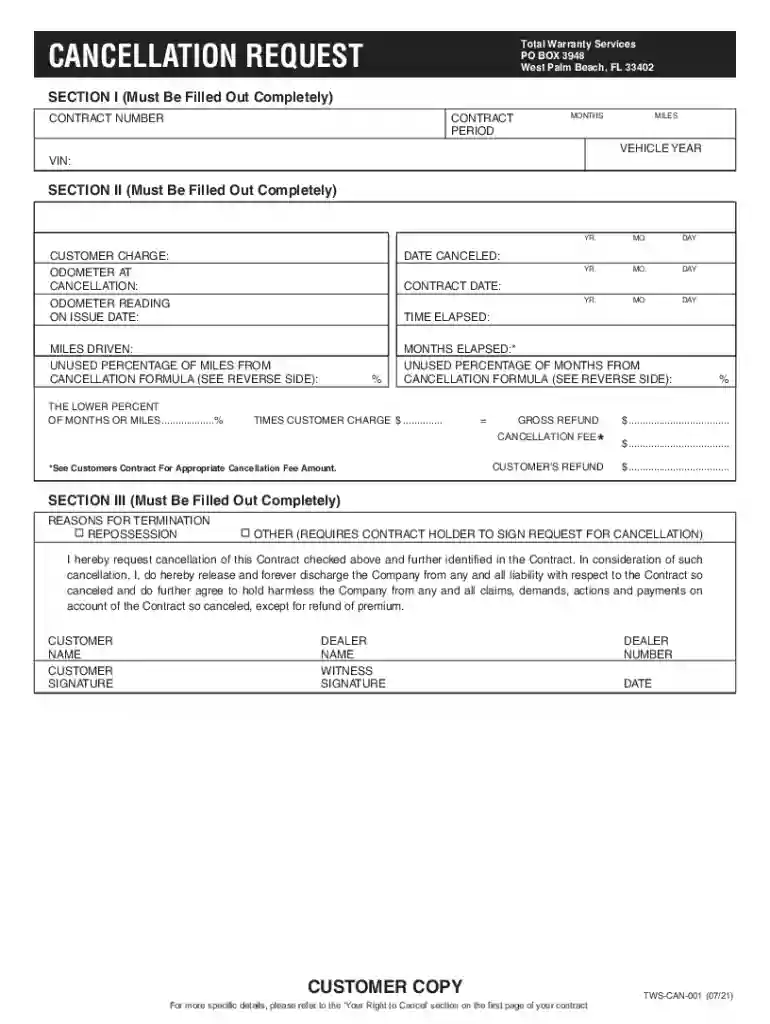
tws cancellation form Preview on Page 1

Total Warranty Services - Fill and Sign Printable Template 2026

Here's how it works

  • 01. Edit your tws cancellation form online

    Type text, add images, blackout confidential details, add comments, highlights and more.

  • 02. Sign it in a few clicks

    Draw your signature, type it, upload its image, or use your mobile device as a signature pad.

  • 03. Share your form with others

    Send total warranty services cancellation via email, link, or fax. You can also download it, export it or print it out.

How to use or fill out Total Warranty Services - Fill and Sign Printable Template

Form edit decoration
9.5
Ease of Setup
DocHub User Ratings on G2
9.0
Ease of Use
DocHub User Ratings on G2
  1. Click ‘Get Form’ to open the Total Warranty Services cancellation request template in our editor.
  2. In Section I, fill out your Contract Number, Contract Period (in months), and the Vehicle Year along with the VIN. Ensure all fields are completed accurately.
  3. Proceed to Section II. Enter the Customer Charge, Odometer at Cancellation, Date Canceled, and Contract Date. Record the Odometer Reading on Issue Date and calculate Time Elapsed and Miles Driven.
  4. Calculate the Unused Percentage of Miles and Months using the formulas provided on the form. Input these values in their respective fields.
  5. In Section III, select your reason for termination by checking the appropriate box. Provide your name and signature as well as those of the dealer and witness.

Start filling out your Total Warranty Services cancellation request today for free using our platform!

See more tws cancellation form versions

We've got more versions of the tws cancellation form form. Select the right tws cancellation form version from the list and start editing it straight away!

VersionsForm popularityFillable & printable
20214.2 Satisfied (39 Votes)
20114.5 Satisfied (51 Votes)

be ready to get more

Complete this form in 5 minutes or less

Got questions?

We have answers to the most popular questions from our customers. If you can't find an answer to your question, please contact us.

Total Warranty Servicess email format typically follows the pattern of FLast@totalwarrantyservices.com; this email format is used 55% of the time. Other contacts within LeadIQs database had email formats such as First@totalwarrantyservices.comLast@totalwarrantyservices.com.

Security and compliance

At DocHub, your data security is our priority. We follow HIPAA, SOC2, GDPR, and other standards, so you can work on your documents with confidence.

Related links

DocHub eSignature Service General information

Aug 8, 2023 Quickly create templates from existing envelopes. self-service documents created using eSignature templates. Fill out the form in DocHub

Learn more
If you believe that this page should be taken down, please follow our DMCA take down process here