Department of Social ServicesVirginia VA TreasuryHomeSecretary of the Commonwealth - Notary Commissi 2026

Get Form
Department of Social ServicesVirginia VA TreasuryHomeSecretary of the Commonwealth - Notary Commissi Preview on Page 1

Here's how it works

01. Edit your form online
Type text, add images, blackout confidential details, add comments, highlights and more.

02. Sign it in a few clicks
Draw your signature, type it, upload its image, or use your mobile device as a signature pad.

03. Share your form with others
Send it via email, link, or fax. You can also download it, export it or print it out.

How to use or fill out Department of Social Services Virginia VA Treasury Home Secretary of the Commonwealth - Notary Commission with our platform

Form edit decoration
9.5
Ease of Setup
DocHub User Ratings on G2
9.0
Ease of Use
DocHub User Ratings on G2
  1. Click ‘Get Form’ to open it in the editor.
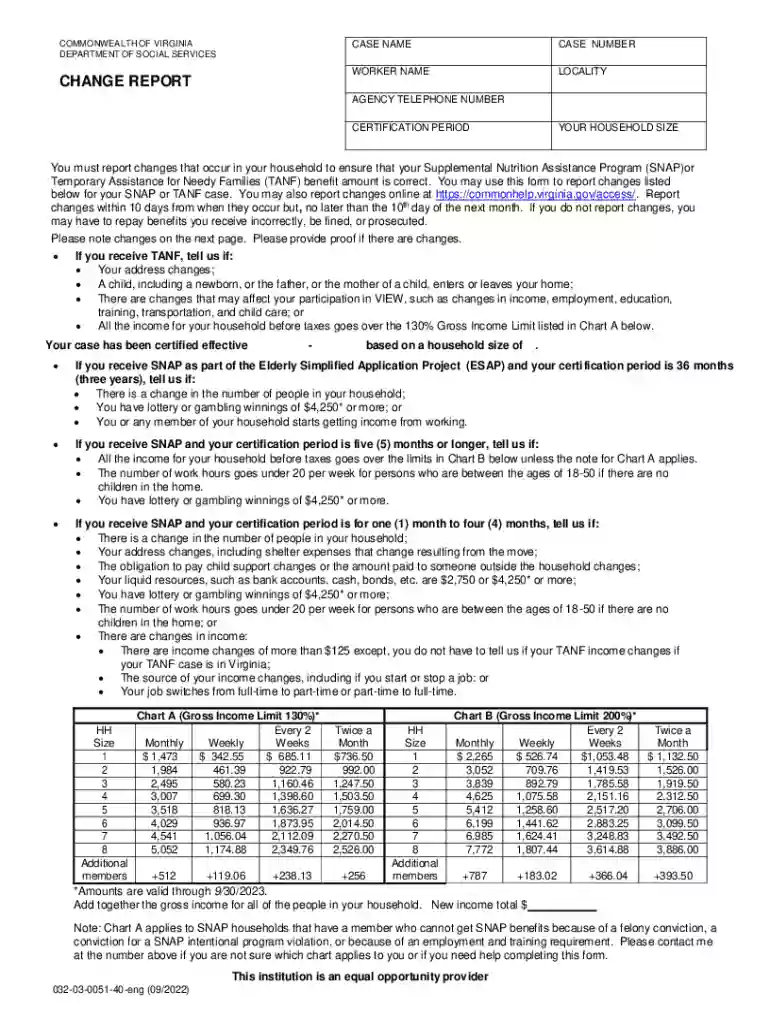
  2. Begin by entering your case name and case number at the top of the form. This information is crucial for identifying your application.
  3. Fill in your worker's name, locality, and agency telephone number. Ensure these details are accurate to facilitate communication.
  4. Indicate your household size and certification period. This helps determine eligibility for SNAP or TANF benefits.
  5. In the 'Details on Changes' section, report any changes in your household composition, such as new members moving in or out. Provide their names, dates of birth, and relationships.
  6. Update your address if it has changed, including all relevant details like city and ZIP code.
  7. Report any changes in income or work hours that may affect your benefits. Be specific about amounts and sources.
  8. Review all entries for accuracy before submitting the form to ensure compliance with reporting requirements.

Start using our platform today to easily complete and submit your Department of Social Services forms online for free!

See more Department of Social ServicesVirginia VA TreasuryHomeSecretary of the Commonwealth - Notary Commissi versions

We've got more versions of the Department of Social ServicesVirginia VA TreasuryHomeSecretary of the Commonwealth - Notary Commissi form. Select the right Department of Social ServicesVirginia VA TreasuryHomeSecretary of the Commonwealth - Notary Commissi version from the list and start editing it straight away!
Versions Form popularity Fillable & printable
2022 4.1 Satisfied (45 Votes)
2005 4 Satisfied (37 Votes)
be ready to get more

Complete this form in 5 minutes or less

Get form

Got questions?

We have answers to the most popular questions from our customers. If you can't find an answer to your question, please contact us.
Contact us
In order to complete an online notarization in Virginia, youll need the following: An original, unsigned document (Dont sign it before uploading! A computer, iPhone, or Android phone with audio and video capabilities. A valid governmentissued photo ID. A U.S. social security number for secure identity verification.
1. Location and State Regulations StateNotary Fee Limits California $15 per signature for acknowledgments and jurats Texas $6 per signature for acknowledgments Florida $10 per notarial act New York $2 per signature Jul 18, 2025
Notary fees by notarial act StateAcknowledgmentVerbal Oath/Affirmation CA California $15 CO Colorado $15 CT Connecticut $5 DE Delaware $547 more rows
To be eligible to apply for a Virginia Notary Public Commission, you must be: At least eighteen years old. A legal resident of the United States. Able to read and write the English language. A resident of Virginia or regularly employed in the state and perform notary services in connection with their employment.
The average loan signing job from loan signing services are paid between $75 and $200 per appointment. A typical loan signing appointment usually takes between 30 and 60 minutes depending on the complexity of the documents. This means you can earn upwards of $200/hour as a loan signing agent!

Security and compliance

At DocHub, your data security is our priority. We follow HIPAA, SOC2, GDPR, and other standards, so you can work on your documents with confidence.

Learn more
ccpa2
pci-dss
gdpr-compliance
hipaa
soc-compliance