Type text, add images, blackout confidential details, add comments, highlights and more.

02. Sign it in a few clicks
Draw your signature, type it, upload its image, or use your mobile device as a signature pad.

03. Share your form with others
Send it via email, link, or fax. You can also download it, export it or print it out.

How to use or fill out the Authorization For Release of Medical Records form online
Ease of Setup
DocHub User Ratings on G2
Ease of Use
DocHub User Ratings on G2
Click ‘Get Form’ to open it in the editor.
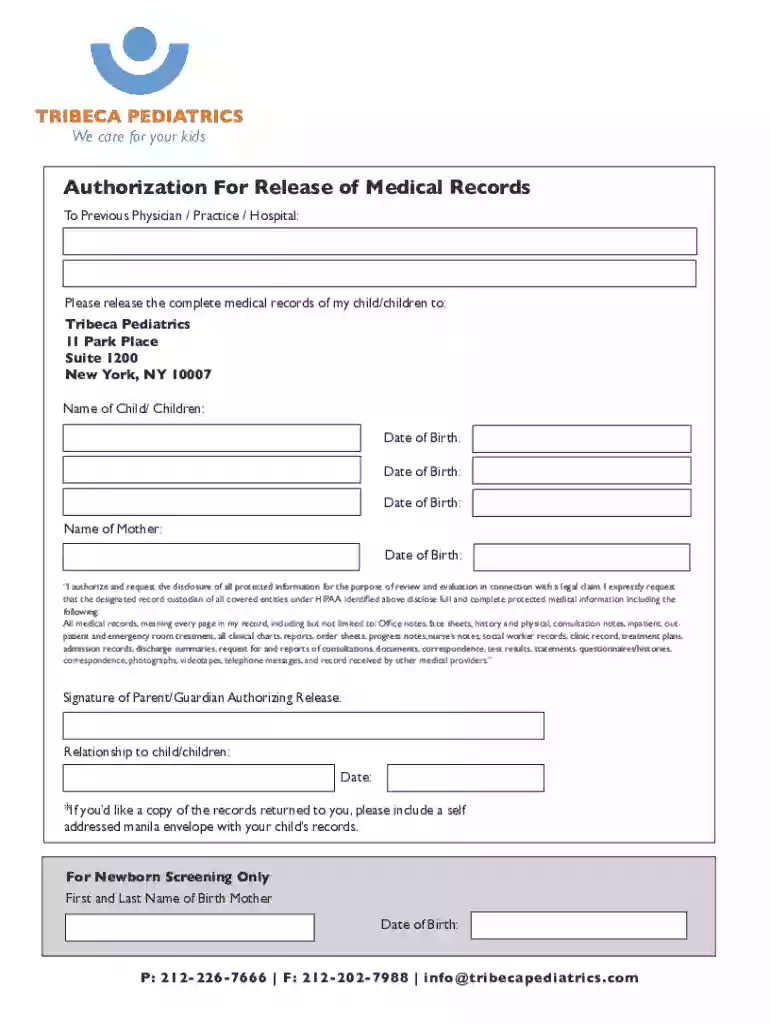
Begin by entering the name of your child or children in the designated field. Ensure that you provide accurate names for proper identification.
Next, fill in the date of birth for each child listed. This is crucial for verifying medical records.
In the section labeled 'Name of Mother', input your full name along with your date of birth to confirm your identity as the authorizing parent or guardian.
Review the authorization statement carefully. If you agree, proceed to sign in the designated area, confirming your relationship to the child or children.
Finally, if you wish to receive a copy of the records, remember to include a self-addressed manila envelope as instructed.
Start filling out your form online for free today and streamline your document management!
Fill out Authorization For Release of Medical Records online It's free
See more Authorization For Release of Medical Records versions
We've got more versions of the Authorization For Release of Medical Records form. Select the right Authorization For Release of Medical Records version from the list and start editing it straight away!
Sample authorization for release of medical recordsAuthorization for release of medical records pdfAuthorization for release of medical records exampleRelease of information form PDFAuthorization for release of information formHIPAA release form PDFAuthorization for release of medical information formBlank authorization to release information form
Security and compliance
At DocHub, your data security is our priority. We follow HIPAA, SOC2, GDPR, and other standards, so you can work on your documents with confidence.
Patient Authorization for Release of Protected Health Information (PHI)An authorization, signed by the subject of the records, are authorized to release.
Cookie consent notice
This site uses cookies to enhance site navigation and personalize your experience.
By using this site you agree to our use of cookies as described in our Privacy Notice.
You can modify your selections by visiting our Cookie and Advertising Notice.