Print Post Lodgement document 2026

Get Form
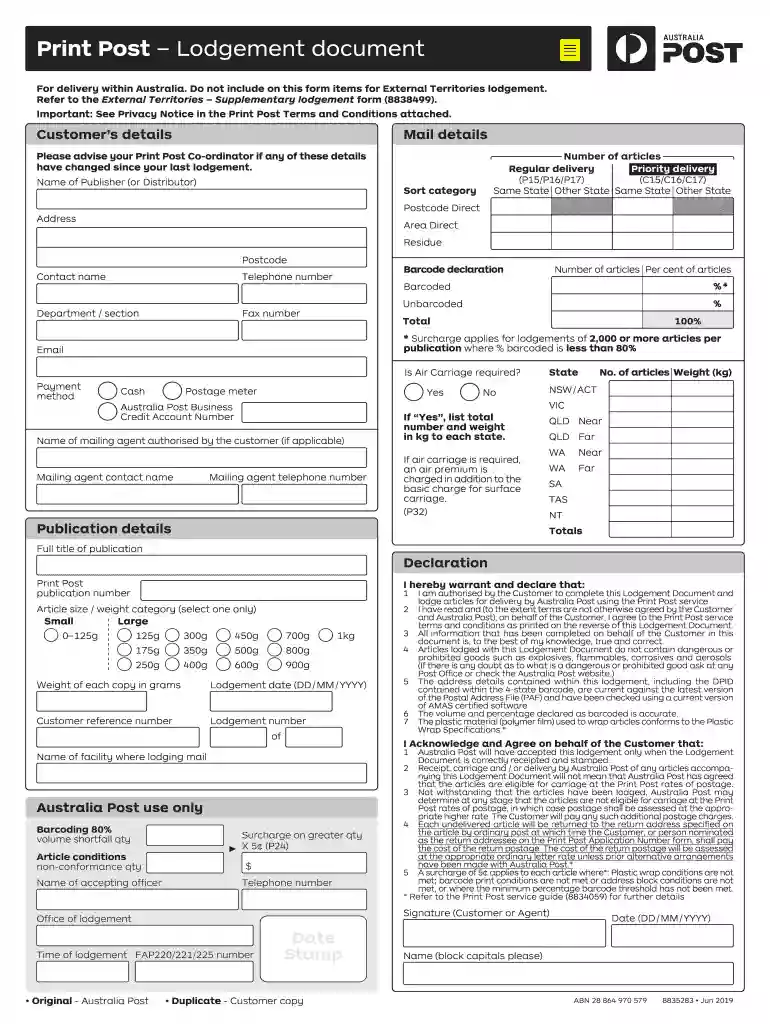
lodgement document Preview on Page 1

Here's how it works

01. Edit your lodgement document online
Type text, add images, blackout confidential details, add comments, highlights and more.

02. Sign it in a few clicks
Draw your signature, type it, upload its image, or use your mobile device as a signature pad.

03. Share your form with others
Send post print lodgement document via email, link, or fax. You can also download it, export it or print it out.

How to use or fill out Print Post Lodgement document with our platform

Form edit decoration
9.5
Ease of Setup
DocHub User Ratings on G2
9.0
Ease of Use
DocHub User Ratings on G2
  1. Click ‘Get Form’ to open the Print Post Lodgement document in the editor.
  2. Begin by entering your Customer’s details, including the Name of Publisher or Distributor, and ensure all contact information is accurate.
  3. Fill in the Mail details section, specifying the number of articles for Regular and Priority delivery, along with their respective categories and postcodes.
  4. Complete the Barcode declaration by indicating the percentage of barcoded versus unbarcoded articles. Ensure that this aligns with Australia Post's requirements.
  5. In the Publication details section, provide the full title of your publication and select the appropriate article size/weight category.
  6. Review all entries for accuracy before signing off on the Declaration section, confirming your authority to lodge this document.

Start using our platform today to streamline your Print Post Lodgement process for free!

See more Print Post Lodgement document versions

We've got more versions of the Print Post Lodgement document form. Select the right Print Post Lodgement document version from the list and start editing it straight away!
Versions Form popularity Fillable & printable
2019 4.1 Satisfied (32 Votes)
2018 4.1 Satisfied (61 Votes)
be ready to get more

Complete this form in 5 minutes or less

Get form

Got questions?

We have answers to the most popular questions from our customers. If you can't find an answer to your question, please contact us.
Contact us
Additional services include photocopy and printing, passport issues and renewals, ID certification, newsagency, Lotto, gift cards and much more are available in-store.
While the post office does offer printing services, there is a better option available. In this article, well explore the benefits of using a portable thermal printer and why its a better option than printing at the post office. Printing at the post office can be expensive and time-consuming.
We also provide a wide range of essential small business services including ID Passport photos, printing, copying, scanning, binding and laminating. We take pride in our commitment to sustainability.
We also provide a wide range of essential small business services including ID Passport photos, printing, copying, scanning, binding and laminating.
In most cases, Post Office staff can docHub documents as being true copies of the original document. As part of their service, they will photocopy your original document and stamp it to verify its a true copy.

Security and compliance

At DocHub, your data security is our priority. We follow HIPAA, SOC2, GDPR, and other standards, so you can work on your documents with confidence.

Learn more
ccpa2
pci-dss
gdpr-compliance
hipaa
soc-compliance
be ready to get more

Complete this form in 5 minutes or less

Get form