




01. Edit your miami dade college mdc transcript online
Type text, add images, blackout confidential details, add comments, highlights and more.

Type text, add images, blackout confidential details, add comments, highlights and more.

Draw your signature, type it, upload its image, or use your mobile device as a signature pad.

Send mdc transcript via email, link, or fax. You can also download it, export it or print it out.
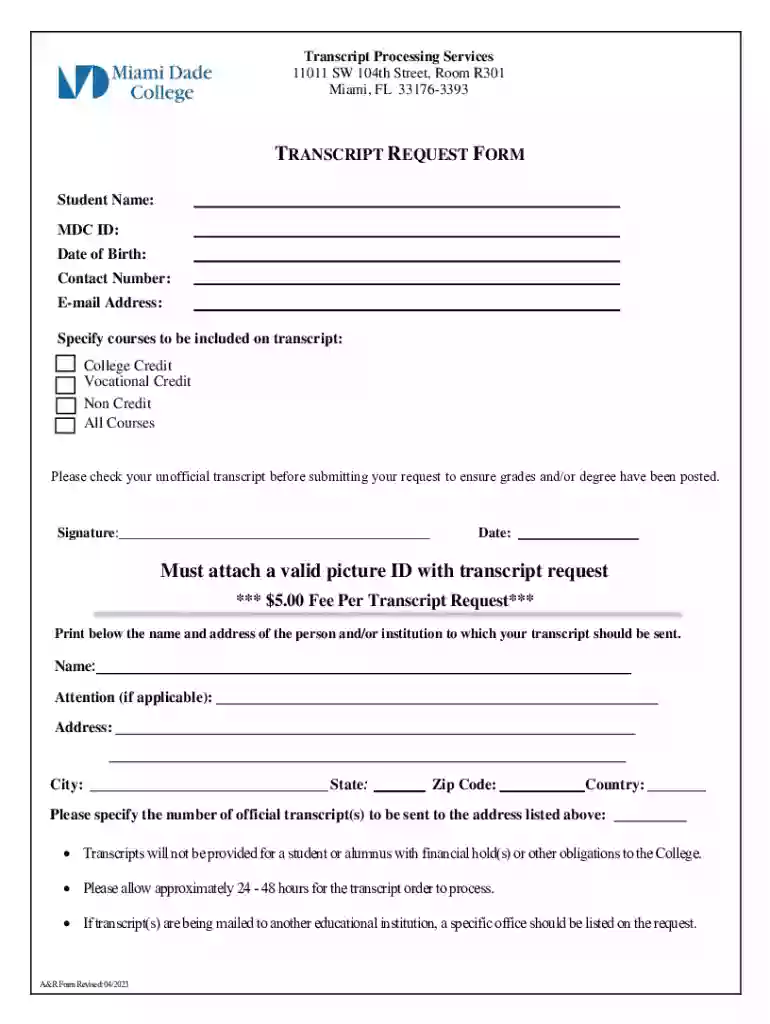
The Transcript Request Form is a crucial document for students at Miami Dade College (MDC) seeking to obtain their academic records. This form enables current and former students to request an official transcript, which is a certified document detailing the courses taken, grades received, and degrees conferred by MDC. Official transcripts are often required for transferring to another institution, applying for graduate school, or securing employment. The form outlines all necessary details needed to process the request effectively.
To ensure a smooth process when requesting your transcripts from MDC, follow the outlined steps below:
Gather Required Information: Have your student ID, personal contact information, and recipient details ready.
Fill Out the Form: Complete the provided sections carefully, ensuring all fields are accurate and legible.
Provide a Valid ID: Attach a copy of your government-issued identification to verify your identity.
Calculate the Fee: Prepare $5 for each transcript request, which can typically be paid through various methods.
Sign the Form: Your signature is essential to authorize MDC to release your transcripts.
Securing a Transcript Request Form from MDC is straightforward and can be done through several channels:
Understanding key terms associated with the transcript request process is vital:
Transcripts requested using this form must adhere to legal guidelines protecting student privacy and data handling, primarily under the Family Educational Rights and Privacy Act (FERPA). Compliance ensures that transcripts are only released upon the requestor’s explicit permission.
When preparing to complete your Transcript Request Form, pay attention to the following components to minimize errors and processing delays:
The submission of your transcript request necessitates several supporting documents:
Miami Dade College offers various ways to submit your transcript request:
Submitting an incomplete or incorrectly filled request can result in processing delays or a denial of issuance. Ensure all sections are adequately filled, signatures are present, and all required documents are included to avoid such complications.
We've got more versions of the miami dade college mdc transcript form. Select the right miami dade college mdc transcript version from the list and start editing it straight away!
At DocHub, your data security is our priority. We follow HIPAA, SOC2, GDPR, and other standards, so you can work on your documents with confidence.
This program will cover the costs of obtaining official transcripts from Florida International University, Miami Dade College, and the University of Florida.Read more
You must have a valid MDC account in order to request transcripts. All requests must be placed by the student/alumni. email at registrar@mdc.edu. Transcript


