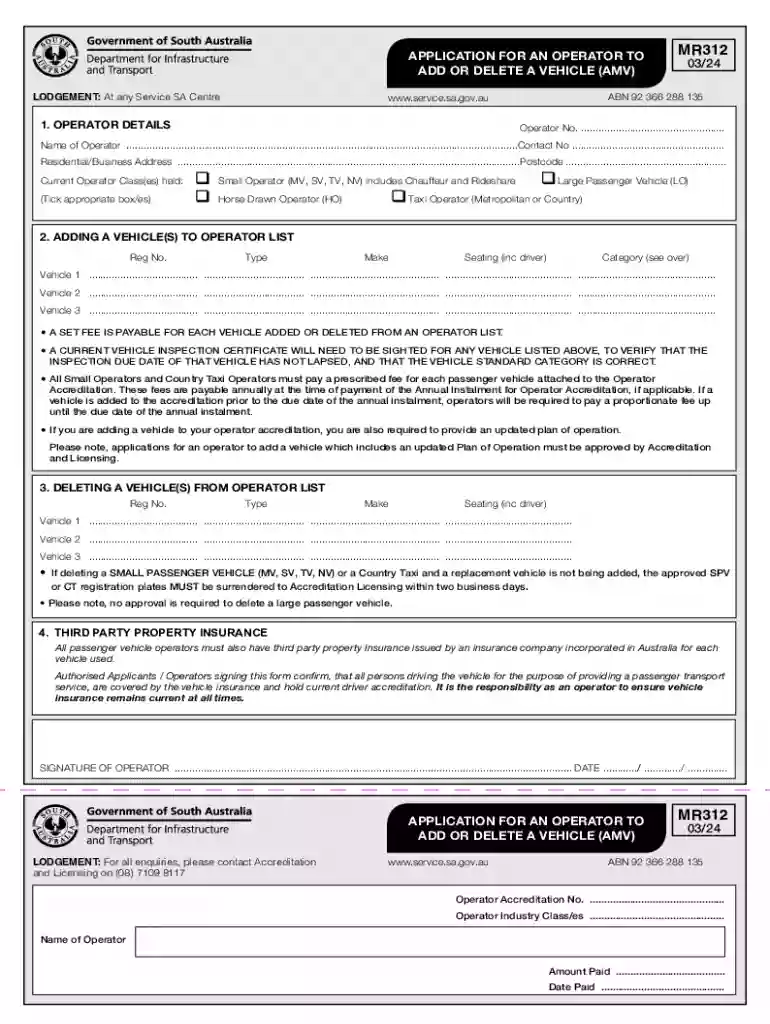
MR312 Application For An Operator To Add Or Delete A Vehicle (AMV) 2026

Get Form
transport amv mr312 form Preview on Page 1

Here's how it works

01. Edit your transport amv mr312 form online
Type text, add images, blackout confidential details, add comments, highlights and more.

02. Sign it in a few clicks
Draw your signature, type it, upload its image, or use your mobile device as a signature pad.

03. Share your form with others
Send it via email, link, or fax. You can also download it, export it or print it out.

How to use or fill out MR312 Application For An Operator To Add Or Delete A Vehicle (AMV) with our platform

Form edit decoration
9.5
Ease of Setup
DocHub User Ratings on G2
9.0
Ease of Use
DocHub User Ratings on G2
  1. Click ‘Get Form’ to open the MR312 Application in the editor.
  2. Begin by filling out the 'Operator Details' section. Enter your Operator Number, Name, Contact Number, and Residential/Business Address. Ensure all information is accurate for smooth processing.
  3. In the 'Adding a Vehicle(s) to Operator List' section, list each vehicle you wish to add. Fill in the Registration Number, Type, Make, Seating capacity (including driver), and select the appropriate Category from the provided list.
  4. If you are deleting vehicles, complete the 'Deleting a Vehicle(s) from Operator List' section similarly by providing details for each vehicle being removed.
  5. Review your entries carefully. Ensure that all required fields are filled and that any necessary documents, such as vehicle inspection certificates, are prepared for submission.
  6. Finally, sign and date the application at the bottom of the form before submitting it through your preferred method.

Start using our platform today to easily fill out your MR312 Application for free!

See more MR312 Application For An Operator To Add Or Delete A Vehicle (AMV) versions

We've got more versions of the MR312 Application For An Operator To Add Or Delete A Vehicle (AMV) form. Select the right MR312 Application For An Operator To Add Or Delete A Vehicle (AMV) version from the list and start editing it straight away!
Versions Form popularity Fillable & printable
2024 4.8 Satisfied (24 Votes)
2017 4.6 Satisfied (42 Votes)
2016 4 Satisfied (41 Votes)
be ready to get more

Complete this form in 5 minutes or less

Get form

Got questions?

We have answers to the most popular questions from our customers. If you can't find an answer to your question, please contact us.
Contact us
The Accreditation Licensing Centre at Mile End has permanently closed. You can now conveniently visit any Service SA centre across the state to complete your passenger transport transactions. This includes centres that operate on Saturdays.
If you are interested in applying as a rideshare driver and you are the registered owner of the vehicle you will use, you need both driver and operator accreditation and you will be responsible for your vehicle inspections, insurances and accreditation.
There is no cost to apply for driver accreditation. Fees apply for: Drivers licence. Working with Children Check.
Accreditation is the act of granting credit or recognition, especially to an educational institution that maintains suitable standards. Accreditation is necessary to any person or institution in education that needs to prove that they meet a general standard of quality.
Operator accreditation is valid for 5 years, subject to annual instalment payments, and is required by any person or company responsible for the operation of a passenger transport service. This includes: the registered owner of one or more vehicles used for passenger transport.

Security and compliance

At DocHub, your data security is our priority. We follow HIPAA, SOC2, GDPR, and other standards, so you can work on your documents with confidence.

Learn more
ccpa2
pci-dss
gdpr-compliance
hipaa
soc-compliance