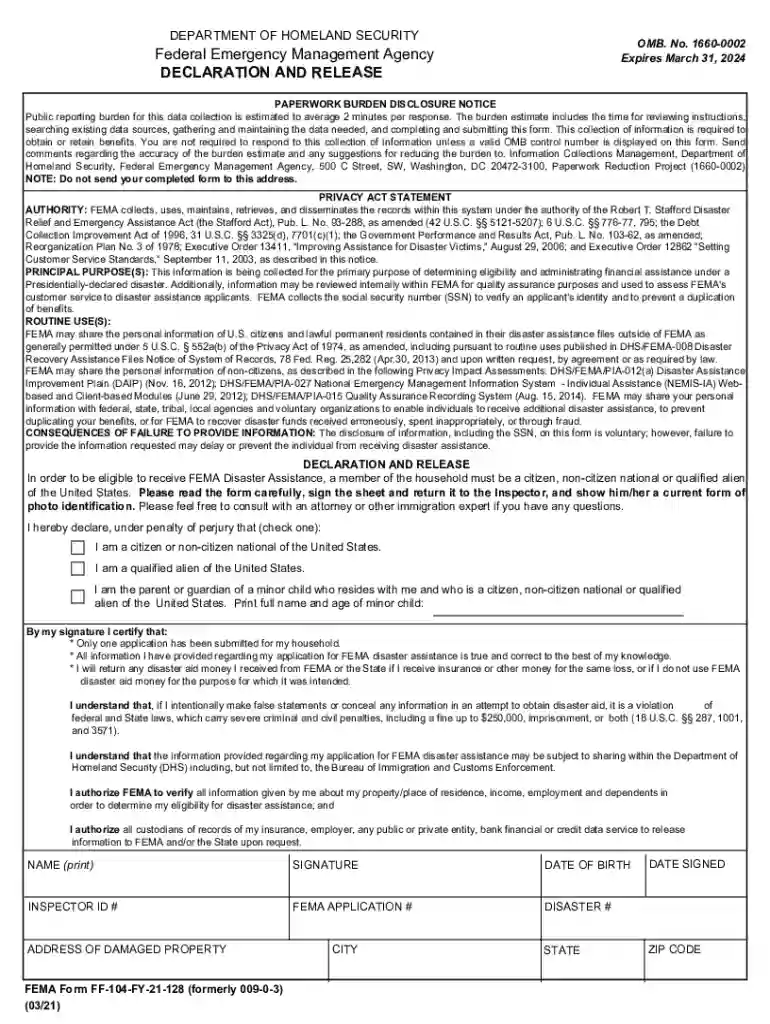
signed 009 0 3 Preview on Page 1

Declaration and Release FEMA Form 009-0-3, Declaration and Release 2026

Here's how it works

  • 01. Edit your signed 009 0 3 online

    Type text, add images, blackout confidential details, add comments, highlights and more.

  • 02. Sign it in a few clicks

    Draw your signature, type it, upload its image, or use your mobile device as a signature pad.

  • 03. Share your form with others

    Send fema form 009 0 3 via email, link, or fax. You can also download it, export it or print it out.

How to use or fill out Declaration and Release FEMA Form 009-0-3, Declaration and Release with our platform

Form edit decoration
9.5
Ease of Setup
DocHub User Ratings on G2
9.0
Ease of Use
DocHub User Ratings on G2
  1. Click ‘Get Form’ to open the Declaration and Release FEMA Form 009-0-3 in the editor.
  2. Begin by reading the instructions carefully. This form requires you to declare your eligibility for FEMA disaster assistance.
  3. In the declaration section, check the appropriate box indicating your status: citizen, non-citizen national, or qualified alien. If applicable, provide the full name and age of any minor child residing with you.
  4. Sign the form where indicated. Ensure that your signature is clear and matches your printed name.
  5. Fill in your date of birth, inspector ID number, FEMA application number, disaster number, and address of the damaged property accurately.
  6. Review all information for accuracy before submitting. Once completed, save your document within our platform for easy access.

Start using our platform today to fill out your FEMA form quickly and efficiently!

See more signed 009 0 3 versions

We've got more versions of the signed 009 0 3 form. Select the right signed 009 0 3 version from the list and start editing it straight away!

VersionsForm popularityFillable & printable
20214.4 Satisfied (40 Votes)
20194.9 Satisfied (27 Votes)

be ready to get more

Complete this form in 5 minutes or less

Got questions?

We have answers to the most popular questions from our customers. If you can't find an answer to your question, please contact us.

According to eSignature regulations, documents approved electronically have the same validity as traditionally approved ones. You can electronically sign almost any business and personal paperwork. Four types of paperwork still require wet signatures only - wills and testamentary trusts, court orders and other court papers, state statutes regulating divorce, adoption, or other family law, and notice of cancellation of utility services. If you adhere to the regulations and use a safe and compliant software solution, like DocHub, you can eSign your Declaration and Release FEMA Form 009-0-3, Declaration and Release without printing it.

If you are looking for a state-specific Declaration and Release FEMA Form 009-0-3, Declaration and Release sample, you can find it in our DocHub Forms & Templates catalog. Use the search field, enter your form’s name, and search through the results for your state. You can also filter out irrelevant results while searching our catalog by groups.

Security and compliance

At DocHub, your data security is our priority. We follow HIPAA, SOC2, GDPR, and other standards, so you can work on your documents with confidence.

Related links

FEMA Disaster Operations Legal Reference Manual

Jan 10, 2017 The Third Edition of the Disaster Operations Legal Reference (DOLR 3.0) describes the legal authorities for FEMAs readiness, response, and

Learn more
If you believe that this page should be taken down, please follow our DMCA take down process here