01. Edit your work permit visa application form for canada online
Type text, add images, blackout confidential details, add comments, highlights and more.

02. Sign it in a few clicks
Draw your signature, type it, upload its image, or use your mobile device as a signature pad.

03. Share your form with others
Send 1295 form canada via email, link, or fax. You can also download it, export it or print it out.

How to use or fill out IMM 1295 E: Application for work permit made outside of Canada - imm1295e with our platform
Ease of Setup
DocHub User Ratings on G2
Ease of Use
DocHub User Ratings on G2
Click ‘Get Form’ to open it in the editor.
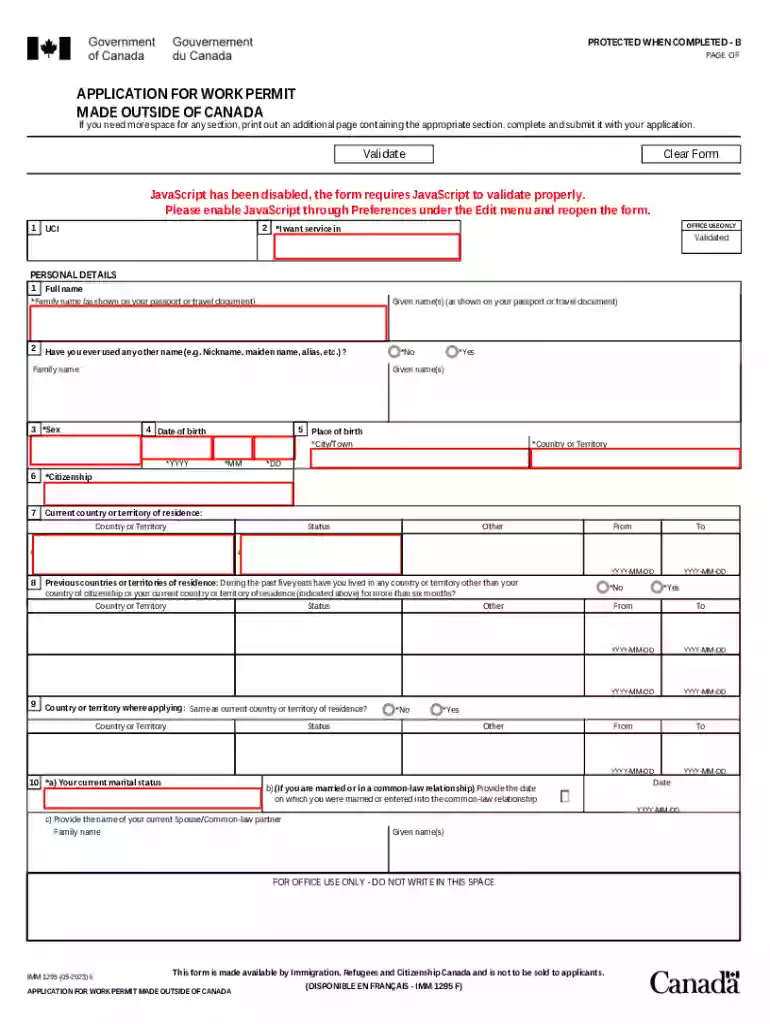
Begin by filling out your personal details. Enter your full name as shown on your passport, including family and given names. Indicate if you have ever used another name.
Provide your date of birth, citizenship, and current country of residence. Ensure all dates are formatted correctly (YYYY-MM-DD).
Complete the sections regarding previous countries of residence and marital status. If applicable, provide details about your spouse or common-law partner.
Fill in the language proficiency section, indicating your native language and any tests taken for English or French proficiency.
Input passport information including the country of issue, passport number, issue date, and expiry date.
Detail your intended work in Canada by specifying the type of work permit you are applying for and providing employer details.
Finally, review all sections for accuracy before signing and dating the application. Don’t forget to include any required documents.
Start using our platform today to simplify your application process for free!
Fill out IMM 1295 E: Application for work permit made outside of Canada - imm1295e online It's free
See more IMM 1295 E: Application for work permit made outside of Canada - imm1295e versions
We've got more versions of the IMM 1295 E: Application for work permit made outside of Canada - imm1295e form. Select the right IMM 1295 E: Application for work permit made outside of Canada - imm1295e version from the list and start editing it straight away!
What is the difference between TRV and electronic travel authorization?
Temporary Resident Visas (TRVs), commonly called entry visas, are to be obtained by foreign nationals who require visas to enter Canada, while Electronic Travel Authorization (eTA) allows foreign nationals from visa-exempted countries to enter Canada without a visa.
Is IMM 5257 required for a visitor visa?
Application for Temporary Resident Visa [IMM 5257] - The application form listed in your document checklist will be called Application for Visitor Visa (Temporary Resident Visa) Made Outside of Canada (IMM 5257). This is the form you need to fill out, even when you apply from inside Canada.
What is the difference between IMM 5257 and IMM5257e?
How does IRCC verify work hours? IRCC will use the reference letters and other supporting documentation provided in your Express Entry permanent residence application to assess your work hours. They may also contact employers, supervisors, and your clients to confirm the hours youve worked.
How do I download IMM5257E?
Download the IMM5257E PDF form from the official website of Immigration, Refugees and Citizenship Canada (IRCC). Open the downloaded form using a PDF viewer such as docHub Reader. Read the instructions provided on the form carefully.
What is IMM5257E for?
APPLICATION FOR VISITOR VISA (TEMPORARY RESIDENT VISA) If you need more space for any section, print out an additional page containing the appropriate section, complete and submit it with your application.
application for work permit made outside of canada imm 1295
application for work permit made outside of canada (imm 1295) pdfApplication for work permit made Outside of Canada PDFIMM 1295 form 2024 PDF downloadIMM 1295 application for work permitIMM 1295 form 2023 downloadApplication for work permit made outside of Canada sampleIMM 1295 form downloadIMM 1295 sample form
Security and compliance
At DocHub, your data security is our priority. We follow HIPAA, SOC2, GDPR, and other standards, so you can work on your documents with confidence.
Cookie consent notice
This site uses cookies to enhance site navigation and personalize your experience.
By using this site you agree to our use of cookies as described in our Privacy Notice.
You can modify your selections by visiting our Cookie and Advertising Notice.