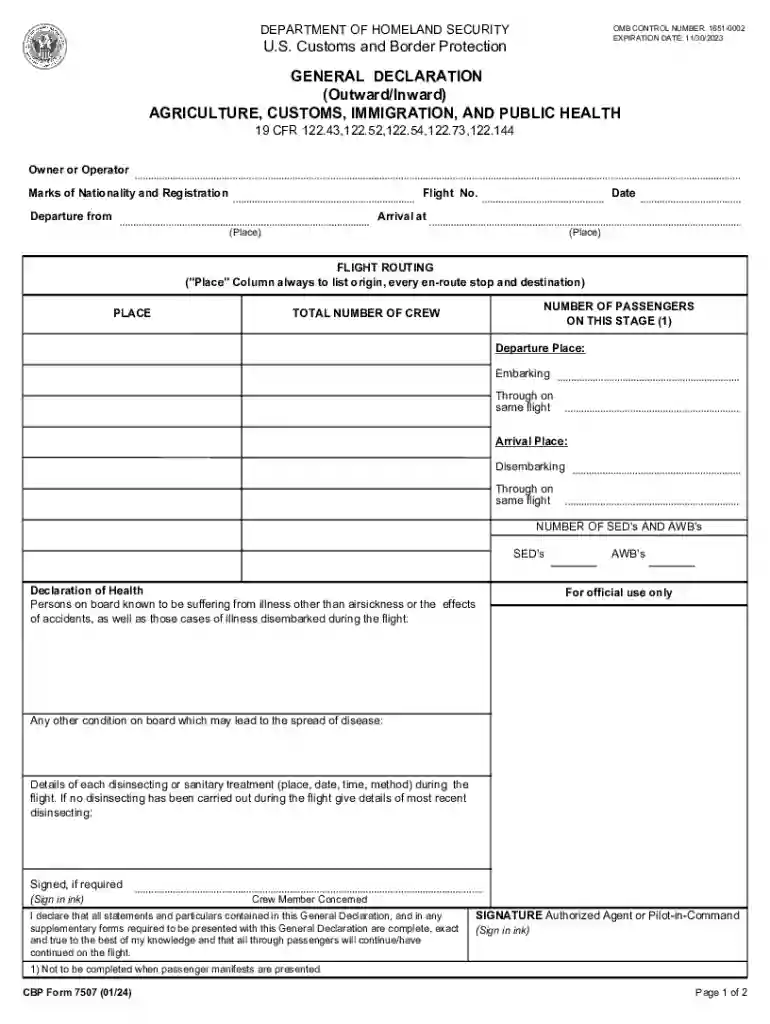
Cbp form 7507-2026

Get Form
customs border declaration Preview on Page 1

Here's how it works

01. Edit your customs border declaration online
Type text, add images, blackout confidential details, add comments, highlights and more.

02. Sign it in a few clicks
Draw your signature, type it, upload its image, or use your mobile device as a signature pad.

03. Share your form with others
Send cbp form declaration via email, link, or fax. You can also download it, export it or print it out.

How to use or fill out cbp form 7507 with DocHub

Form edit decoration
9.5
Ease of Setup
DocHub User Ratings on G2
9.0
Ease of Use
DocHub User Ratings on G2
  1. Click ‘Get Form’ to open the cbp form 7507 in our editor.
  2. Begin by filling out the 'Owner or Operator' section, including the flight number, departure location, and arrival destination. Ensure all details are accurate for smooth processing.
  3. In the 'Flight Routing' section, list every stop along the route. This includes the origin and any en-route locations before reaching the final destination.
  4. Enter the total number of passengers and crew members on board. Make sure to include their surnames and initials as required in the respective fields.
  5. Complete the 'Declaration of Health' section if there are any known illnesses on board. Provide details of any disinsecting treatments conducted during the flight.
  6. Finally, sign where indicated as either an authorized agent or pilot-in-command, ensuring that all information is true and complete.

Start using our platform today to fill out your cbp form 7507 quickly and efficiently!

See more cbp form 7507 versions

We've got more versions of the cbp form 7507 form. Select the right cbp form 7507 version from the list and start editing it straight away!
Versions Form popularity Fillable & printable
2024 4.8 Satisfied (42 Votes)
2019 4.8 Satisfied (70 Votes)
2017 4.2 Satisfied (116 Votes)
2012 4.1 Satisfied (51 Votes)
2009 4.4 Satisfied (44 Votes)
1996 4.2 Satisfied (49 Votes)
be ready to get more

Complete this form in 5 minutes or less

Get form

Got questions?

We have answers to the most popular questions from our customers. If you can't find an answer to your question, please contact us.
Contact us
How to fill out CBP 7507 Obtain the CBP Form 7507 from the official Customs and Border Protection (CBP) website or your local CBP office. Fill in the date on the top of the form. Provide your business name and address in the designated fields. Enter the name and address of the importer in the respective sections.
CBP Declaration Form 6059B provides us with basic information about who you are and what you are bringing into the United States, such as agricultural and wildlife products and whether or not you have visited a farm prior to traveling to the United States.
CBP Form 7507, General Declaration, must be filed for all aircraft entering under the provisions of 19 CFR 122.41. This form is used to document clearance by the arriving aircraft at the required inspectional facilities and inspections by appropriate regulatory agency staffs.
US Customs Form 7507, or the General Declaration, is used by the aircraft commander or agent upon the aircrafts arrival from a foreign port to detail the particulars of the aircraft, crew, passengers, and cargo.

Security and compliance

At DocHub, your data security is our priority. We follow HIPAA, SOC2, GDPR, and other standards, so you can work on your documents with confidence.

Learn more
ccpa2
pci-dss
gdpr-compliance
hipaa
soc-compliance