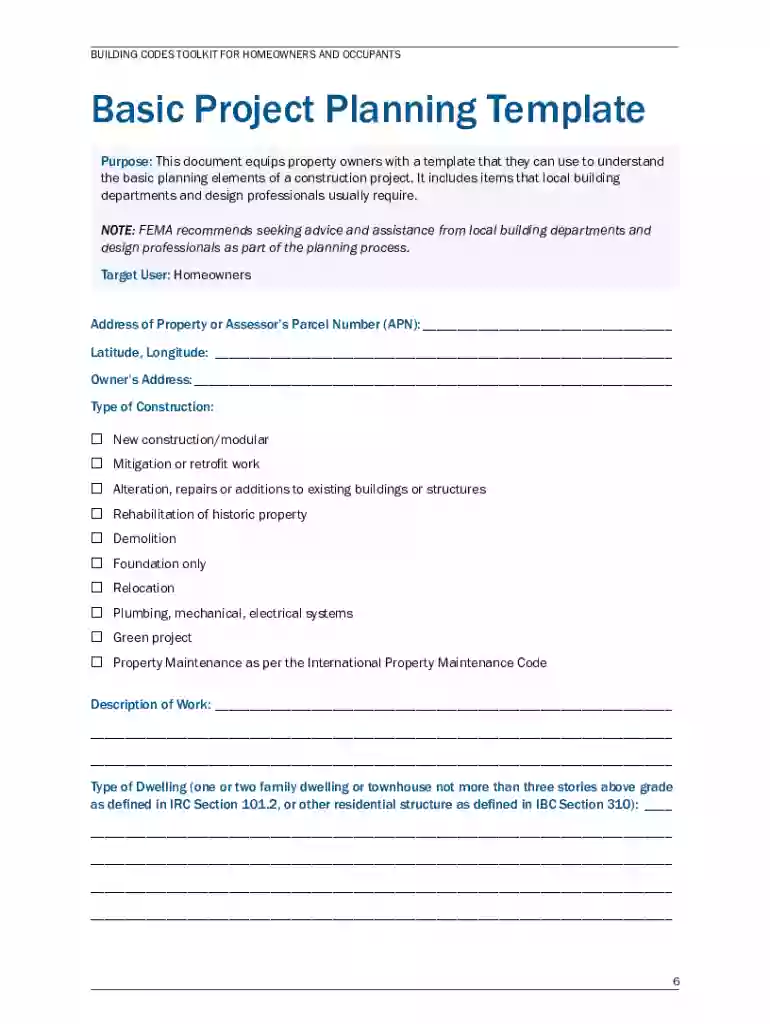
Basic Project Planning Template Building Codes 2026

Get Form
Basic Project Planning Template Building Codes Preview on Page 1

Here's how it works

01. Edit your form online
Type text, add images, blackout confidential details, add comments, highlights and more.

02. Sign it in a few clicks
Draw your signature, type it, upload its image, or use your mobile device as a signature pad.

03. Share your form with others
Send it via email, link, or fax. You can also download it, export it or print it out.

How to use or fill out Basic Project Planning Template Building Codes

Form edit decoration
9.5
Ease of Setup
DocHub User Ratings on G2
9.0
Ease of Use
DocHub User Ratings on G2
  1. Click ‘Get Form’ to open it in the editor.
  2. Begin by entering the 'Address of Property or Assessor’s Parcel Number (APN)' at the top of the form. This is crucial for identifying your project location.
  3. Fill in the 'Latitude, Longitude' fields to provide precise geographical coordinates for your property.
  4. Select the 'Type of Construction' that best describes your project from the provided options, ensuring you check all that apply.
  5. In the 'Description of Work' section, clearly outline what your project entails. Be as detailed as possible to avoid confusion later.
  6. Complete the 'Type of Dwelling' section by specifying whether it is a single-family home, townhouse, or another type of residential structure.
  7. Proceed to fill out hazard indicators such as 'Design Wind Speed', 'Seismic Design Category', and others based on local building codes and regulations.
  8. Lastly, review all sections for accuracy before saving or sharing your completed template using our platform's export features.

Start using our platform today to streamline your project planning process for free!

See more Basic Project Planning Template Building Codes versions

We've got more versions of the Basic Project Planning Template Building Codes form. Select the right Basic Project Planning Template Building Codes version from the list and start editing it straight away!
Versions Form popularity Fillable & printable
2023 4.5 Satisfied (34 Votes)
2013 4.9 Satisfied (58 Votes)
be ready to get more

Complete this form in 5 minutes or less

Get form

Got questions?

We have answers to the most popular questions from our customers. If you can't find an answer to your question, please contact us.
Contact us
Yes, you can use Excel to manage simple projects, especially if your team is small and you want to save money. Excel is not specifically designed to manage projects, but it can handle many project management tasks, such as planning and tracking resource usage, budgeting, and managing day-to-day tasks.
How to create a project plan in six steps. Define your project scope. Identify and meet with stakeholders. Structure your project deliverables, milestones, and dependencies. Set your project budget. Outline your schedule and timeline. Present the project plan to stakeholders.
Here are five of the most important commercial building codes you should be aware of. Means of Egress. Fire Safety and Suppression Systems. Structural Integrity and Load-Bearing Standards. Accessibility (ADA Compliance) Energy Efficiency and Mechanical Systems.
How to Create a Residential Construction Project Plan Define Project Scope and Objectives. Create a Detailed Timeline. Budget and Cost Estimation. Resource Allocation and Subcontractor Coordination. Risk Management and Contingency Planning. Permit Acquisition and Compliance.
How do I create a roadmap in Excel? Step-by-step instructions List the main components and dates of your project schedule in Excel. Set a timeline at the top. Set up horizontal swimlanes and sub-swimlanes. Include the details of each project step in swimlanes. Add descriptions to shapes. Add milestones.

Security and compliance

At DocHub, your data security is our priority. We follow HIPAA, SOC2, GDPR, and other standards, so you can work on your documents with confidence.

Learn more
ccpa2
pci-dss
gdpr-compliance
hipaa
soc-compliance

People also ask

How to create an Excel timeline in 7 steps List your key events or dates in an Excel table. Make a timeline in Excel by setting it up as a Scatter chart. Add Milestone data to your timeline. Turn your Scatter chart into a timeline. Format chart to look like a timeline. Add titles to your timelines milestones.

Related links