Box or Suite 2026

Get Form
Box or Suite Preview on Page 1

Here's how it works

01. Edit your form online
Type text, add images, blackout confidential details, add comments, highlights and more.

02. Sign it in a few clicks
Draw your signature, type it, upload its image, or use your mobile device as a signature pad.

03. Share your form with others
Send it via email, link, or fax. You can also download it, export it or print it out.

How to use or fill out Box or Suite with our platform

Form edit decoration
9.5
Ease of Setup
DocHub User Ratings on G2
9.0
Ease of Use
DocHub User Ratings on G2
  1. Click ‘Get Form’ to open the Box or Suite document in the editor.
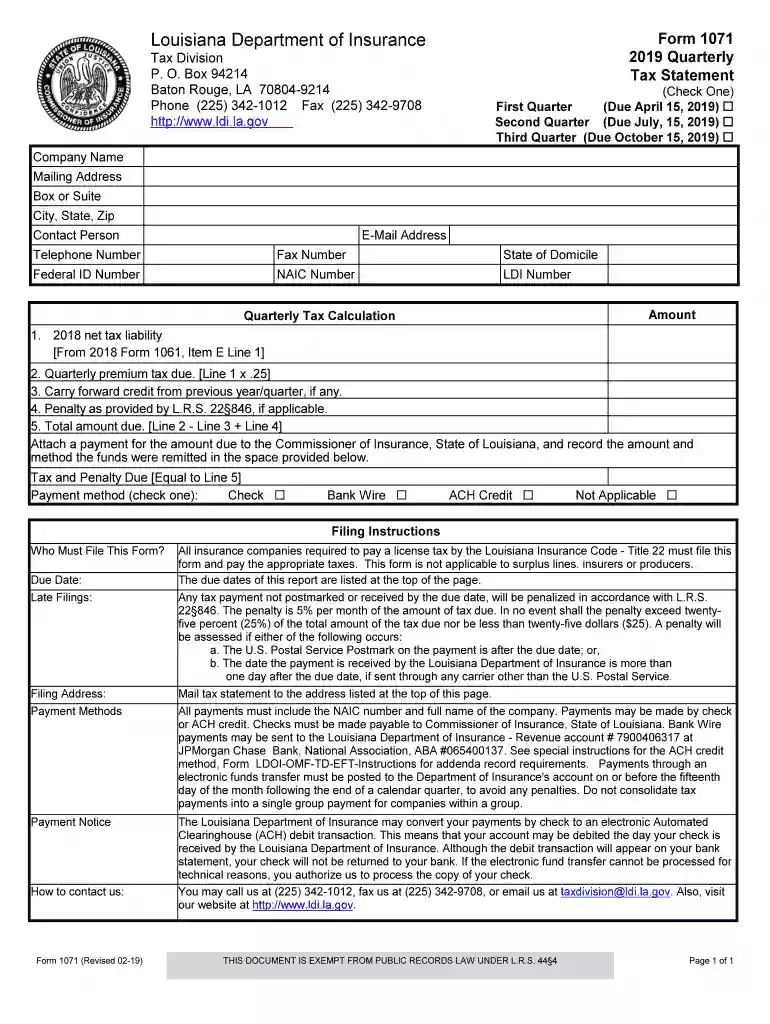
  2. Begin by entering your Company Name and Mailing Address. Ensure that you include the Box or Suite number for accurate processing.
  3. Fill in the City, State, and Zip code fields to provide your complete address.
  4. Enter the Contact Person's name along with their E-Mail Address, Telephone Number, and Fax Number for communication purposes.
  5. Specify your State of Domicile, Federal ID Number, NAIC Number, and LDI Number as required for tax identification.
  6. Calculate your Quarterly Tax by following the provided formula: start with your 2018 net tax liability from Form 1061, then compute the quarterly premium tax due.
  7. Complete any applicable fields regarding penalties and total amount due. Make sure to attach a payment method as indicated.

Start using our platform today to streamline your form completion process effortlessly!

See more Box or Suite versions

We've got more versions of the Box or Suite form. Select the right Box or Suite version from the list and start editing it straight away!
Versions Form popularity Fillable & printable
2024 4.3 Satisfied (58 Votes)
2019 4.4 Satisfied (23 Votes)
be ready to get more

Complete this form in 5 minutes or less

Get form

Got questions?

We have answers to the most popular questions from our customers. If you can't find an answer to your question, please contact us.
Contact us
Party suites typically offer a larger event space for entertaining more people in a suite setting. Loge boxes, which are typically designed for four to six people, allow corporate buyers to experience the game in a semi-private, suite-like setting.
Unlike box seats at a stadium, concert, or arena, theater box seats are often discounted there may be sightline issues that cut off certain areas of the stage, or nearby sound or electric equipment that obscure the views. But a box seat isnt always a bad seat.
The low end is $750,000 and the most expensive is $2 million. In 2022, SoFi Stadiums largest suite went for $2.2 million. Last year, Allegiant Stadiums priciest suite (which Taylor Swift watched the game in) was $3 million.
All the Celebrities Inside Taylor Swifts $3 Million Dollar Super Bowl Suite. Ice Spice and the Haim sisters secured the best seats in the house. Emily is a New York-based writer and InStyles evergreen and special projects editor.
Behind the doors of the VIP suites, high-rollers like Taylor Swift will be treated to succulent tomahawk steaks that have the Super Bowl LIX logo branded on the bone, eye-popping seafood towers, and bespoke sushi displays crafted in the shape of LIX in honor of the games 59th anniversary.

Security and compliance

At DocHub, your data security is our priority. We follow HIPAA, SOC2, GDPR, and other standards, so you can work on your documents with confidence.

Learn more
ccpa2
pci-dss
gdpr-compliance
hipaa
soc-compliance

People also ask

How much did Travis Kelce spend on his Super Bowl suite? Kelce reportedly spent up to $3 million on a premium suite to ensure his loved ones had the best views and amenities. What do Super Bowl suites include?
All the Celebrities Inside Taylor Swifts $3 Million Dollar Super Bowl Suite.
Suites are generally more expensive than hotel rooms due to their larger size, enhanced amenities, and increased level of comfort and luxury.

Related links