Fillable Online Application for Temporary Disconnect and 2026

Get Form
Fillable Online Application for Temporary Disconnect and Preview on Page 1

Here's how it works

01. Edit your form online
Type text, add images, blackout confidential details, add comments, highlights and more.

02. Sign it in a few clicks
Draw your signature, type it, upload its image, or use your mobile device as a signature pad.

03. Share your form with others
Send it via email, link, or fax. You can also download it, export it or print it out.

How to use or fill out Fillable Online Application for Temporary Disconnect and with our platform

Form edit decoration
9.5
Ease of Setup
DocHub User Ratings on G2
9.0
Ease of Use
DocHub User Ratings on G2
  1. Click ‘Get Form’ to open the Fillable Online Application for Temporary Disconnect in the editor.
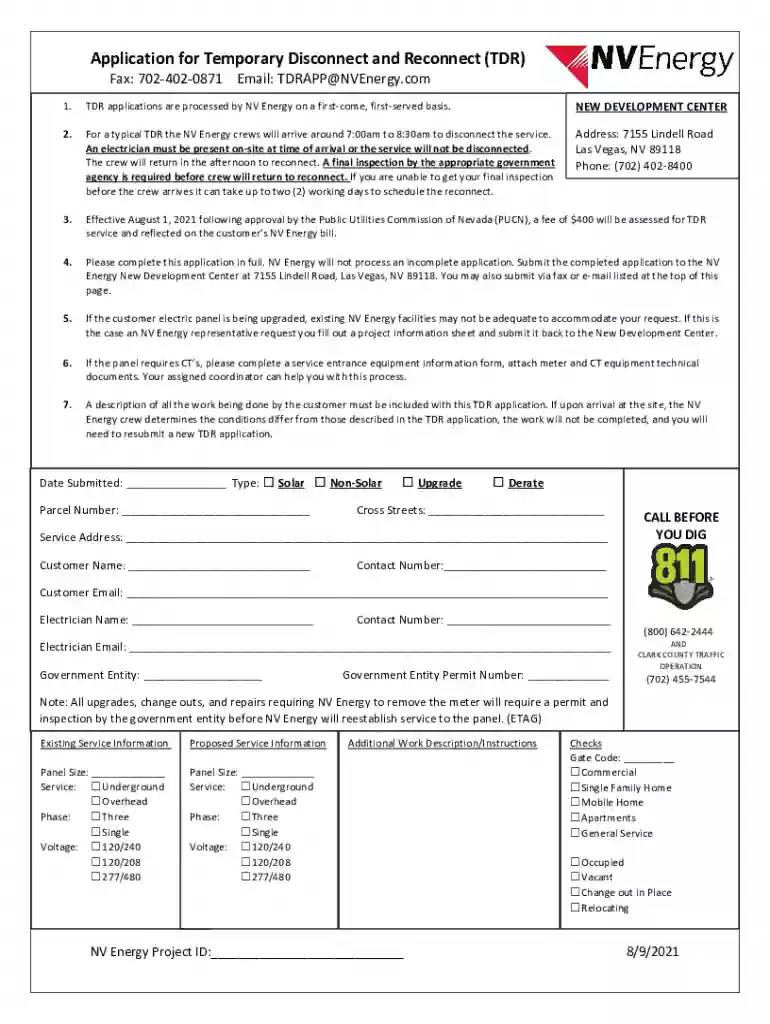
  2. Begin by entering the 'Date Submitted' and selecting the type of application (Solar or Non-Solar) by checking the appropriate box.
  3. Fill in your 'Parcel Number', 'Cross Streets', and 'Service Address' accurately to ensure proper processing.
  4. Provide your personal details including 'Customer Name', 'Contact Number', and 'Email'.
  5. Next, input the electrician's information, including their name, contact number, and email address.
  6. Complete the sections regarding existing and proposed service information, ensuring all panel sizes, service types, phases, and voltages are correctly filled out.
  7. In the 'Additional Work Description/Instructions' section, provide a detailed description of all work being done. This is crucial for approval.
  8. Review all entries for accuracy before submitting. Incomplete applications will not be processed.

Start filling out your application today using our platform for free!

be ready to get more

Complete this form in 5 minutes or less

Get form

Got questions?

We have answers to the most popular questions from our customers. If you can't find an answer to your question, please contact us.
Contact us

If you frequently work with documents stored in your Google Drive, DocHub is a superb option for you to easily and quickly fill out, modify, and sign them. This editor integrates properly with Google services, so you can export your Fillable Online Application for Temporary Disconnect and from your Google Drive to the editor without the need of downloading and re-uploading it. Right-click on your document, choose Open With → DocHub PDF Sign and Edit. In our editor, add and assign Signature Fields for all people involved, then click on the Menu option above → Send → select how you want to share your form.

You can get and edit your Fillable Online Application for Temporary Disconnect and online by using DocHub. Its straightforward yet feature-rich design enables you to start effective work immediately after you register your account. Create your account and add your document, and then our interface will guide you through our stress-free form completion experience.

I am [your name] I have a shop in (address). My shop will need renovations, which may take two to three months to complete. Please temporarily disconnect the electricity supply until I get back to you because the renovation work could harm the electricity meter and other electric devices.
If you need to disconnect your electricity meter, you will need to contact your electricity supplier (the company who you pay your electricity bills to) to complete the work.
Key Points to Include Your name, address, and mobile number. Your consumer or account number. Date and subject line. Recipient (usually the Manager, Electricity Board) Clear explanation of the issue (faulty, burnt, not working, high bill, etc.) Request for urgent inspection or replacement.

Security and compliance

At DocHub, your data security is our priority. We follow HIPAA, SOC2, GDPR, and other standards, so you can work on your documents with confidence.

Learn more
ccpa2
pci-dss
gdpr-compliance
hipaa
soc-compliance

People also ask

When your property (or metered street furniture) no longer needs an electricity supply you can apply to disconnect from the mains network and make it safe.
Dear Sir/ Madam, I am [your name] I have a shop in (address). My shop will need renovations, which may take two to three months to complete. Please temporarily disconnect the electricity supply until I get back to you because the renovation work could harm the electricity meter and other electric devices.

Related links