ALLSTATE INSURANCE COMPANY OF CANADA - allstatebenefits ca 2026

Get Form
enrolment designation beneficiary Preview on Page 1

Here's how it works

01. Edit your enrolment designation beneficiary online
Type text, add images, blackout confidential details, add comments, highlights and more.
02. Sign it in a few clicks
Draw your signature, type it, upload its image, or use your mobile device as a signature pad.
03. Share your form with others
Send canada benefits enrolment via email, link, or fax. You can also download it, export it or print it out.

How to use or fill out ALLSTATE INSURANCE COMPANY OF CANADA - allstatebenefits ca with our platform

Form edit decoration
9.5
Ease of Setup
DocHub User Ratings on G2
9.0
Ease of Use
DocHub User Ratings on G2
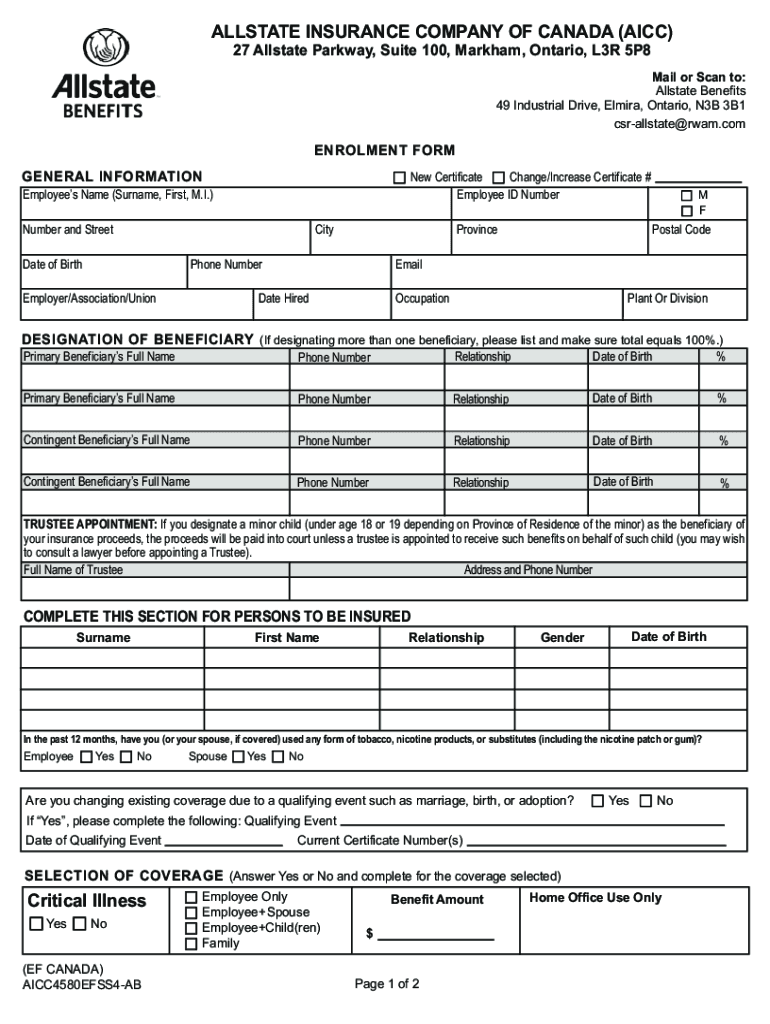
  1. Click ‘Get Form’ to open the ALLSTATE INSURANCE COMPANY OF CANADA enrolment form in the editor.
  2. Begin by filling out the 'General Information' section. Enter your name, address, date of birth, employee ID number, and contact details. Ensure accuracy as this information is crucial for your insurance records.
  3. Designate your beneficiaries in the 'Designation of Beneficiary' section. List their full names, relationships to you, and ensure that the total percentage equals 100%. This step is vital for ensuring your benefits are distributed according to your wishes.
  4. Complete the 'Trustee Appointment' if applicable. If a minor is designated as a beneficiary, appoint a trustee by providing their full name and contact information.
  5. Fill out the 'Persons to be Insured' section with details about yourself and any dependents. Include their relationship to you and confirm tobacco usage status.
  6. Select your coverage options in the 'Selection of Coverage' section. Indicate whether you want critical illness coverage and choose from available plans.
  7. Review the 'Electronic Acceptance' section carefully. Choose whether you prefer electronic delivery of documents and provide consent as needed.
  8. Finally, sign and date the form in the 'Acceptance/Authorization' section to complete your enrolment process.

Start using our platform today for free to streamline your document editing and signing experience!

be ready to get more

Complete this form in 5 minutes or less

Get form

Got questions?

We have answers to the most popular questions from our customers. If you can't find an answer to your question, please contact us.
Contact us
If you need to make a claim contact your insurer as soon as possible and ask them to send you a claim form. They may be able to email this to you to speed things up. Complete the claim form carefully and keep a copy for yourself.
1. Log into the MyBenefits website at . 2. From the Claim Center, click File a Claim.
Contact your agency or our Customer Contact Centre at 1-800-allstate (1-800-255-7828) if you have any questions or concerns.
I was in an accident and need to make a claim, what should I do? Simply submit your claim online on My Account, and a claims team member will determine if youre eligible to submit photos to complete the estimate for your auto. If eligible, you can use the Allstate mobile app or text ALLSTATE6 to 25788 to start today.
0:16 1:39 To begin make sure youre in a safe well-lit. Area and that you have a good cellular. Connection.MoreTo begin make sure youre in a safe well-lit. Area and that you have a good cellular. Connection. Open your Allstate app and select quick photo claim from the home.

Security and compliance

At DocHub, your data security is our priority. We follow HIPAA, SOC2, GDPR, and other standards, so you can work on your documents with confidence.

Learn more
ccpa2
pci-dss
gdpr-compliance
hipaa
soc-compliance

People also ask

File a claim through your Allstate Protection Plan for covered incidents at .

Related links