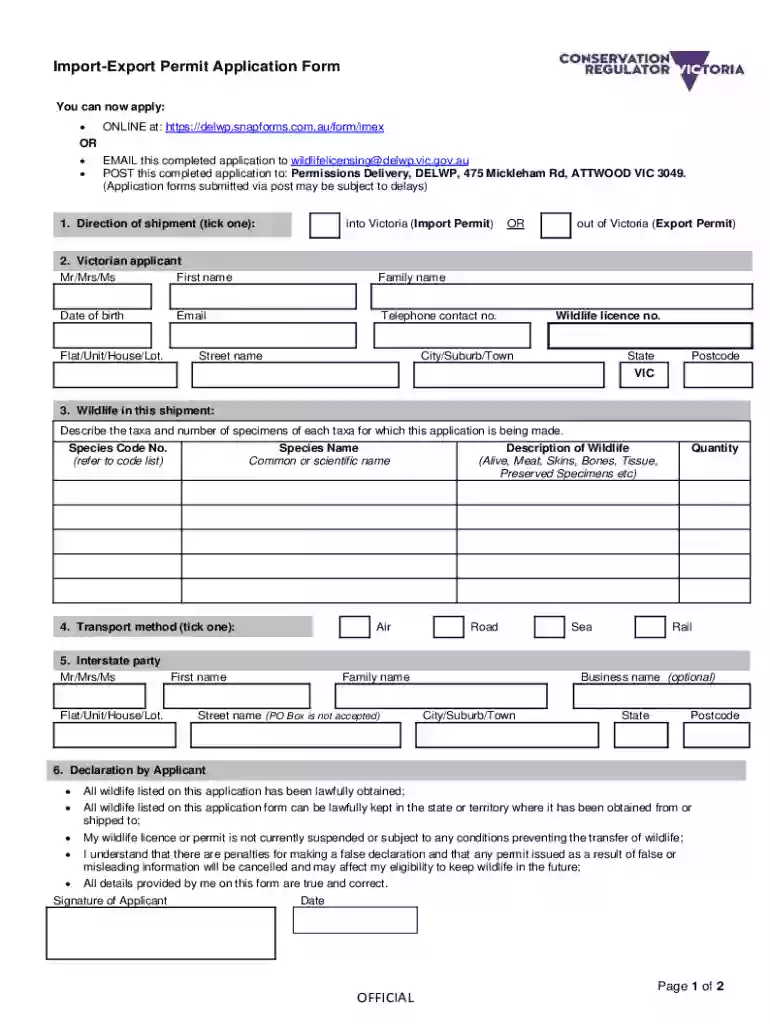
Import-Export Permit Application Form - Victorian Government Preview on Page 1

Import-Export Permit Application Form - Victorian Government 2026

Here's how it works

  • 01. Edit your form online

    Type text, add images, blackout confidential details, add comments, highlights and more.

  • 02. Sign it in a few clicks

    Draw your signature, type it, upload its image, or use your mobile device as a signature pad.

  • 03. Share your form with others

    Send it via email, link, or fax. You can also download it, export it or print it out.

How to use or fill out Import-Export Permit Application Form - Victorian Government with DocHub

Form edit decoration
9.5
Ease of Setup
DocHub User Ratings on G2
9.0
Ease of Use
DocHub User Ratings on G2
  1. Click ‘Get Form’ to open the Import-Export Permit Application Form in our editor.
  2. Begin by selecting the direction of shipment: either 'into Victoria' for an Import Permit or 'out of Victoria' for an Export Permit. Tick the appropriate box.
  3. Fill in your personal details as the Victorian applicant, including your title (Mr/Mrs/Ms), first name, family name, date of birth, telephone number, email address, and residential address.
  4. In the 'Wildlife in this shipment' section, describe the taxa and number of specimens you are applying for. Include species code numbers and names as required.
  5. Select your transport method by ticking one of the options: Air, Road, Sea, or Rail.
  6. Provide details about the interstate party if applicable, including their name and address information.
  7. Complete the declaration by confirming that all wildlife listed has been lawfully obtained and sign with your name and date.

Start filling out your application today using our platform for free!

See more Import-Export Permit Application Form - Victorian Government versions

We've got more versions of the Import-Export Permit Application Form - Victorian Government form. Select the right Import-Export Permit Application Form - Victorian Government version from the list and start editing it straight away!

VersionsForm popularityFillable & printable
20224.3 Satisfied (38 Votes)
20084 Satisfied (52 Votes)

be ready to get more

Complete this form in 5 minutes or less

Security and compliance

At DocHub, your data security is our priority. We follow HIPAA, SOC2, GDPR, and other standards, so you can work on your documents with confidence.

Related links

Proceedings of the CleanUp Conference 2015

Sep 13, 2015 Disclaimer: This publication is provided for the purpose of disseminating information relating to scientific and technical matters.Read more

Learn more
Government control of export and import in foreign countries

by AM Hannay 1926 Cited by 1 government printer for the -state of Victoria, 1920. A list of articles the export of which has been pro- hibited or subjected to license

Learn more
50 CFR Part 23 -- Convention on International Trade in

Permit means a CITES document that identifies on its face import permit or export permit. Collect the cancelled foreign export permit or re-export certificate.

Learn more
If you believe that this page should be taken down, please follow our DMCA take down process here