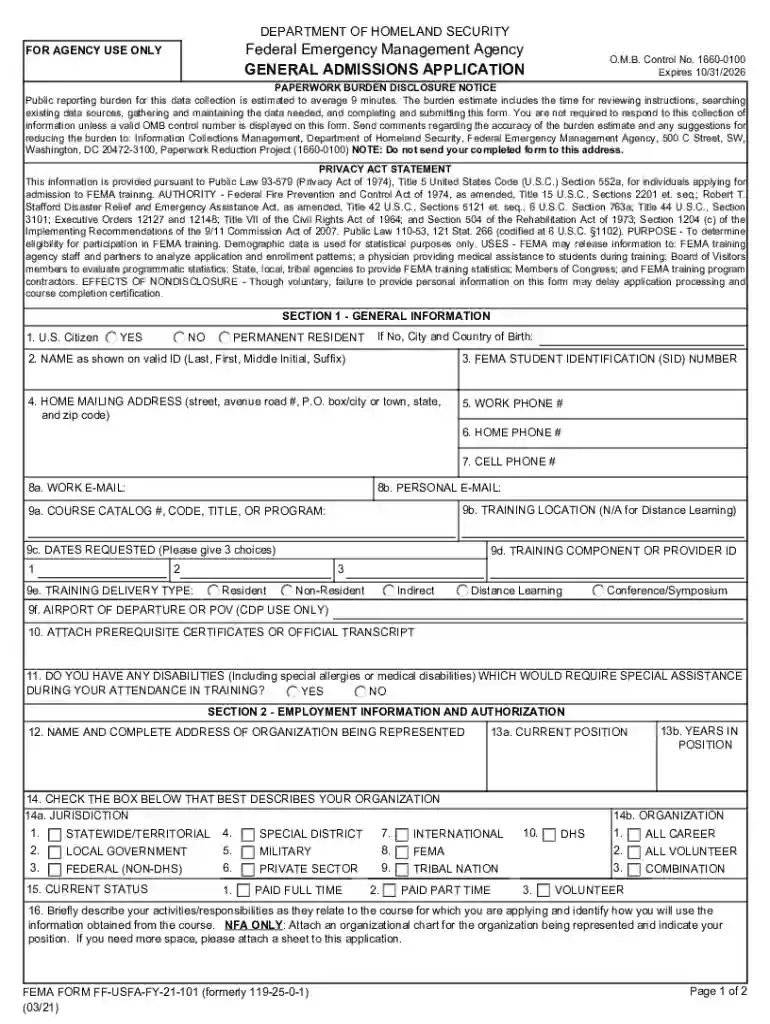
Expires 10 31 2026

Get Form
fema form application Preview on Page 1

Here's how it works

01. Edit your fema form application online
Type text, add images, blackout confidential details, add comments, highlights and more.

02. Sign it in a few clicks
Draw your signature, type it, upload its image, or use your mobile device as a signature pad.

03. Share your form with others
Send fillable fema form via email, link, or fax. You can also download it, export it or print it out.

How to use or fill out Expires 10 31 2026

Form edit decoration
9.5
Ease of Setup
DocHub User Ratings on G2
9.0
Ease of Use
DocHub User Ratings on G2
  1. Click ‘Get Form’ to open it in the editor.
  2. Begin with Section 1: General Information. Fill in your citizenship status and provide your name as shown on your valid ID. Ensure accuracy for identification purposes.
  3. Continue by entering your FEMA Student Identification Number, home mailing address, and contact numbers. This information is crucial for communication regarding your application.
  4. In Section 1, also specify your training details including course catalog number, requested dates, and training delivery type. Be sure to provide three date options for flexibility.
  5. Move to Section 2: Employment Information. Fill in the organization you represent, your current position, and check the appropriate boxes that describe your organization.
  6. Complete Section 3: Endorsement and Certification by certifying the accuracy of your information and obtaining necessary approvals from supervisors if required.

Start filling out the Expires 10 31 2026 form today using our platform for free!

See more Expires 10 31 2026 versions

We've got more versions of the Expires 10 31 2026 form. Select the right Expires 10 31 2026 version from the list and start editing it straight away!
Versions Form popularity Fillable & printable
2021 4.2 Satisfied (46 Votes)
2012 4.8 Satisfied (114 Votes)
2010 4 Satisfied (44 Votes)
be ready to get more

Complete this form in 5 minutes or less

Get form

Got questions?

We have answers to the most popular questions from our customers. If you can't find an answer to your question, please contact us.
Contact us

With DocHub, you can quickly sign your fema application pdf or any other paperwork on iOS, even without installing extra programs. You can access your DocHub account from any web-connected browser and complete and sign your form in any way you like with just a couple of clicks.

Document editing with DocHub is equally convenient on desktop and mobile devices. You just need an internet browser to edit your fillable fema on Android. Open our site and sign in to access the instruments you need. Add your file and introduce your intended changes. After that, you can keep your form in your file storage or send it out immediately.

Foods with an expiration date will have the letters EXP along with the last safe date of consumption. Items with the letters BB/MA are products with best before dates, which are products that do not need to be disposed of so quickly.
The month and day must be included, and the year if necessary. The format must be year/month/day (with 2- or 4-digit year). An expiration date on food differs from a best-before date.
Look for a date accompanied with use by, sell by, or best by.Check the bottom of the product, the sides of the container, the lid, and the necks of bottles. The numbers are stamped on and can sometimes be hard to read or find depending on where they were placed.

Security and compliance

At DocHub, your data security is our priority. We follow HIPAA, SOC2, GDPR, and other standards, so you can work on your documents with confidence.

Learn more
ccpa2
pci-dss
gdpr-compliance
hipaa
soc-compliance
be ready to get more

Complete this form in 5 minutes or less

Get form

People also ask

Look for the void by date on the check. Some cashiers checks may have no expiration, but more typically they expire after 90 or 180 days.

fillable fema fillable