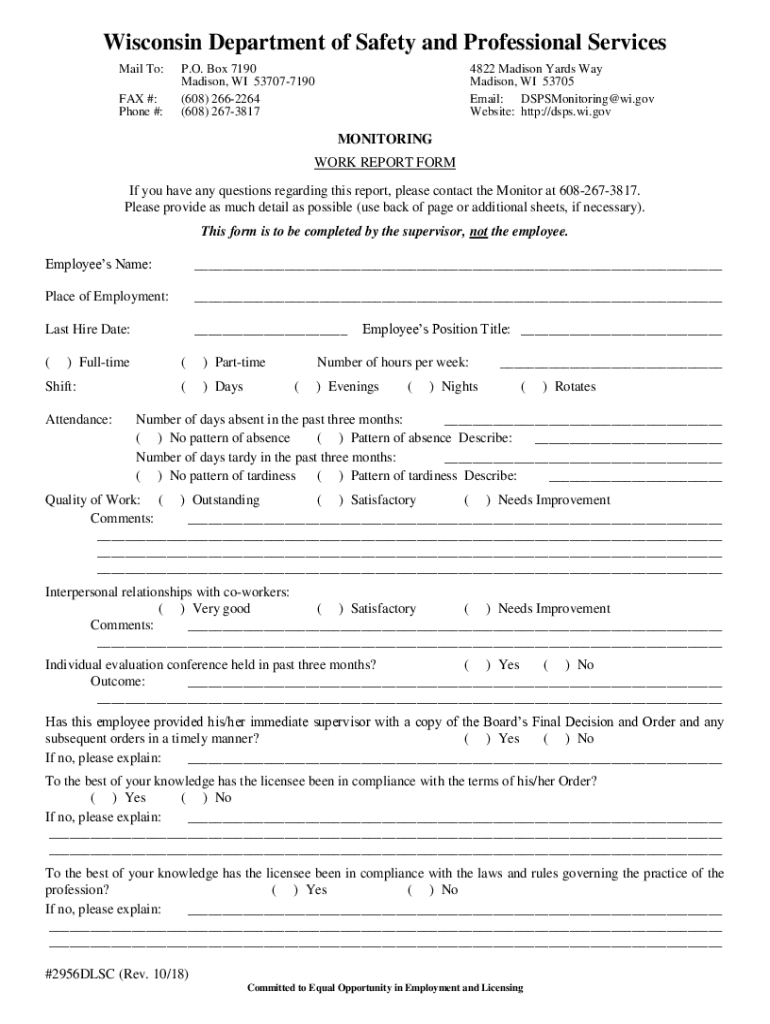
08 15 12 #2956 Monitoring - Work Report Form (non-nursing professions) KCB-2026

Get Form
08 15 12 #2956 Monitoring - Work Report Form (non-nursing professions) KCB Preview on Page 1

Here's how it works

01. Edit your form online
Type text, add images, blackout confidential details, add comments, highlights and more.
02. Sign it in a few clicks
Draw your signature, type it, upload its image, or use your mobile device as a signature pad.
03. Share your form with others
Send it via email, link, or fax. You can also download it, export it or print it out.

How to use or fill out 08 15 12 #2956 Monitoring - Work Report Form (non-nursing professions) KCB with Our Platform

Form edit decoration
9.5
Ease of Setup
DocHub User Ratings on G2
9.0
Ease of Use
DocHub User Ratings on G2
  1. Click ‘Get Form’ to open the 08 15 12 #2956 Monitoring - Work Report Form in the editor.
  2. Begin by entering the employee’s name and place of employment in the designated fields.
  3. Fill in the last hire date and select whether the employee is full-time or part-time, along with their shift details.
  4. Indicate the number of hours worked per week and record any absences or tardiness patterns over the past three months.
  5. Evaluate the quality of work and interpersonal relationships with co-workers, providing comments as necessary.
  6. Complete sections regarding supervision levels, access to controlled substances, and compliance with orders.
  7. Finally, ensure that all required signatures are added before saving your completed form for submission.

Start using our platform today to easily fill out your forms online for free!

See more 08 15 12 #2956 Monitoring - Work Report Form (non-nursing professions) KCB versions

We've got more versions of the 08 15 12 #2956 Monitoring - Work Report Form (non-nursing professions) KCB form. Select the right 08 15 12 #2956 Monitoring - Work Report Form (non-nursing professions) KCB version from the list and start editing it straight away!
Versions Form popularity Fillable & printable
2018 4.2 Satisfied (55 Votes)
be ready to get more

Complete this form in 5 minutes or less

Get form

Got questions?

We have answers to the most popular questions from our customers. If you can't find an answer to your question, please contact us.
Contact us

Sure, and it’s really straightforward! DocHub is a web-based PDF editor with advanced document processing features that allow you promptly modify your documents, fill out empty fields and drop new ones for others to fill out, and create eSignatures in several ways. Upload your 08 15 12 #2956 Monitoring - Work Report Form (non-nursing professions) KCB, provide information as requested, and select how you want to eSign your document - by typing your name, drawing your signature, uploading its image, or utilizing a QR code.

You can complete and sign your 08 15 12 #2956 Monitoring - Work Report Form (non-nursing professions) KCB online, even on a tight deadline. All you need to access high quality editing tools on any device is a DocHub account, that you can sign up in just a couple of moments. Once you register, add your document or find what you are looking for in our catalog, complete it using the editing tools you need, and place your electronic signature on it at the end.

If youve been injured on the job, you may be entitled to workers compensation benefits. In order to receive these benefits, youll need to fill out a C4 form. This form is used to report your injury to your employer and to the workers compensation insurance carrier.
Post a Notice of Compliance Posting a notice of compliance with workers compensation laws can help your employees respond if someone gets hurt on the job. This document should include important information like your insurance carrier and the effective date of your policy.
Wages List (Form C-4) includes the employee names, Social Security numbers and wage amounts paid in the quarter. TWC Rules 815.107 and 815.109 require all employers to report wages and pay unemployment taxes electronically.

Security and compliance

At DocHub, your data security is our priority. We follow HIPAA, SOC2, GDPR, and other standards, so you can work on your documents with confidence.

Learn more
ccpa2
pci-dss
gdpr-compliance
hipaa
soc-compliance

People also ask

What Not to Say to a Workers Comp Doctor Avoid Downplaying Your Injury: Dont minimize your pain or discomfort. Dont Speculate on Recovery Time: Do not make guesses about how quickly you will recover. Stay Away from Absolute Statements: Do not use words like always or never when describing your symptoms.

Related links