





Deephaven Parking Permit - Fill Online, Printable, Fillable, Blank 2026

Get Form
deephaven parking permit Preview on Page 1

Here's how it works

01. Edit your deephaven parking permit online
Type text, add images, blackout confidential details, add comments, highlights and more.
02. Sign it in a few clicks
Draw your signature, type it, upload its image, or use your mobile device as a signature pad.
03. Share your form with others
Send deephaven parking permit via email, link, or fax. You can also download it, export it or print it out.

How to use or fill out Deephaven Parking Permit - Fill Online, Printable, Fillable, Blank

Form edit decoration
9.5
Ease of Setup
DocHub User Ratings on G2
9.0
Ease of Use
DocHub User Ratings on G2
  1. Click ‘Get Form’ to open it in the editor.
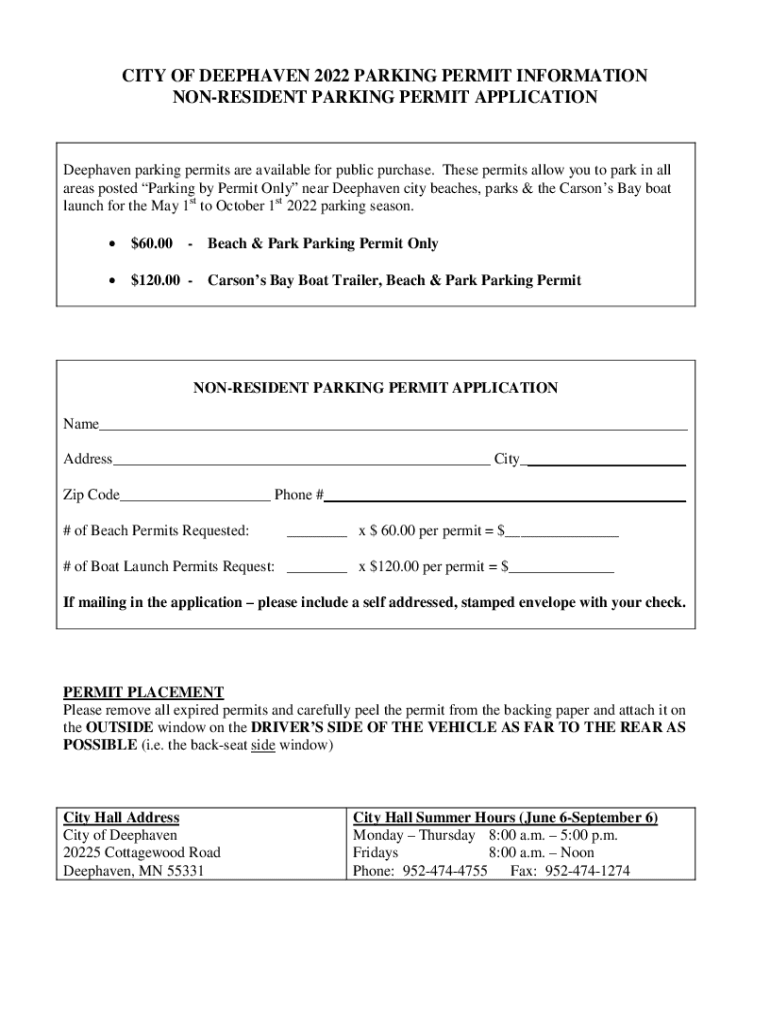
  2. Begin by entering your name in the designated field at the top of the form. Ensure that your name is spelled correctly for accurate processing.
  3. Next, fill in your address, including city and zip code. This information is crucial for permit verification.
  4. Provide your phone number in the specified field. This will be used for any necessary follow-up regarding your application.
  5. Indicate the number of beach permits you are requesting by entering a quantity next to ‘# of Beach Permits Requested’. Multiply this number by $60.00 and enter the total amount in the corresponding field.
  6. Similarly, specify how many boat launch permits you need and calculate the total cost by multiplying by $120.00.
  7. If you plan to mail your application, remember to include a self-addressed stamped envelope with your check before submitting.

Start filling out your Deephaven Parking Permit today for free using our platform!

See more Deephaven Parking Permit - Fill Online, Printable, Fillable, Blank versions

We've got more versions of the Deephaven Parking Permit - Fill Online, Printable, Fillable, Blank form. Select the right Deephaven Parking Permit - Fill Online, Printable, Fillable, Blank version from the list and start editing it straight away!
Versions Form popularity Fillable & printable
2022 4.7 Satisfied (35 Votes)
2018 4.5 Satisfied (23 Votes)
2012 4 Satisfied (31 Votes)
be ready to get more

Complete this form in 5 minutes or less

Get form

Got questions?

We have answers to the most popular questions from our customers. If you can't find an answer to your question, please contact us.
Contact us

Signing documents on a mobile device is fast, easy, and doesn’t require software installation if you have an account with DocHub. Log in from any browser, complete your blank fields with your information, and click on Sign → Create your signature. You can draw your eSignature the same way you usually do on paper, add its image to your city of deephaven parking permit, or type in your name and stylize its look. Whatever option you select, your documentation will be valid.

You can easily complete, modify, and even eSign your city of deephaven permits using DocHub. Create a new profile and begin your free trial. After that, you can add the file with the form and easily make all the necessary edits. No need to print on paper or use a third-party application to sign it, as you can put your electronic signature on your document quicker via DocHub.

Instructions to Purchase a Permit Click on the Parking Portal button in the top right corner. Log in with your CampusID and password. Click + New Permit (above) and see all permits currently available for purchase (below). Select the permit you wish to purchase. The screen will display your recent purchase as Unpaid.
You will be required to upload your proof of address and vehicle before a permit can be issued. If you do not have an e-mail address to create an account, please contact the permit team on 0118 937 3767 (Monday Friday 9am 5pm) and they will be able to post out an application form. Permits last for 12 months.
Short Term and Time Limited Parking Permit TypeRate 1 Hour $4.00 2 Hours $8.00 Daily $8.00 Weekly $40.00

Security and compliance

At DocHub, your data security is our priority. We follow HIPAA, SOC2, GDPR, and other standards, so you can work on your documents with confidence.

Learn more
ccpa2
pci-dss
gdpr-compliance
hipaa
soc-compliance

People also ask

Permit charges Permit typeCurrent fee Resident first permit 48 Resident second permit 180 Business 331 Business discretionary 39821 more rows Apr 19, 2024
If you have any questions or concerns, please call the Parking Office at 956-872-3333.
ParkMobile App Download. Get your favorite app to find pay for parking on-the-go. Park. Pay.
A maximum of two permits are issued to each household in streets designated as within residents parking zones.
You can apply for your permits online. You will need to create an account and must have an e-mail address to do so. You will be required to upload your proof of address and vehicle before a permit can be issued.

Related links

