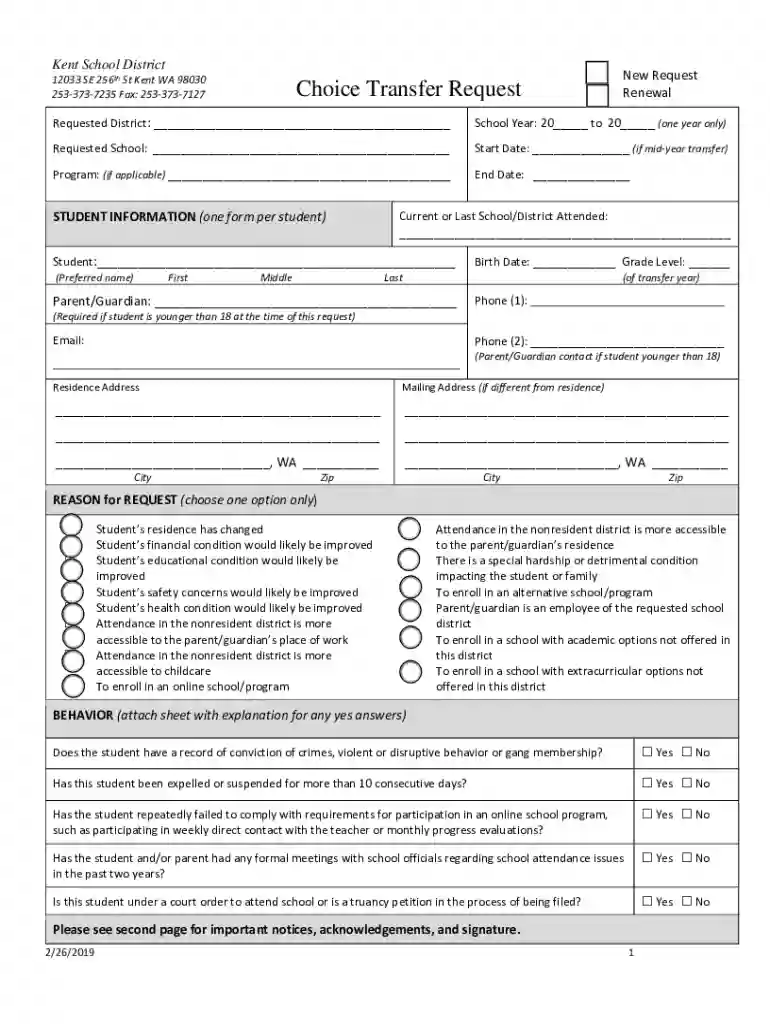
Choice Transfer Request - Kent School District 2026

Get Form
Choice Transfer Request - Kent School District Preview on Page 1

Here's how it works

01. Edit your form online
Type text, add images, blackout confidential details, add comments, highlights and more.

02. Sign it in a few clicks
Draw your signature, type it, upload its image, or use your mobile device as a signature pad.

03. Share your form with others
Send it via email, link, or fax. You can also download it, export it or print it out.

How to use or fill out Choice Transfer Request - Kent School District with our platform

Form edit decoration
9.5
Ease of Setup
DocHub User Ratings on G2
9.0
Ease of Use
DocHub User Ratings on G2
  1. Click ‘Get Form’ to open the Choice Transfer Request in the editor.
  2. Begin by selecting whether this is a New Request or Renewal. Fill in the Requested District and School Year, ensuring you specify the correct dates.
  3. Provide details about the Requested School and Start Date if applicable. If your transfer involves a specific program, include that information as well.
  4. Enter Student Information: Fill out the student's name, birth date, grade level, and parent/guardian contact details including phone numbers and email.
  5. Indicate the Residence Address and Mailing Address if different. Ensure all fields are accurately filled to avoid delays.
  6. Select one reason for your request from the provided options. This helps clarify your motivation for the transfer.
  7. Answer the behavior questions honestly. Attach additional sheets if necessary for explanations.
  8. Review Notices and Acknowledgements carefully before signing. Your signature confirms understanding of responsibilities and consent for record release.
  9. Finally, return the signed form via fax or email as indicated at the bottom of the document.

Start filling out your Choice Transfer Request today using our platform for free!

See more Choice Transfer Request - Kent School District versions

We've got more versions of the Choice Transfer Request - Kent School District form. Select the right Choice Transfer Request - Kent School District version from the list and start editing it straight away!
Versions Form popularity Fillable & printable
2019 4.8 Satisfied (162 Votes)
2015 4 Satisfied (46 Votes)
be ready to get more

Complete this form in 5 minutes or less

Get form

Got questions?

We have answers to the most popular questions from our customers. If you can't find an answer to your question, please contact us.
Contact us

Yes, you can utilize DocHub for signing any business and personal paperwork, including your Choice Transfer Request - Kent School District. All eSignatures you create with our tool are legally binding and court-admissible, as DocHub complies with criteria required by ESIGN and UETA. Save your accomplished document with a detailed Audit Trail if needed.

If you want to edit your Choice Transfer Request - Kent School District on the internet easily, it does not matter what internet browser you employ. DocHub’s straightforward editing instruments are accessible using any internet browser. Simply open the appropriate tab within our editor, add your file, and fill it out without stress.

Steps to request a choice transfer: If you do not see the resident school district listed, please use the Choice Transfer Request form(opens in a new window) to initiate the request. Step 2: After the resident school district approves the transfer, it is sent to the non-resident school district for approval.
I am writing to formally request a transfer for my child, [Students Name], who is currently in Grade [X] at [Current School]. Provide a valid reason for the transfer, such as relocation, a change in family circumstances, or better academic opportunities. Be honest and polite.
Begin with an Introduction: Start off by introducing yourself, and what youre currently studying. Including a brief overview of your reasons for transferring can also be helpful. For example, you may say youre looking to study a specific program not offered at your current school.

Security and compliance

At DocHub, your data security is our priority. We follow HIPAA, SOC2, GDPR, and other standards, so you can work on your documents with confidence.

Learn more
ccpa2
pci-dss
gdpr-compliance
hipaa
soc-compliance
be ready to get more

Complete this form in 5 minutes or less

Get form

People also ask

Contact the New School: docHub out to the admissions office of the school youre interested in. Explain your situation, including your previous enrollment and the fact that you stopped attending. Ask about their transfer process and any specific requirements.
How to Transfer Schools Submit an application. Create an enrollment portal account to choose a school and fill out an application. Upload required documents. Gather your supporting documents and upload them to the enrollment portal. Get approved. Start your learning journey.
Typically, you need to let your childs current school know youre changing schools. Ask the principal for the appropriate form. You also need to contact the new district to get information on how to register your child for school. In most districts, kids attend the school thats zoned for their home address.

Related links