Fillable Online Montana Department of Justice Motor Preview on Page 1

Fillable Online Montana Department of Justice Motor 2026

Here's how it works

  • 01. Edit your form online

    Type text, add images, blackout confidential details, add comments, highlights and more.

  • 02. Sign it in a few clicks

    Draw your signature, type it, upload its image, or use your mobile device as a signature pad.

  • 03. Share your form with others

    Send it via email, link, or fax. You can also download it, export it or print it out.

How to use or fill out Fillable Online Montana Department of Justice Motor

Form edit decoration
9.5
Ease of Setup
DocHub User Ratings on G2
9.0
Ease of Use
DocHub User Ratings on G2
  1. Click ‘Get Form’ to open it in the editor.
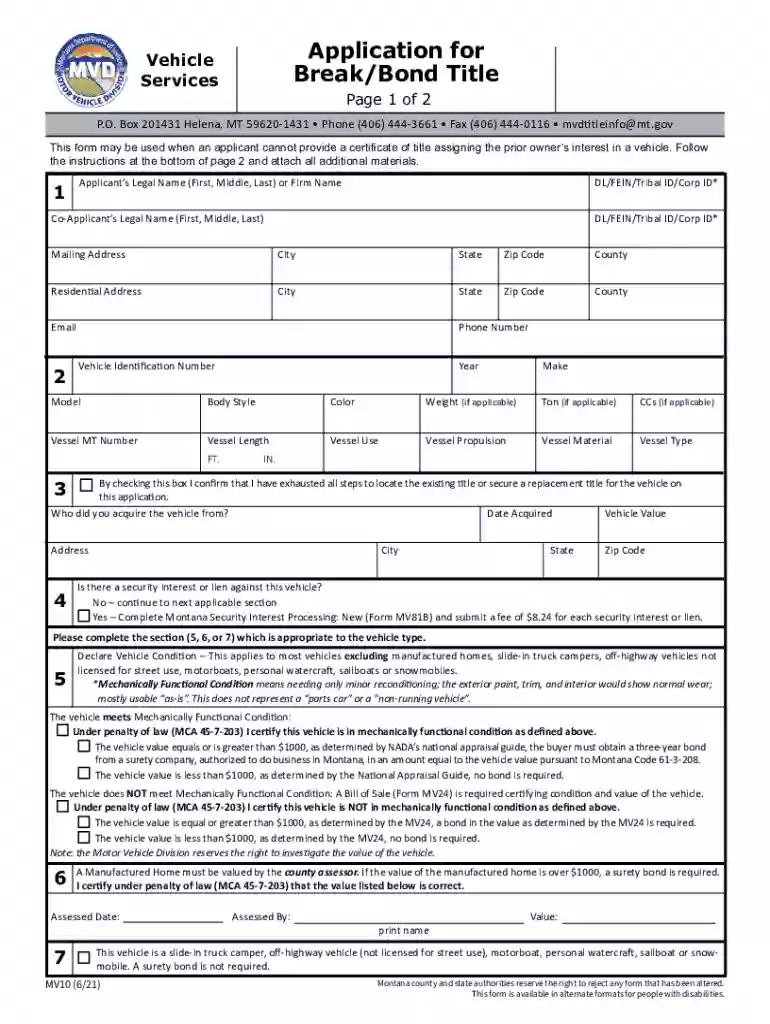
  2. Begin by entering your legal name and identification number in the designated fields. If applicable, include the co-applicant's information.
  3. Fill in your mailing and residential addresses accurately, ensuring all details are correct for correspondence.
  4. Provide the vehicle identification number (VIN), year, make, model, body style, color, and any other relevant vehicle details as required.
  5. Indicate whether there is a security interest or lien against the vehicle. If yes, complete the necessary Montana Security Interest Processing form.
  6. Declare the vehicle condition by checking the appropriate box and providing any necessary documentation if it does not meet mechanically functional condition.
  7. Complete Section 8 by signing and dating the form. Ensure that your signature is notarized as required.

Start using our platform today to fill out your form quickly and efficiently for free!

See more Fillable Online Montana Department of Justice Motor versions

We've got more versions of the Fillable Online Montana Department of Justice Motor form. Select the right Fillable Online Montana Department of Justice Motor version from the list and start editing it straight away!

VersionsForm popularityFillable & printable
20244.1 Satisfied (39 Votes)
20214.3 Satisfied (20 Votes)
20164.3 Satisfied (43 Votes)
20144 Satisfied (31 Votes)

be ready to get more

Complete this form in 5 minutes or less

Got questions?

We have answers to the most popular questions from our customers. If you can't find an answer to your question, please contact us.

Most eSignature solutions require users to have a paid subscription. With DocHub, there are two ways for you to create an electronic signature to your Fillable Online Montana Department of Justice Motor without being charged:

  • You can do it during a 7-day trial period;
  • You can subscribe to a free plan.

The second option, however, has limitations on the number of signatures, sign requests, emails, and documents for editing available per month. You can check for full information here.

When you edit your Fillable Online Montana Department of Justice Motor with DocHub, you merely need a stable internet connection and virtually any browser installed on your device. No need to install any third-party applications or study guides. Simply open a tab with DocHub, drag and drop your file, and edit it on the spot.

0:45 2:11 Date of sale selling price tradein price if any and total price paid. The seller will also need toMoreDate of sale selling price tradein price if any and total price paid. The seller will also need to complete the purchaser. Information box they must complete the name of purchaser.
Montana Title - Private Party SELLER must sign (where it says ALL OWNERS MUST SIGN ) and have the Title docHubD. If the vehicle is 9 years old or newer, the ACKNOWLEDGEMENT OF MILEAGE DISCLOSURE must be filled out. The BUYER must sign and print name in the section marked BUYER
This is especially true with the popular Montana LLC loophole, which has gained attention in recent years. By setting up a limited liability corporation (LLC) in Montanaa process thats quick and inexpensivecar owners can register high-end or luxury vehicles without paying sales tax.

Security and compliance

At DocHub, your data security is our priority. We follow HIPAA, SOC2, GDPR, and other standards, so you can work on your documents with confidence.

People also ask

The buyer does not have to be present. Montana motor vehicle titles only require the sellers signature be docHubd.
You can take care of most DMV business online without going into a DMV office. Through the DMV Virtual Office, you can complete forms and upload necessary documents online, and then a DMV customer service representative will review your documents and contact you to finalize the process.
Montana requires that the seller(s) signature(s) on a Montana Motor Vehicle Title be docHubd. Once docHubd, the title becomes a negotiable instrument and ownership is readily transferred to the person holding the title.
The current registration and plates remain active until the registration expires. At that time, residents may use MVD Online Services to renew their registration and update their address.
To make an appointment at a Drivers Services location for a drivers license, REAL ID, knowledge testing, road testing, drivers license transfer, special VIN inspections, and other related services, please visit the link for Getting a Montana Driver License or call 406-444-1772.

Related links

Using a Beneficiary Designation (Form MV13) to Transfer a

a beneficiary designation form to allow for the transfer of title for vehicles and vessels upon death of the owner. The Montana Beneficiary Designation for a

Learn more
If you believe that this page should be taken down, please follow our DMCA take down process here