




Here's how it works

01. Edit your qcat miscellaneous matters 40 form online
Type text, add images, blackout confidential details, add comments, highlights and more.

02. Sign it in a few clicks
Draw your signature, type it, upload its image, or use your mobile device as a signature pad.

03. Share your form with others
Send application miscellaneous matters via email, link, or fax. You can also download it, export it or print it out.
How to use or fill out Form-40-application-for-miscellaneous-matters with our platform

- Click ‘Get Form’ to open it in the editor.
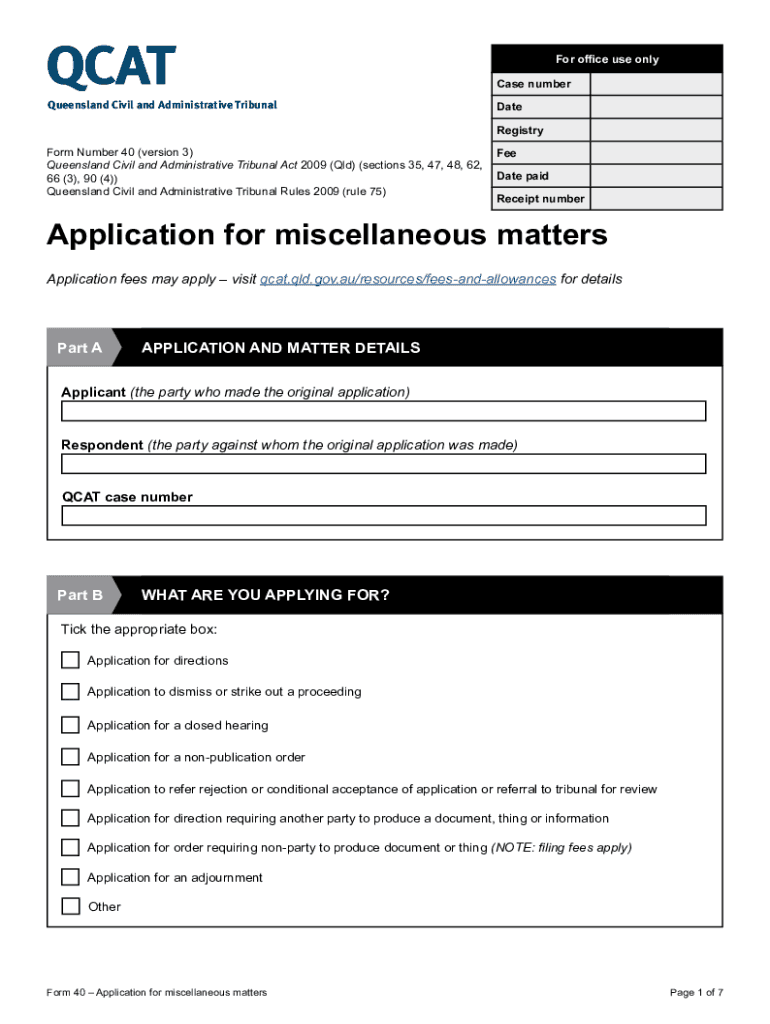
- Begin with Part A, where you will enter the details of the applicant and respondent. Fill in their names and any relevant case numbers.
- Move to Part B and select the appropriate application type by ticking the corresponding box. Options include applications for directions, dismissals, closed hearings, and more.
- In Part C, provide detailed information about what you seek from the tribunal. Clearly list your requests and reasons in numbered paragraphs for clarity.
- Ensure all necessary supporting documents are attached as indicated in the checklist section at the end of the form.
- Finally, sign and date the application before submitting it through our platform for a streamlined process.
Start using our platform today to fill out your Form-40 efficiently and for free!
Fill out Form-40-application-for-miscellaneous-matters online
It's free
It's free
See more Form-40-application-for-miscellaneous-matters versions
We've got more versions of the Form-40-application-for-miscellaneous-matters form. Select the right Form-40-application-for-miscellaneous-matters version from the list and start editing it straight away!
Got questions?
We have answers to the most popular questions from our customers. If you can't find an answer to your question, please contact us.
Contact us
How do I find out the outcome of a court case in QLD?
Most Queensland court and tribunal decisions are published on the Supreme Court Library Queensland website. Refer to the search help guide to make best use of the Librarys advanced search function for CaseLaw by filtering by court, judge, parties, file number or judgement date, etc..
How long does a QCAT case take?
Time to finalise an application JurisdictionNumber of weeks that most* applications were finalised within** Consumers, traders and businesses 50 weeks Dividing fence disputes 46 weeks Minor debt disputes 50 weeks Residential tenancy disputes (Non urgent) 26 weeks19 more rows Aug 26, 2025
What evidence is needed for a QCAT hearing?
Written evidence is usually given to QCAT before the final hearing of your matter. Written evidence comes in various forms, including affidavits, statutory declarations, statements and other documents.
What is the full form of QCAT?
The Queensland Civil and Administrative Tribunal (QCAT) is an independent, accessible tribunal that efficiently resolves disputes on a range of matters.
How do I find QCAT decisions?
How do I find a QCAT decision? Decisions from the Queensland Civil and Administrative Tribunal (QCAT) are freely available on our CaseLaw database (sclqld.org.au/caselaw). The Supreme Court Library Queensland is the official publisher of these decisions on behalf of QCAT.
Security and compliance
At DocHub, your data security is our priority. We follow HIPAA, SOC2, GDPR, and other standards, so you can work on your documents with confidence.
Learn more




