Transcript Request Form - DMACC 2026

Get Form
Transcript Request Form - DMACC Preview on Page 1

Here's how it works

01. Edit your form online
Type text, add images, blackout confidential details, add comments, highlights and more.

02. Sign it in a few clicks
Draw your signature, type it, upload its image, or use your mobile device as a signature pad.

03. Share your form with others
Send it via email, link, or fax. You can also download it, export it or print it out.

How to use or fill out Transcript Request Form - DMACC with our platform

Form edit decoration
9.5
Ease of Setup
DocHub User Ratings on G2
9.0
Ease of Use
DocHub User Ratings on G2
  1. Click ‘Get Form’ to open the Transcript Request Form - DMACC in the editor.
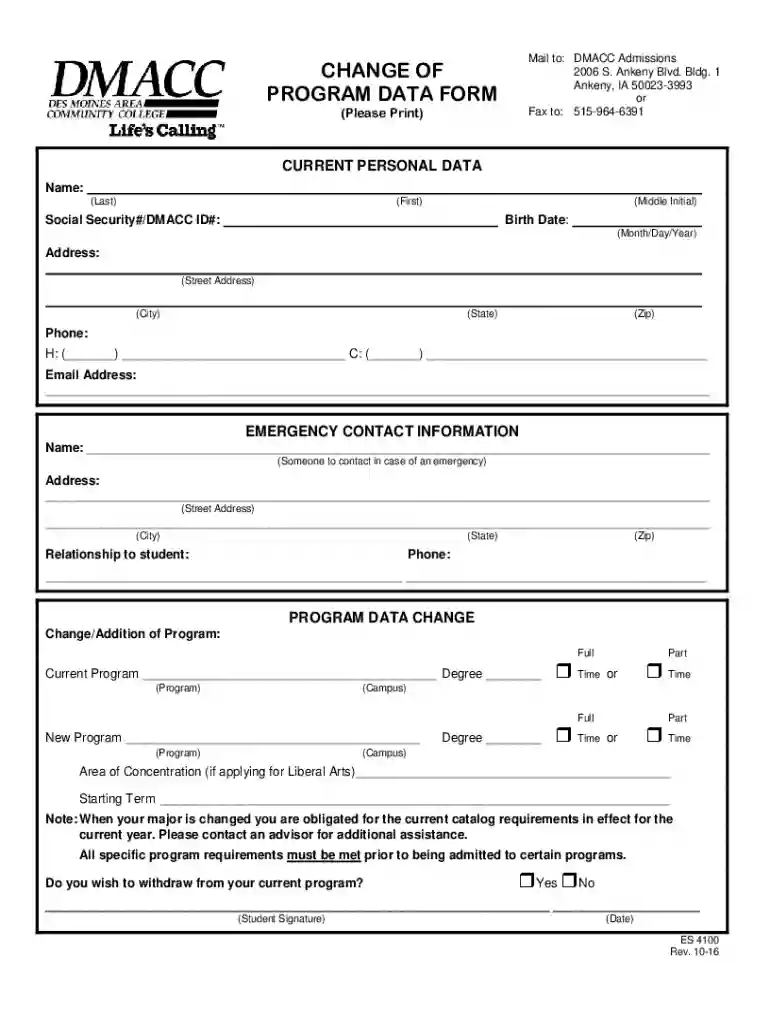
  2. Begin by entering your current personal data. Fill in your name, Social Security number or DMACC ID, birth date, address, phone numbers, and email address in the designated fields.
  3. Next, provide emergency contact information. Include the name, address, relationship to you, and phone number of someone who can be contacted in case of an emergency.
  4. In the Program Data Change section, indicate any changes or additions to your program. Specify your current program and degree type before detailing your new program and degree.
  5. Select whether you wish to withdraw from your current program by checking 'Yes' or 'No'.
  6. Finally, sign and date the form at the bottom to complete your request.

Start using our platform today for free to streamline your transcript request process!

See more Transcript Request Form - DMACC versions

We've got more versions of the Transcript Request Form - DMACC form. Select the right Transcript Request Form - DMACC version from the list and start editing it straight away!
Versions Form popularity Fillable & printable
2016 4.1 Satisfied (28 Votes)
2009 4 Satisfied (38 Votes)
be ready to get more

Complete this form in 5 minutes or less

Get form

Got questions?

We have answers to the most popular questions from our customers. If you can't find an answer to your question, please contact us.
Contact us
If you do not have an academic transcript you will need to contact your previous institution to request one. A transcript from a professional body will list all the units completed, grades achieved and confirmation of any exemptions.
Order through MyUI Transcripts requested through MyUI are free and are processed the next business day. If you have trouble logging in to MyUI please visit HawkID Tools for help. You can also call the ITS Help Desk at 319-384-4357. They are not able to reset your information from an email request.
How To Apply For A Transcript Certificate? Contact your institution. Complete the transcript request form. Submit the transcript certificates to institutions. New school transfer. Application for the college admission. Placements. Mention relevant details. Describe the urgency of the transcript.
If you need your transcript mailed, please email your attachment along with the Transcript Request form to transcripts@dmacc.edu.

Security and compliance

At DocHub, your data security is our priority. We follow HIPAA, SOC2, GDPR, and other standards, so you can work on your documents with confidence.

Learn more
ccpa2
pci-dss
gdpr-compliance
hipaa
soc-compliance