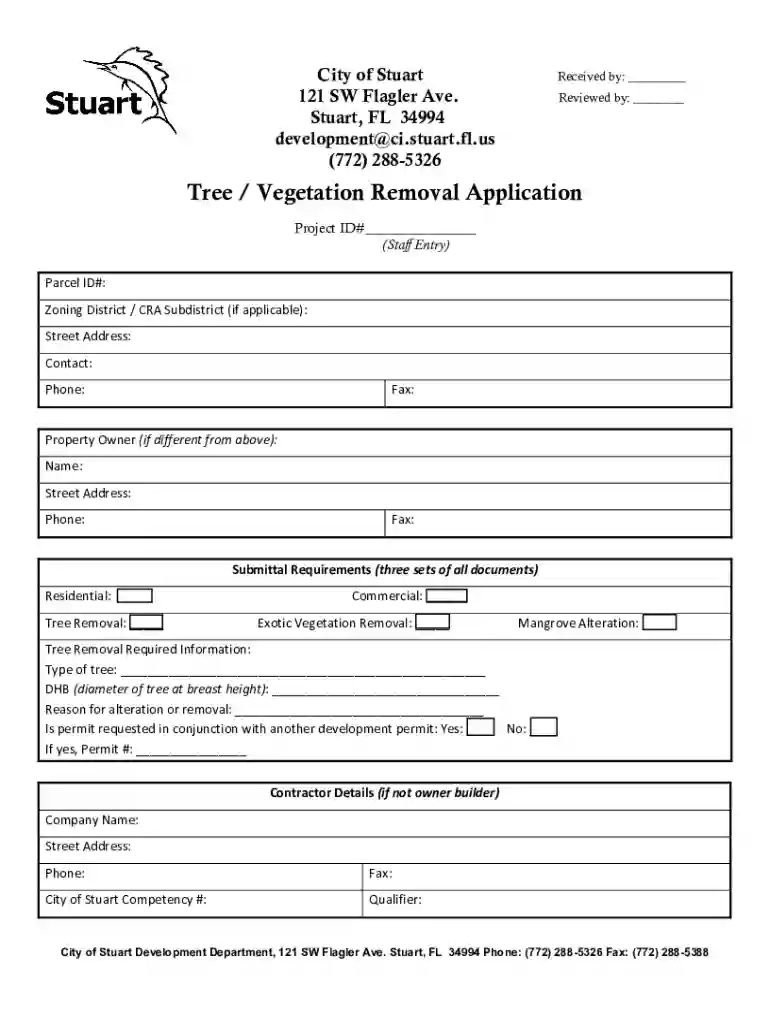
Development DepartmentStuart, FL 2026

Get Form
fl application tree vegetation removal Preview on Page 1

Here's how it works

01. Edit your fl application tree vegetation removal online
Type text, add images, blackout confidential details, add comments, highlights and more.

02. Sign it in a few clicks
Draw your signature, type it, upload its image, or use your mobile device as a signature pad.

03. Share your form with others
Send it via email, link, or fax. You can also download it, export it or print it out.

How to use or fill out Development Department Stuart, FL with our platform

Form edit decoration
9.5
Ease of Setup
DocHub User Ratings on G2
9.0
Ease of Use
DocHub User Ratings on G2
  1. Click ‘Get Form’ to open the Development Department Stuart, FL application in the editor.
  2. Begin by entering your Project ID and Parcel ID in the designated fields. Ensure that you provide accurate information as this will be crucial for processing your application.
  3. Fill in your contact details including name, phone number, and email address. If the property owner differs from the applicant, complete the Property Owner section with their information.
  4. Indicate the type of tree removal or alteration you are applying for by checking the appropriate boxes under Submittal Requirements. Be sure to include any necessary documentation as specified.
  5. In the Tree Removal Required Information section, specify the type of tree and its diameter at breast height (DBH). Clearly state your reason for removal or alteration.
  6. Complete contractor details if applicable, including company name and contact information. Ensure all signatures are obtained where required before submission.

Start filling out your application today using our platform for a seamless experience!

See more Development DepartmentStuart, FL versions

We've got more versions of the Development DepartmentStuart, FL form. Select the right Development DepartmentStuart, FL version from the list and start editing it straight away!
Versions Form popularity Fillable & printable
2021 4.7 Satisfied (35 Votes)
2009 4.4 Satisfied (42 Votes)
be ready to get more

Complete this form in 5 minutes or less

Get form

Got questions?

We have answers to the most popular questions from our customers. If you can't find an answer to your question, please contact us.
Contact us

Yes, and it’s really easy! DocHub is an online PDF editor with advanced document processing capabilities that allow you quickly adjust your paperwork, fill out empty fields and add new ones for others to fill out, and create eSignatures in several ways. Upload your Development DepartmentStuart, FL, give information as required, and choose how you want to eSign your document - by typing your name, drawing your signature, uploading its image, or utilizing a QR code.

With DocHub, you have several convenient ways to edit your Development DepartmentStuart, FL online. You can drag and drop the form and edit it directly at the DocHub website or use our browser extension to fill out your form immediately. On top of that, you can edit your PDF on your smartphone, as DocHub is compatible with all the available mobile platforms.

Each zone is divided into half zones designated as a and b. For example, 7a and 7b are 5-degree F increments representing the colder and warmer halves of zone 7, respectively.
According to the Kppen climate classification, Stuart has a tropical rainforest climate (Af), with hot, humid summers and warm, drier winters.
Zone 9a: The Panhandle and Most of Inland North Florida. Zone 9b: Coastal North Florida Down to Central Florida. Zone 10a: Central Florida and Parts of Inland South Florida. Zone 10b: The Southwest Florida Coastline.

Security and compliance

At DocHub, your data security is our priority. We follow HIPAA, SOC2, GDPR, and other standards, so you can work on your documents with confidence.

Learn more
ccpa2
pci-dss
gdpr-compliance
hipaa
soc-compliance
be ready to get more

Complete this form in 5 minutes or less

Get form

People also ask

According to the 2023 USDA Hardiness Zone Map Stuart, Florida is in Zones 10b (35F to 30F).
2023 Hardiness Zone:Zone 10b: 35F to 40F Zone 10a: 30F to 35F Koppen-Geiger Climate Zone: Cfa - Humid Subtropical Climate Ecoregion: 75d - Eastern Florida Flatwoods Current Drought Status: Moderate Drought Heat Zone Days: 121 - 150 days Over 86F4 more rows

Related links